Multipurpose WordPress themes promise everything and often deliver chaos — a bloated plugin stack, a third-party builder you didn’t choose, and a site that breaks the moment you switch themes. This review examines a different approach: a self-contained theme with its own drag-and-drop, header, and grid builders built in, backed by more than 50 ready-made demos spanning a wide range of industries.
Whether Impreza’s built-in builder and demo library justify its price over better-known alternatives like Avada or Divi is what this review weighs.
Quick Verdict
Impreza is a strong fit for freelancers and agency developers who want a capable, self-contained theme without depending on a third-party page builder. Buyers managing large portfolios of client sites should factor in the per-domain licensing model before committing.
Pros
- Built-in drag-and-drop, header, and grid builders mean no third-party page builder dependency
- 50+ pre-built demos and 300+ page designs accelerate site setup across multiple industries
- WooCommerce, WPML, Gravity Forms, The Events Calendar, and bbPress compatibility covered out of the box
- $59 Regular License includes free lifetime updates — strong long-term value at the entry price
- Tested on WordPress 6.5 and PHP 8.4 with cross-browser support across all major browsers
Cons
- Support is capped at 6 months from purchase
- Each public domain requires its own license — agencies building multiple client sites face compounding costs
- No free tier or trial; buyers must purchase before they can evaluate the theme hands-on
- The built-in builder creates lock-in — migrating to a different theme means rebuilding content from scratch
Core Features
Built-In Visual Page Builder
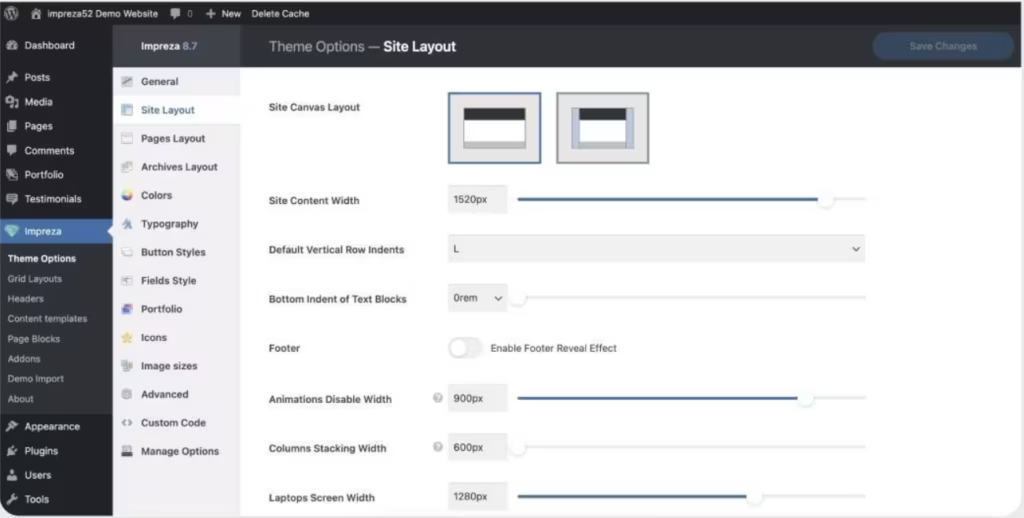
Impreza ships with its own drag-and-drop visual builder — no separate page builder plugin is required. The builder is integrated directly into the theme, so the editing interface, the design system, and the output are all part of a single package rather than a stack of separate tools.
For agencies and freelancers building sites across multiple industries, this removes a common dependency. There’s no need to purchase, license, or maintain a separate builder plugin alongside the theme.
After downloading, the file you receive — themeforest-6434280-impreza-retina-responsive-wordpress-theme.zip — should be uploaded directly through the WordPress dashboard without extracting it first.
Header Builder
Separate from the main page builder, Impreza includes a dedicated header builder. Designers get direct control over header layout without touching template files or writing custom CSS — the header is treated as its own editable canvas.
Navigation structure, branding elements, and layout variations are all handled inside the same visual environment as the rest of the site, so headers can be configured per project without workarounds.
Grid Builder
Impreza also includes a standalone grid builder for content collections — post grids, portfolio listings, product archives, and similar repeating structures. A purpose-built grid tool means these layouts aren’t constrained to whatever the main page builder supports.
For WooCommerce stores, control over product grid presentation is often where visual differentiation happens. The grid builder addresses that directly rather than leaving it to theme defaults.
50+ Pre-Built Demo Sites and 300+ Page Designs
The demo library covers more than 50 complete site templates spanning a wide range of industries, each importable through a built-in demo importer. Alongside those full demos, the theme includes over 300 individual pre-built page designs that can be pulled into any project independently.
This combination — full demos for rapid site launches, individual page designs for filling out specific sections — means the library is useful well beyond initial setup. A freelancer building a fifth or tenth client site can draw on page designs without starting from a blank canvas each time.
WooCommerce Integration
WooCommerce support is built into Impreza rather than added through a separate compatibility layer. Store pages, product layouts, and checkout flows are covered within the theme’s design system, keeping visual consistency between store and non-store pages intact.
This matters most for mixed-content sites where a business needs both editorial or service pages and a functioning shop — no separate WooCommerce-specific theme or child theme required.
WPML and Multilingual Compatibility
Impreza is compatible with WPML, the widely-used WordPress multilingual plugin. Sites targeting audiences across multiple languages can use WPML to manage translations while keeping the theme’s layout and builder output intact.
This is relevant for agencies building international sites or businesses operating across language markets. No separate multilingual setup is needed outside of what WPML itself provides.
Plugin Ecosystem Compatibility
Beyond WooCommerce and WPML, Impreza is compatible with Gravity Forms, The Events Calendar, and bbPress 2.6.x. These cover three common site requirements — form handling, event management, and community forums — that would otherwise need to be tested for theme conflicts independently.
Documented compatibility with this set of plugins reduces integration risk on complex builds. A site combining a contact form, an events section, and a community area can use established plugins for each without stepping outside the theme’s tested environment.
Retina-Ready Responsive Design
Impreza is built to display sharply on high-density screens and to adapt across device sizes. Retina readiness means graphics and UI elements are served at the resolution modern displays expect, rather than appearing soft or pixelated on high-DPI screens.
Cross-browser support covers Firefox, Safari, Opera, Chrome, and Edge. For client work where browser consistency is a deliverable, that coverage is part of the theme’s baseline rather than something to verify separately.
Installation and Setup
Installation is straightforward and takes only a few minutes from download to a working site.
- Purchase Impreza on ThemeForest and download the package from your Envato account. The downloaded file is named
themeforest-6434280-impreza-retina-responsive-wordpress-theme.zip.
- Log in to your WordPress dashboard and navigate to Appearance → Themes → Add New → Upload Theme.
- Upload the
.zipfile directly — do not extract it first. Click Install Now, then Activate.
- Once the theme is active, install any companion plugins your project requires. Impreza supports the following:
- WooCommerce — required for any store or product functionality
- WPML — required for multilingual sites
- Gravity Forms — required for advanced form features
- The Events Calendar — required for event listing functionality
- bbPress — required for forum functionality
- Use the built-in demo importer to load one of the 50+ pre-built demo sites. This imports pages, settings, and content in a single step, giving you a complete starting point to customize.
- Build and adjust your layout using the visual drag-and-drop builder, header builder, and grid builder — all accessible directly from the WordPress dashboard.
Total setup time including basic configuration runs approximately two minutes, based on first-hand testing.
Compatibility and Requirements
| Requirement | Detail |
|---|---|
| Tested on WordPress | 6.5 |
| Tested on PHP | 8.4 |
| bbPress | 2.6.x |
| Compatible Browsers | Firefox, Safari, Opera, Chrome, Edge |
| WPML | Supported |
| Gravity Forms | Supported |
| The Events Calendar | Supported |
Impreza has been tested on WordPress 6.5 and PHP 8.4.
Browser support covers all five major desktop browsers — Firefox, Safari, Opera, Chrome, and Edge — and the theme is built to be retina-ready and fully responsive across screen sizes.
Impreza Pricing
Impreza is a premium theme sold exclusively through ThemeForest. There is no free version or trial tier.
Two license options are available, both covering a single public domain. Each additional domain requires a separate license purchase.
Regular License — $59
The Regular License covers one end product on one domain. End users cannot be charged for access to that product. This is the standard choice for business websites, portfolios, and WooCommerce stores where the site itself is not a paid-access platform.
Extended License — $2,999
The Extended License also covers one end product on one domain, but permits charging end users for access. This applies when the site or application built with Impreza is itself a commercial product that users pay to use.
Both licenses include six months of support from the date of purchase and free theme updates for as long as Impreza remains available on ThemeForest. Support can be extended to twelve months by purchasing an optional support extension. Since support pricing may change over time, check the current product listing before purchasing.
👉 Get Impreza at the best available price
Alternatives to Impreza
The premium multipurpose theme market is crowded, and the right choice depends heavily on whether you want a self-contained builder or a theme built around a third-party ecosystem. The five alternatives below cover the main options agencies and freelancers typically evaluate alongside Impreza.
| Product | Key Difference | Best For | Price Tier |
|---|---|---|---|
| Impreza | Built-in drag-and-drop, header, and grid builders with 50+ demos and no third-party page builder dependency | Agencies and freelancers wanting a self-contained multipurpose theme at a low entry price | Paid |
| Avada | Best-selling ThemeForest theme built around its own Fusion Builder and Fusion Core plugin ecosystem, with an exceptionally large user base and extensive documentation | Teams who prioritize a mature ecosystem with deep community resources | Paid |
| Divi | Available as both a theme and a standalone page builder plugin, with a subscription or lifetime membership covering unlimited sites | Freelancers and agencies managing many sites who want one license to cover all of them | Paid |
| Flatsome | WooCommerce-focused multipurpose theme built around the UX Builder, widely regarded as a leading choice for ecommerce-first projects | Store owners and developers whose primary goal is a polished WooCommerce build | Paid |
| Enfold | Long-established ThemeForest theme known for clean code, a strong performance reputation, and a loyal agency user base | Agencies and freelancers who value stability and a well-maintained codebase | Paid |
| The7 | Bundles WPBakery Page Builder and Elementor compatibility alongside an extensive theme options panel | Agencies building varied client sites who want flexibility across multiple page builders | Paid |
Competitor details reflect publicly known information and may have changed.
Impreza suits buyers who want everything in one package without depending on a third-party builder. If unlimited-site licensing matters more than builder independence, Divi is the natural alternative; if WooCommerce is the entire focus, Flatsome is the more specialized choice.
Frequently Asked Questions
How much does the Impreza WordPress theme cost?
Impreza costs $59 for a Regular License, which covers a single public domain. An Extended License — required when end users are charged for access to the end product — is priced at $2,999 and also covers one domain.
Does Impreza work with WooCommerce?
Yes. Impreza includes full WooCommerce integration as a core feature, designed to support online store builds alongside its standard multipurpose site capabilities.
How long does Impreza support last after purchase?
Support is included for six months from the date of purchase. It can be extended to 12 months for an additional fee payable at checkout.
Can I use Impreza on multiple websites with one license?
No. Each license — Regular or Extended — covers a single public domain. Agencies or freelancers managing multiple client sites need to purchase a separate license for each domain.
Does Impreza include pre-built demo sites?
Yes. Impreza ships with 50+ pre-built demo sites and a library of 300+ pre-built page designs, importable through the built-in demo importer and intended to accelerate site setup across a range of industries.
Impreza vs Avada: which multipurpose theme is better?
Both are established premium multipurpose themes sold on ThemeForest. Impreza is priced at $59 with a built-in visual builder, header builder, and grid builder included out of the box; Avada is a competing product with its own builder ecosystem, and pricing and features may have changed. The better choice depends on which builder workflow and demo library better fits your project requirements.
How do I install the Impreza theme on WordPress?
After purchase, download the theme file from ThemeForest — the file is named themeforest-6434280-impreza-retina-responsive-wordpress-theme.zip. Upload that zip file directly through the WordPress dashboard under Appearance > Themes > Add New, without extracting it first. Installation including basic setup takes approximately two minutes.
Download & Pricing Options
🔍 Try Before You Buy
Impreza does not have an official free tier. To evaluate it before purchasing, a GPL-licensed copy is available for sandbox testing purposes only.
👉 Download GPL Evaluation Copy
This is a GPL-licensed redistributed copy for testing only — not an official developer product.
💎 Get Impreza (Best Available Price)
👉 Check Current Pricing for Impreza
Pricing and availability may change — use the link above for current rates.