Tagging every post by hand, keeping WooCommerce product categories tidy, and manually linking related content eats into time that busier site owners don’t have. This TaxoPress review looks at whether paying for the Pro version actually solves that problem, or whether the free plugin already does enough for most sites. For stores and content-heavy sites juggling hundreds of terms, the automation on offer is the real draw.
The question is whether AI-assisted tagging, auto links, and automated related posts justify an annual license over sticking with the free taxonomy tools.
Quick Verdict
TaxoPress Pro suits site owners, developers managing client sites, WooCommerce stores, and bbPress forum admins dealing with enough content or products that manual tagging has become a bottleneck. Smaller sites with a handful of categories and no plans to scale will likely find the free version sufficient. Anyone hesitant about recurring annual costs should weigh the automation savings against the license price before upgrading.
Pros
- Free tier covers core taxonomy, tag, and category management, including WooCommerce and bbPress support
- AI-assisted term creation and suggestion speeds up tagging on the Pro tier
- Auto links, auto terms, and related posts automate work that would otherwise be manual
- Unlimited display layouts allow flexible front-end presentation of taxonomy terms
- Priority, personal support is included with the Pro plan
Cons
- The Unlimited Sites tier is a steep price increase over the single-site plan
- AI-assisted and automation tools bring a learning curve for admins used to tagging manually
- Advanced automation features sit entirely behind the paid tier, so larger sites can’t rely on the free version alone
Core Features
Taxonomy, Tag, and Category Management
At its core, TaxoPress handles the everyday work of creating and organizing WordPress taxonomies, tags, and categories. It covers both the built-in taxonomies WordPress ships with and any custom ones a site relies on, forming the foundation the rest of the plugin builds on.
For a site owner juggling a growing archive of posts, this means one central place to add, edit, merge, or clean up terms instead of digging through multiple admin screens. Developers managing several client sites get a consistent way to structure content across each install.
WooCommerce Product Category Support
TaxoPress extends its taxonomy tools to WooCommerce product categories, treating them the same way it treats standard WordPress taxonomies. Store owners can manage product categories alongside regular tags and categories rather than switching between separate management screens.
For a WooCommerce store with a large or evolving catalog, this keeps category upkeep from becoming a separate task. It’s a practical fit for store admins who already use TaxoPress for blog content and want the same workflow applied to products.
bbPress Topic Tag Support
The plugin also works with bbPress topic tags, giving forum administrators the same taxonomy management tools available elsewhere in TaxoPress. Topic tags can be created, edited, and organized using the same interface as post tags and categories.
Community sites benefit especially, since forum content grows quickly and topic tags can become inconsistent over time. Forum admins get a single toolset for tidying up tags instead of relying on bbPress’s native, more limited options.
AI-Assisted Term Creation and Suggestion
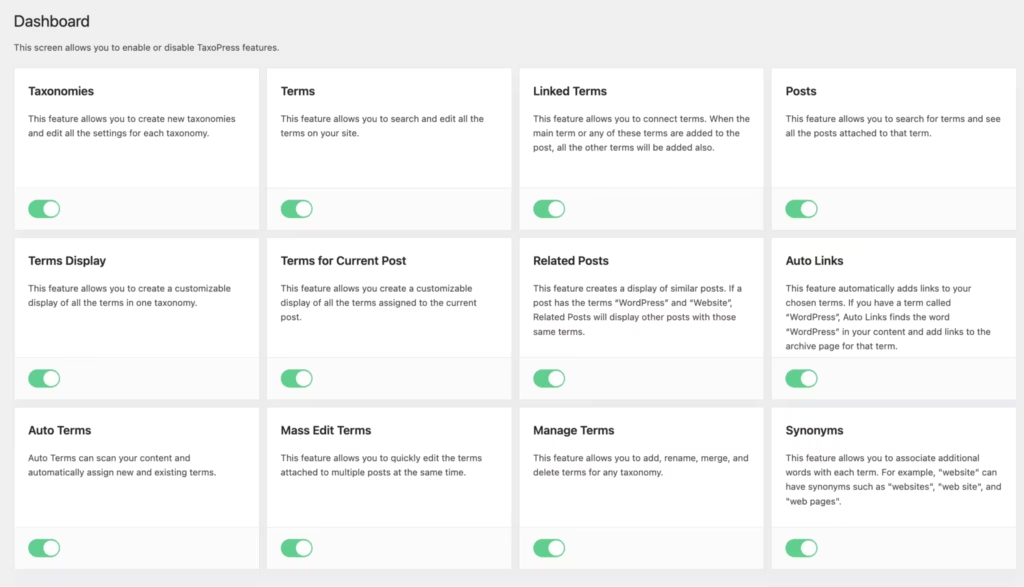
TaxoPress Pro adds AI-assisted term creation, suggesting taxonomy terms based on content rather than requiring every tag or category to be typed in manually. This sits alongside the plugin’s manual management tools rather than replacing them.
For busier sites publishing content regularly, this cuts down the time spent deciding how to tag or categorize each post. It’s particularly useful for teams without a dedicated editor whose job is to keep taxonomy consistent across contributors.
Auto Links
Auto links automatically turn taxonomy terms found in post content into links, connecting related content without manual linking. As a built-in Pro feature, it runs against existing terms already assigned through the plugin’s taxonomy tools.
The practical benefit is stronger internal linking with less manual effort, which helps readers find related content and keeps older posts connected to newer ones. Sites with a large content backlog benefit most, since retroactive manual linking at that scale isn’t realistic.
Auto Terms
Auto terms automatically assigns taxonomy terms to content based on rules set within the plugin, reducing the need to tag every post by hand. Auto Terms automatically assigns taxonomy terms to content based on rules configured within the plugin, reducing the need for manual tagging.
For multi-author sites, this helps enforce consistent tagging even when contributors skip the step themselves. It also reduces the backlog of untagged or inconsistently tagged posts that tends to build up over time.
Related Posts
The related posts feature displays content connected by shared taxonomy terms, drawing on the same tags and categories already managed elsewhere in TaxoPress. Rather than a separate related-content system, it reuses the taxonomy data already in place.
Readers stay on-site longer as a result, since genuinely related articles or products surface instead of arbitrary recent posts. For content-heavy sites, it turns existing taxonomy structure into a practical navigation tool without additional setup work.
Unlimited Display Layouts
TaxoPress Pro includes unlimited display layouts for how taxonomy terms, tag clouds, and related content appear on the front end. Site owners aren’t limited to a single fixed layout and can adjust presentation across different sections of a site.
Larger sites benefit especially, since a single taxonomy display style rarely suits every page type, such as a blog versus a product catalog. Developers managing client sites can tailor layouts per project without needing separate plugins for each display style.
Installation and Setup
- Download the TaxoPress Pro plugin file (taxopress-pro.zip) after purchasing a license.
- Log in to your WordPress dashboard and navigate to Plugins → Add New → Upload Plugin.
- Click Choose File, select the taxopress-pro.zip file, and click Install Now.
There is no need to extract the zip archive first — WordPress handles this during upload.
- Once installation finishes, click Activate Plugin.
- Enter your license key when prompted to enable Pro features such as AI-assisted term creation, auto links, auto terms, related posts, and the display layout options.
- Configure your taxonomy, tag, and category settings from the TaxoPress menu that appears in the dashboard sidebar.
On a test install running WordPress 6.5 with PHP 8.4, uploading the file and completing basic configuration took about two minutes from start to finish.
Compatibility and Requirements
TaxoPress is built to work with core WordPress taxonomies, and its feature set extends into two common ecosystem tools:
- WooCommerce product categories
- bbPress topic tags
This makes it a relevant option for WooCommerce store owners managing large product catalogs and for bbPress forum administrators who need to organize topic tags at scale, alongside standard WordPress category and tag management.
If you’re running an older PHP version on a live production site, it’s worth checking with your host about upgrading to a currently supported PHP version before installing any actively maintained plugin, since outdated PHP branches no longer receive security patches.
TaxoPress Pricing
TaxoPress follows a freemium model. The free version, available through the WordPress.org repository, covers the core job of creating and managing taxonomies, tags, and categories, including WooCommerce product categories and bbPress topic tags. For site owners who just need to organize content types without automation or AI assistance, the free plugin handles that on its own.
TaxoPress Pro adds the features built for larger or busier sites: AI-assisted term creation and suggestions, auto links, auto terms, related posts, and unlimited display layouts. Pro is sold on three annual license tiers:
| Plan | Price | Sites | Billing |
|---|---|---|---|
| One Site | $69.00 | 1 site | Billed once per year until cancelled |
| Five Sites | $129.00 | 5 sites | Billed once per year until cancelled |
| Unlimited Sites | $299.00 | Unlimited sites | Billed once per year until cancelled |
All three tiers unlock the same Pro feature set — the difference is purely how many sites the license covers. Pricing renews annually and continues automatically until canceled, so treat it as a recurring cost rather than a one-time purchase and mark the renewal date on a calendar.
Pro purchasers also get priority, personal support, a step up from the community support model that free-tier users rely on through the WordPress.org forums.
For agencies or developers managing several client sites, the Five Sites or Unlimited Sites tiers work out considerably cheaper per site than buying single licenses repeatedly. Check the official TaxoPress website for the current pricing page before purchasing, since annual license costs can be adjusted over time.
👉 Get TaxoPress at the best available price
Alternatives to TaxoPress
Before committing to a paid taxonomy plugin, it helps to see how TaxoPress stacks up on cost and capability.
| Product | Key Difference | Best For | Price Tier |
|---|---|---|---|
| TaxoPress | Free core taxonomy management with Pro-tier AI term creation, auto links, auto terms, related posts, and unlimited display layouts | Site owners, developers, WooCommerce stores, and bbPress admins needing automated tag and category workflows | Freemium |
Competitor data is sourced from publicly available information as of 2026 and may have changed.
The right choice ultimately comes down to how much taxonomy automation your site actually needs. A small blog may never outgrow the free tier, while a busy WooCommerce store or multi-author publication managing thousands of terms is more likely to benefit from TaxoPress Pro’s AI-assisted tagging and auto-linking tools.
Frequently Asked Questions
What is TaxoPress used for?
TaxoPress is used for creating and managing WordPress taxonomies, tags, and categories. It supports WooCommerce product categories and bbPress topic tags, and its Pro version adds automation features like auto links, auto terms, and related posts based on taxonomy terms.
Is there a free version of TaxoPress?
Yes, a free version of TaxoPress exists for creating and managing WordPress taxonomies, tags, and categories. It includes support for WooCommerce product categories and bbPress topic tags, covering the core tagging and categorization needs of most sites.
How much does TaxoPress Pro cost?
TaxoPress Pro starts at $69.00 per year for a One Site license. A Five Sites license costs $129.00 per year, and an Unlimited Sites license costs $299.00 per year, with all tiers billed annually until canceled.
Does TaxoPress work with WooCommerce product categories?
Yes, TaxoPress supports WooCommerce product categories. This support is included even in the free tier, making it useful for WooCommerce store owners who need better category management.
Does TaxoPress support bbPress topic tags?
Yes, TaxoPress supports bbPress topic tags. This makes it a fit for bbPress forum administrators who need to organize and manage discussion tags alongside standard WordPress taxonomies.
What Pro features does TaxoPress add over the free version?
TaxoPress Pro adds AI-assisted term creation and suggestion, auto links, auto terms, related posts, and unlimited display layouts. It also includes priority, personal support, which is not part of the free tier.
Does TaxoPress use AI to create taxonomy terms?
Yes, TaxoPress Pro includes AI-assisted term creation and suggestion. This feature helps generate and recommend taxonomy terms automatically rather than requiring manual tagging for every post or product.
How do I install TaxoPress Pro on WordPress?
Upload the taxopress-pro.zip file through the WordPress dashboard by going to Plugins, then Add New, then Upload Plugin, choosing the file, and selecting Install Now — no need to extract it first. Activate the plugin and enter your license key to unlock the Pro features. On a test setup running WordPress 6.5 with PHP 8.4, the whole process, including basic configuration, took about two minutes.
Download & Pricing Options
🆓 Free Version
👉 Download the Free Version of TaxoPress
💎 Get TaxoPress (Best Available Price)
👉 Check Current Pricing for TaxoPress
Pricing and availability may change — use the link above for current rates.