Most WordPress site owners start with a free SEO plugin, fill in a few titles and descriptions, and then hit the point where they need redirects, product schema, or a technical audit that actually finds what is broken. This SEOPress Pro review looks at the paid add-on that sits on top of the free SEOPress plugin and folds AI metadata, WooCommerce and local SEO, a redirect manager, a broken link checker, a 52-test site audit and Google Search Console data into the admin. The question is whether that bundle earns an annual subscription when the free tier already handles the basics.
Quick Verdict
SEOPress Pro suits site owners and developers who need more than metadata fields — store operators wanting WooCommerce and local SEO, agencies managing redirects and audits across multisite installs, and anyone migrating away from another SEO plugin without losing existing data. Buyers who only want titles and descriptions will find the free version enough, and anyone who refuses recurring costs or expects live chat support should look elsewhere.
Pros
- AI-generated titles and meta descriptions with a choice of OpenAI, Google Gemini, Claude by Anthropic, Mistral, DeepSeek or SEOPress AI credits
- One license covers WooCommerce SEO, local SEO, structured data, 301/302/307 redirects and 410/451 response handling, a broken link checker and Google News plus video XML sitemaps
- Built-in Site Audit runs 52 tests across 13 categories, with Search Console data surfaced inside WordPress
- Migration importers for Yoast, Rank Math, All In One SEO, The SEO Framework, SmartCrawl and Slim SEO, plus CSV metadata import and settings import/export
- Wide developer and multilingual reach: REST API, WP-CLI, 650+ hooks, multisite support, multiple translations, and WPML, Polylang, TranslatePress and Weglot compatibility
- Free core carries no ads and no telemetry, with content analysis on unlimited keywords
Cons
- Works only as an add-on — the free SEOPress plugin must be installed first
- Annual subscription only, with no lifetime option
- AI metadata needs SEOPress AI credits or your own third-party API key, an extra running cost
- Support is email-only, in English and French
- The sheer breadth of settings is a real learning curve for a first-time user
Core Features
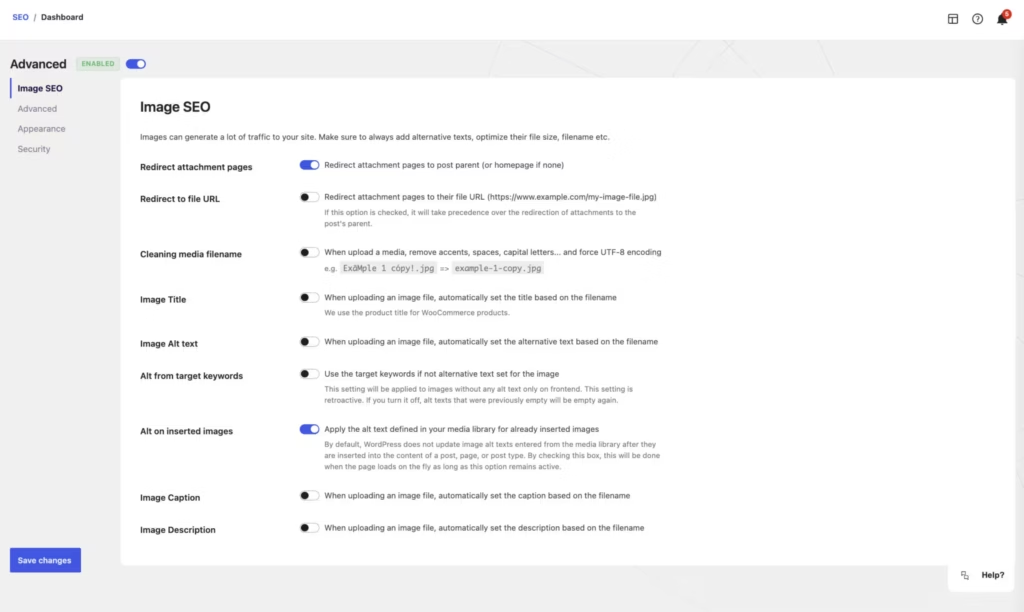
AI-Generated Titles and Meta Descriptions
Metadata generation is the headline addition in the Pro tier, and it is unusually open about which model does the work. You can connect OpenAI, Google Gemini, Claude by Anthropic, Mistral or DeepSeek using your own API key, or use SEOPress AI credits instead of bringing a provider.
For a site with several hundred posts sitting on empty description fields, that flexibility matters more than it first appears. If a provider’s pricing or output quality changes, you switch keys rather than switch plugins. Check the provider’s API billing separately; a consumer chatbot subscription should not be assumed to cover API usage.
WooCommerce SEO
Product pages, category archives and the shop page have different optimization needs from blog posts. The SEOPress Pro add-on includes a dedicated WooCommerce module rather than treating products as generic post types.
Store owners get metadata control over the parts of a catalog that usually go unattended — the archive pages that pull in long-tail queries and the product pages competing with marketplace listings for the same terms.
Local SEO and Structured Data
Local SEO tools and schema management sit together in SEOPress Pro, covering the markup search engines read to understand a business location. A Local Business block is one of five Block Editor blocks included, alongside FAQ, How-to, Breadcrumbs and Table of Contents.
Google no longer displays How-to or FAQ rich results, as documented in its Search documentation updates. The ability to output schema does not guarantee a rich result or ranking improvement. The block approach is the practical part here. Adding FAQ or How-to schema becomes an editor action inside the post you are writing, not a separate settings screen you have to remember to revisit. For a service business or a multi-location operation, the structured data and local tools cover the same job most sites hand to a second plugin.
Site Audit: 52 Tests Across 13 Categories
The built-in Site Audit runs 52 individual checks grouped into 13 categories, all inside the WordPress admin. It is a technical sweep rather than a content grader — the counterpart to the content analysis with unlimited keywords that ships in the free plugin.
Running it gives you a fixed checklist to work through instead of a vague sense that something is misconfigured. For agencies handing over a site, it doubles as a pre-launch pass.
Redirect Manager and Broken Link Checker
The manager supports 301, 302 and 307 redirects, plus 410 and 451 response statuses — a wider set than the permanent-and-temporary pairing many SEO plugins stop at. The 410 Gone status is genuinely useful for content you have deliberately removed and want deindexed, and 451 covers legally blocked content.
The broken link checker helps identify URLs to investigate. Fix incorrect internal links at their source; use a redirect when there is an appropriate replacement page. Site migrations and URL restructures are where this pairing earns its keep.
Google Search Console Data in the Admin
Search Console metrics surface inside WordPress rather than in a separate browser tab. That removes a context switch from the editing workflow — you can look at how a page is performing while you have that page open.
For clients who never log into Search Console at all, it puts the data somewhere they already visit.
Google News and Video XML Sitemaps
SEOPress Pro adds Google News and video XML sitemaps on top of standard sitemap output. The plugin also works with WordPress core’s native XML sitemaps introduced in WP 5.5, automatically disabling them so you do not end up serving two competing sitemap sets.
Publishers submitting to Google News and sites with substantial video libraries are the obvious beneficiaries; both formats require specific markup that general sitemaps do not provide.
Migration and Import Tools
Switching SEO plugins requires checking the migrated metadata. SEOPress includes importers for Yoast, All In One SEO, Squirrly, Rank Math, SureRank, SEO Ultimate, WP Meta SEO, Premium SEO Pack, The SEO Framework, SmartCrawl and Slim SEO, covering posts and terms metadata.
A CSV metadata import tool handles bulk edits outside WordPress, and settings import/export under SEO → Tools → Settings lets you clone a configuration between sites — useful for repeatable configuration, provided site-specific URLs and settings are checked after import.
Also Included
Beyond the modules above, the plugin ships with multisite (WPMU) support, a REST API, WP-CLI integration, WordPress Abilities API support for MCP, more than 650 developer hooks, and translations into multiple languages.
Installation and Setup
The Pro version is an add-on rather than a standalone plugin, so the order of operations matters. The earlier test record reports roughly two minutes for installation on WordPress 6.5 and PHP 8.4. This is a historical setup observation, not a new test of the current release or a guaranteed deployment time.
- Install and activate SEOPress Free from the WordPress.org plugin directory. Pro will not run without it — search for it under Plugins → Add New Plugin, install, then activate.
- Purchase a Pro license from seopress.org and download the plugin zip from your customer account. Payment is handled by PayPal or Stripe.
- Upload the zip in WordPress via Plugins → Add New Plugin → Upload Plugin. The file installs directly without being extracted first.
- Activate SEOPress Pro. It appears as a second plugin alongside the free version, not as a replacement for it.
- Enter your license key to enable updates and email support for the license term.
- Migrate your existing SEO data if you are switching plugins. The importers under SEO → Tools handle posts and terms metadata from Yoast, All In One SEO, Squirrly, Rank Math, SureRank, SEO Ultimate, WP Meta SEO, Premium SEO Pack, The SEO Framework, SmartCrawl and Slim SEO.
A CSV metadata import tool is available for bulk data that does not come from another plugin.
- Connect an AI provider if you plan to generate titles and descriptions automatically. You can supply an API key for OpenAI, Google Gemini, Claude by Anthropic, Mistral or DeepSeek, or use SEOPress AI credits.
- Configure the Pro modules you actually need — WooCommerce SEO, Local SEO, structured data, the redirect manager, Google News and video sitemaps — and leave the rest off.
- Replicate your configuration across other sites using the settings export and import controls on the SEO → Tools → Settings tab. That is the fastest route when rolling the plugin out across several installs.
Compatibility and Requirements
Checked against the current free-plugin listing and developer Pro feature page on 29 October 2026. Recheck requirements for the exact release you install.
| Requirement | Detail |
|---|---|
| WordPress version | 6.5 or higher, per the SEOPress Free listing checked 29 October 2026 |
| PHP version | 7.4 or higher |
| Required plugin | SEOPress Free |
| Multisite | Multisite (WPMU) ready |
| WordPress.com | Requires a WordPress.com plan that permits plugin installation; check for duplicate SEO output |
| Core XML sitemaps | Compatible with core WordPress XML sitemaps (WP 5.5+); native sitemaps are automatically disabled |
| Multilingual plugins | WPML, Polylang, TranslatePress, Weglot, Multilingual Press |
| AI features | SEOPress AI credits and/or an API key from OpenAI, Google Gemini, Claude by Anthropic, Mistral or DeepSeek |
| Interface languages | See the current WordPress.org translation list |
| Developer interfaces | REST API, WP-CLI, WordPress Abilities API (MCP), 650+ hooks |
Those version floors are the published minimums, not a recommendation. PHP 7.4 reached end of life some years ago, so a currently supported PHP release is the sensible choice for any production site.
Check the sitemap behavior before launch: once SEOPress is handling sitemaps, WordPress stops serving its own, so anything you submitted to Search Console from the native sitemap should be re-checked against the plugin’s output.
For multilingual builds, compatibility covers the five translation plugins listed above, which between them account for most WordPress translation setups. Network administrators get multisite support out of the box, and the WP-CLI and REST API interfaces make bulk configuration across a network practical rather than manual.
SEOPress Pro Pricing
Rechecked on 6 November 2026: the published annual PRO prices remain $49 for one site, $59 for five and $149 for unlimited sites, excluding VAT. SEOPress Insights is a separate rank/backlink tracking product, advertised at $99/year/site; it is not included merely because PRO displays Search Console metrics.
SEOPress runs on a freemium model. The free plugin on the WordPress.org repository carries no ads and no telemetry, and it includes white label options plus content analysis with unlimited target keywords. SEOPress Pro is an add-on rather than a replacement.
| License | Price | Sites | Included |
|---|---|---|---|
| 1 site license | $49 / year | 1 site | 1 year of updates and email support |
| 5 site license | $59 / year, excluding VAT | 5 sites | 1 year of updates and email support |
| Unlimited license | $149 / year, excluding VAT | Unlimited sites | 1 year of updates and email support |
Developer prices checked 29 October 2026 on the SEOPress pricing page; the $49 single-site price also excludes VAT. PureGPL is a separate supplier with its own terms.
Beyond the single-site option, licenses are also sold for 5 sites and for unlimited sites, which is the tier most agencies and multisite network operators will look at first.
Every license covers one year of updates and email support. Renewals are billed at the same rate as the original purchase outside of special promotions, but special promotional offers can have different renewal terms. Review renewal settings and terms in your account.
There are no lifetime licenses. Subscriptions can be canceled at any time, either by email or from the customer account under “My License keys,” and the plugin keeps working after cancellation — it simply stops receiving updates and support. Payment is handled through PayPal or Stripe, and purchases are covered by a 14-day money-back guarantee.
One cost sits outside the license: the AI metadata features run on SEOPress AI credits or on your own API key from OpenAI, Google Gemini, Claude by Anthropic, Mistral or DeepSeek. If you plan to generate titles and descriptions at volume, budget for that provider usage separately.
For the current rates on the multi-site tiers and any active promotion, check the pricing page at seopress.org.
👉 Check SEOPress Pro on PureGPL
Alternatives to SEOPress Pro
| Alternative | Reason to compare | Decision point |
|---|---|---|
| Yoast SEO | Free and premium options with content and readability guidance. | Compare its writing workflow and the package required for your site. |
| Rank Math | A modular suite with free and paid features. | Check individual module access and separate AI costs instead of assuming every advertised capability is included free. |
| All in One SEO | Tiered plans with different site counts and advanced-feature access. | Local SEO starts on Plus, Link Assistant on Pro and Search Statistics on Elite. SEOPress PRO includes its PRO feature set across its site-count tiers. |
Choose around the task you need to perform, the editor experience and renewal cost. No comparative ranking or speed experiment is claimed here. If you migrate, back up metadata, inspect imported pages and avoid duplicate SEO output.
Frequently Asked Questions
Do you need the free SEOPress plugin to use SEOPress Pro?
Yes. Pro is an add-on rather than a standalone plugin, so the free SEOPress plugin from the WordPress.org repository has to be installed and active first. In practice that means running two plugins to get one feature set.
How much does SEOPress Pro cost per year?
Pricing starts at $49 per year for a single-site license, which includes one year of updates and email support. Licenses are also available for 5 sites and for unlimited sites. Renewal costs the same as the initial purchase, except during special promotions.
Does SEOPress Pro have a lifetime license?
No. It is sold as an annual subscription only, with no lifetime option offered.
What happens to SEOPress Pro when the subscription is canceled?
The plugin keeps working after cancellation, but it stops receiving updates and support. You retain the features you already have installed; you simply lose access to new versions and the email support channel.
Can you migrate from Yoast SEO or Rank Math to SEOPress?
Yes. Pro includes importers for posts and terms metadata from Yoast, Rank Math, All In One SEO, Squirrly, SureRank, SEO Ultimate, WP Meta SEO, Premium SEO Pack, The SEO Framework, SmartCrawl and Slim SEO. There is also a CSV metadata import tool and a settings import/export function under SEO → Tools → Settings.
Does SEOPress Pro offer a refund or money-back guarantee?
Yes, SEOPress offers a 14-day money-back guarantee on its premium products. If the plugin does not suit your needs, you can claim a full refund within that window.
Which AI providers work with SEOPress Pro metadata generation?
AI title and description generation supports OpenAI, Google Gemini, Claude by Anthropic, Mistral and DeepSeek. You can also use SEOPress AI credits instead of bringing your own key.
Does SEOPress Pro work with WooCommerce and local business sites?
Yes to both. The plugin includes dedicated WooCommerce SEO tools for product and shop pages, plus local SEO features and a Local Business block for the Block Editor. Structured data management covers schemas including FAQ and How-to.
Does SEOPress Pro support WordPress multisite and multilingual plugins?
Yes. The plugin is multisite (WPMU) ready and works with WPML, Polylang, TranslatePress, Weglot and Multilingual Press. The interface itself is translated into multiple languages.
What does the SEOPress site audit actually check?
The built-in Site Audit runs 52 tests grouped into 13 categories, covering technical SEO issues across the site. It sits alongside a broken link checker and Google Search Console data surfaced directly inside the WordPress admin.
Download & Pricing Options
🆓 Free Version
👉 Get SEOPress Free on WordPress.org
💎 SEOPress Pro on PureGPL
👉 Check Current Pricing for SEOPress Pro
Pricing and availability may change — use the link above for current rates.
For distribution options, see our GPL provider comparison. A third-party membership does not automatically include a SEOPress licence key, developer support, hosted AI credits or Insights access; check the supplier’s specific terms.