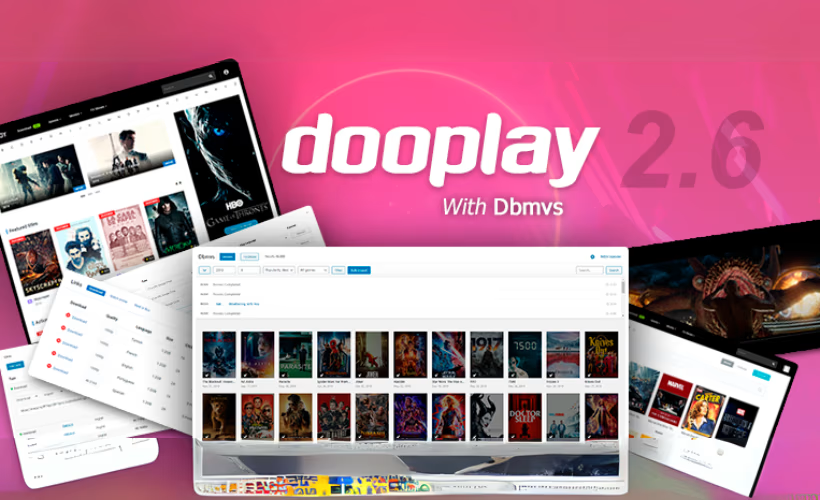
Building a movie database or TV tracking site normally means hours of manual data entry for every title, poster, and cast list. This DooPlay theme review looks at whether its Dbmovies import tool, which pulls metadata and images straight from TheMovieDB and IMDb, actually removes that bottleneck. For entertainment publishers, the appeal is speed: populate a catalog site without typing out synopses one by one.
The real question is whether that automation, plus the TV-specific tools built into the theme, justifies paying for a premium-only license with no free tier to test first.
Quick Verdict
DooPlay suits site owners committed to the movie or TV niche who want automated content population and structured TV series management without custom development. It’s a poor fit for anyone building a general-purpose blog, portfolio, or store, or anyone who wants to try before buying.
Pros
- Dbmovies import tool pulls metadata, text, and images from TheMovieDB and IMDb, cutting manual content entry
- Built-in season generator, episode generator, and custom post types for managing TV series
- Lifetime support and lifetime updates included with every license tier
- Licensing scales from single-site to 10-site/100-activation packages for agencies or multi-site owners
- Setup is fast and straightforward, with the theme file uploadable directly through the WordPress installer
Cons
- No free tier or trial version; it’s a premium-only commercial purchase
- Requires specific server configuration (several PHP extensions, allowurlfopen, mod_rewrite) that may need host support to enable
- Additional site and activation coverage is available through the Extended, Super Extended, and Mega Extended license tiers.
- Narrow movie/TV niche focus makes it unsuitable for general-purpose site building
Core Features
Dbmovies Import Tool
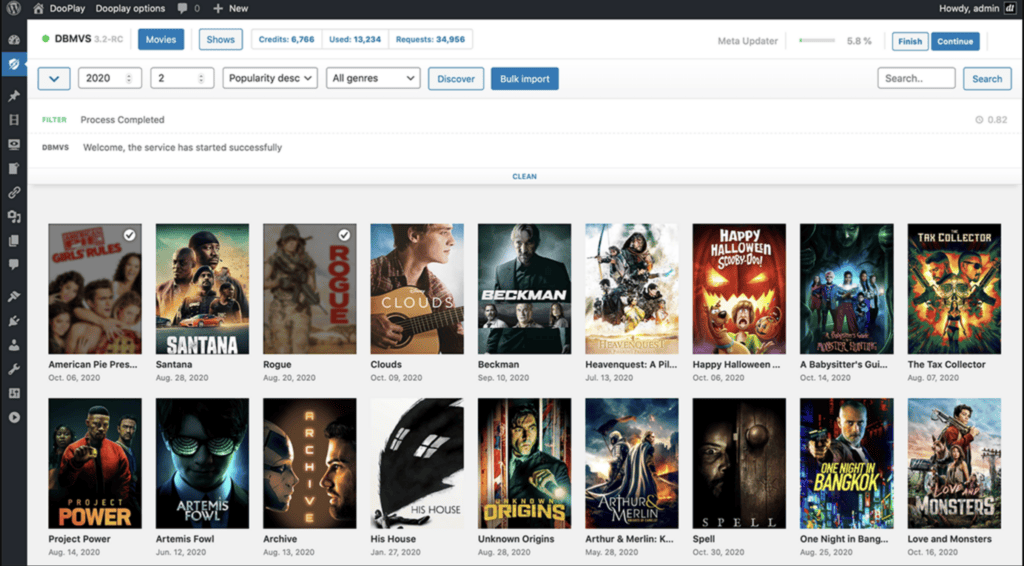
DooPlay’s standout feature is Dbmovies, the developer’s own import tool built specifically to pull metadata, text, and images into a movie or TV site without manual data entry. Rather than requiring an admin to type in cast lists, synopses, and poster art for every title, Dbmovies fetches that content from external sources and populates the corresponding post fields automatically.
For a site owner planning a catalog of hundreds or thousands of titles, this changes the math on how fast a database site can go live. Content that would otherwise take a team weeks to enter by hand can instead be pulled in as a batch process, leaving the site owner to focus on curation, categorization, and site design rather than typing in synopses one title at a time.
TheMovieDB Integration
Dbmovies connects to TheMovieDB as one of its two source integrations, drawing structured movie and show data directly from that database into DooPlay’s post types. This gives the theme a ready-made data source rather than leaving import mapping to a third-party plugin.
The practical benefit is consistency: titles imported through TheMovieDB arrive with a standard data structure, which matters when you’re running search, filtering, or sorting across a large catalog. A site that leans on this integration inherits a level of metadata uniformity that’s difficult to replicate through manual entry.
IMDb Integration
Alongside TheMovieDB, DooPlay’s Dbmovies tool also draws data, text, and images from IMDb. Having both sources available gives site owners flexibility over which reference database to pull from, or to cross-check details between the two.
For entertainment publishers building review or tracking sites, this dual-source setup reduces the risk of gaps in coverage — a title missing detailed information in one database may be more complete in the other. It also means the import workflow isn’t tied to a single external dependency.
Movie and TV Show Website Building
DooPlay is built around custom post types designed for movies and TV series specifically, rather than being a general-purpose theme adapted for the niche. For TV content, this includes a season generator and an episode generator, letting a site structure a series into its component seasons and episodes as distinct, organized entries rather than one flat post per show.
This matters for any site tracking ongoing series, where new episodes and seasons need to be added over time without restructuring existing content. The season and episode generators, combined with the theme’s custom post types, give a TV tracking or review site a data model built for how that content actually grows.
Installation and Setup
- Purchase a DooPlay license through the developer’s site and download the theme package from your account area.
- Locate the downloaded file, named something like “dooplay-wordpress-theme-for-movies-and-tvshows.zip.” This file is the installable theme package itself — there is no need to extract it before uploading.
- In the WordPress dashboard, go to Appearance > Themes > Add New > Upload Theme, select the zip file, and click Install Now.
- Once the install finishes, click Activate to switch your site to DooPlay.
- Work through the theme’s setup and configuration screens to set your homepage layout, menus, and basic site options. In first-hand testing on WordPress 6.5 with PHP 8.4, this initial setup and basic configuration took about five minutes.
- Configure the Dbmovies import tool to pull movie and TV show data, text, and images from sources such as TheMovieDB and IMDb. This is the mechanism DooPlay uses to populate your site’s catalog rather than requiring manual entry of every title.
- If you plan to build out TV show content, use the theme’s built-in season generator, episode generator, and custom post types to structure series data alongside your movie entries.
Compatibility and Requirements
DooPlay’s stated system requirements cover the WordPress and PHP versions, a set of PHP extensions, and server-level settings needed for the Dbmovies import tool and general theme operation.
| Requirement | Details |
|---|---|
| WordPress version | 5+ (also listed by the vendor as WordPress 6+ required, tested up to WordPress 6.6) |
| PHP version | 7.2+ |
| PHP extensions | MySQLi, PDO, cURL, OpenSSL, MBString, iconv, IMAP, GD, Zip |
| Server settings | allowurlfopen and mod_rewrite must be enabled |
| Browser support | Latest Chrome, latest Firefox, latest Safari, latest Edge, Internet Explorer 11 |
| Support | Lifetime support access included with purchase |
DooThemes lists both “WordPress 5+” and “WordPress 6+ required” in different places, with testing confirmed up to WordPress 6.6. Check the current requirement on the product page before purchase to see which applies to your setup.
The extension list is longer than what many WordPress themes require, since Dbmovies relies on cURL and IMAP-style connections to pull data from external movie and TV databases. Confirm with your hosting provider that these PHP extensions and server settings are available before purchasing DooPlay.
If your server is still running a PHP version that has reached end of life, upgrade to a currently supported PHP release before installing DooPlay — running an unsupported PHP version on a live site carries security risks independent of any specific theme.
DooPlay Pricing
DooPlay is sold as a premium theme with no free tier. Buyers choose from four license tiers, which scale by the number of sites and activations covered rather than by feature set:
| Tier | Sites | Activations | Support and updates |
|---|---|---|---|
| Regular | 1 website | 10 activations | Lifetime support and updates |
| Extended | 2 websites | 20 activations | Lifetime support and updates |
| Super Extended | 5 websites | 50 activations | Lifetime support and updates |
| Mega Extended | 10 websites | 100 activations | Lifetime support and updates |
A price of $120 is listed for the theme, frequently discounted to $80 with the code L291JSQZX1. All four tiers carry the same lifetime support and lifetime updates policy regardless of price, so the practical difference between them is how many sites and activations the license covers rather than what the theme does.
For the current price against each specific tier, check the official DooThemes product page before purchasing.
👉 Get DooPlay at the best available price
Alternatives to DooPlay
DooPlay’s focus on automated movie and TV metadata import through Dbmovies sets it apart from general-purpose WordPress themes, which require manual entry for every title, poster, and episode listing. Because the theme occupies a niche category, direct feature-for-feature competitors with verifiable public data are limited.
| Product | Key Difference | Best For | Price Tier |
|---|---|---|---|
| DooPlay | Dbmovies import tool pulls metadata, text, and images from TheMovieDB and IMDb, with built-in season and episode generators for TV series | Movie and TV show database or review sites that need automated content population | Paid |
Competitor data is sourced from publicly available information as of 2026 and may have changed.
The right pick ultimately comes down to how much of the content workflow you want automated versus built manually, and whether your project centers specifically on movies and TV shows or a broader entertainment or media format.
Frequently Asked Questions
What is the DooPlay WordPress theme used for?
DooPlay is built for creating movie and TV show websites, including review sites, streaming information hubs, and entertainment directories. Its core function is pulling in metadata, text, and images from external movie and TV databases rather than requiring content to be entered manually. It’s a niche theme aimed squarely at entertainment content publishers rather than general-purpose site building.
Does DooPlay automatically import movie and TV show data?
Yes, DooPlay uses the developer’s Dbmovies import tool to pull data, text, and images from TheMovieDB and IMDb. This automates much of the content population process for a movie or TV database site instead of requiring manual entry for each title.
Does DooPlay support TV series with seasons and episodes?
Yes, DooPlay includes a season generator, an episode generator, and custom post types specifically for managing TV series. These built-in tools let a site track shows across multiple seasons and episodes without needing separate plugins.
What are the server requirements for running DooPlay?
DooPlay requires PHP 7.2 or higher along with several specific PHP extensions: MySQLi, PDO, cURL, OpenSSL, MBString, iconv, IMAP, GD, and Zip. The server also needs allowurlfopen and mod_rewrite enabled, and the theme supports current versions of Chrome, Firefox, Safari, Edge, and Internet Explorer 11 on the browser side.
Is there a free version of DooPlay?
No, DooPlay is a premium-only theme with no free tier or trial version available. Anyone evaluating it needs to purchase one of the licensed tiers to use it.
How many websites can I use with one DooPlay license?
It depends on the tier: the Regular license covers 1 website with 10 activations, Extended covers 2 websites with 20 activations, Super Extended covers 5 websites with 50 activations, and Mega Extended covers 10 websites with 100 activations. All four tiers include lifetime support and lifetime updates.
How long does it take to set up DooPlay on WordPress?
Setup and basic configuration took about 5 minutes when tested on WordPress 6.5 with PHP 8.4. The downloaded theme file can be uploaded directly through the WordPress theme installer without needing to extract it first, which simplifies the initial installation step.
Download & Pricing Options
🔍 Try Before You Buy
DooPlay does not have an official free tier. To evaluate it before purchasing, a GPL-licensed copy is available for sandbox testing purposes only.
👉 Download GPL Evaluation Copy
This is a GPL-licensed redistributed copy for testing only — not an official developer product.
💎 Get DooPlay (Best Available Price)
👉 Check Current Pricing for DooPlay
Pricing and availability may change — use the link above for current rates.