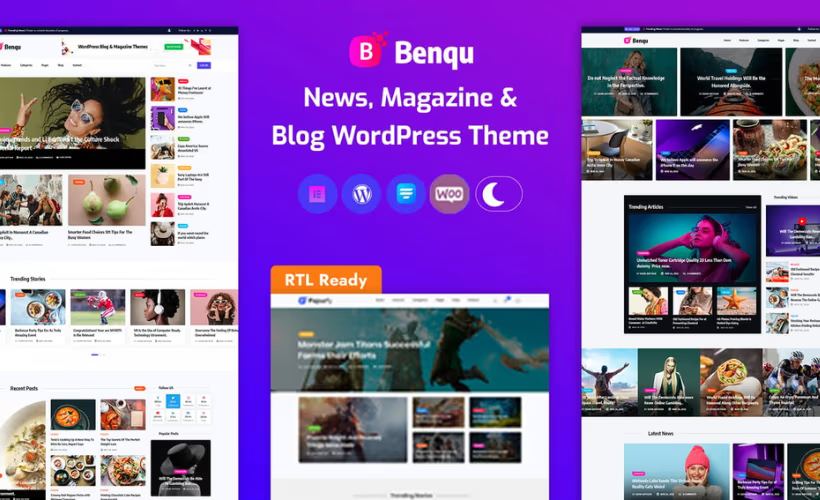
Building a news or magazine site on WordPress usually means paying a premium for a theme that handles editorial layouts well. This Benqu theme review examines whether ITcroc’s $18 Elementor-based option delivers the multi-niche flexibility that established competitors charge far more for — covering sports, fashion, technology, travel, health, and politics out of the box. The real question is whether a low entry price comes with meaningful trade-offs in functionality or long-term support.
Whether Benqu earns its place against pricier alternatives like Newspaper or JNews depends on how much the Elementor lock-in and short default support window matter to your workflow.
Quick Verdict
Benqu suits news publishers, magazine editors, and multi-niche bloggers who already use Elementor and want a capable editorial theme without a steep upfront cost. Buyers who need page-builder flexibility, longer out-of-the-box support, or guaranteed e-commerce functionality should weigh the limitations carefully before committing.
Pros
- Single-site regular license priced at $18, undercutting most established news and magazine theme competitors
- Native Elementor integration lets editors customize layouts without touching code
- Multi-niche demo coverage spans sports, fashion, technology, travel, health, and politics
- WooCommerce and WP User Frontend compatibility opens doors for editorial commerce and membership features
- One-click demo import and an included child theme make initial setup fast
Cons
- Hard dependency on Elementor means migrating to another page builder requires rebuilding the site from scratch
- The download package is a wrapper ZIP that must be extracted before the actual theme file can be installed — a friction point for less experienced users
- WooCommerce integration is listed as optional, so e-commerce functionality is not guaranteed without additional configuration
Core Features
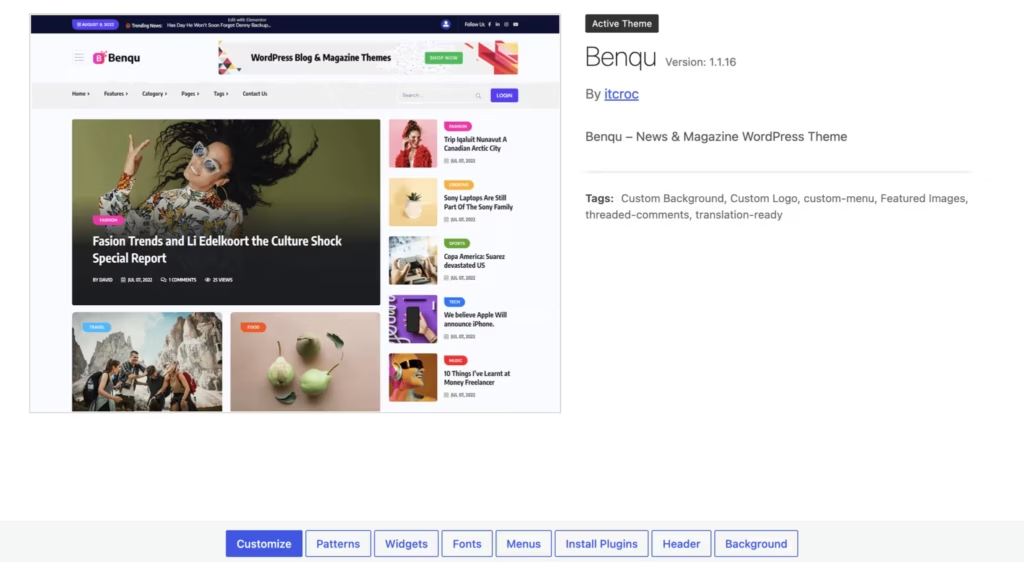
Elementor Page Builder Integration
Benqu is built specifically for Elementor, meaning every layout decision — column structure, widget placement, content blocks — runs through Elementor’s visual editor rather than a separate theme customizer. The theme ships with a dedicated companion plugin, Benqu Extension, which extends Elementor’s default widget set with components tailored to news and magazine publishing.
For publishers who already work in Elementor, the learning curve is minimal. There is no proprietary drag-and-drop system to learn alongside the theme; the editor you already know handles the full build.
Multi-Niche Layout Support
Rather than targeting a single editorial vertical, Benqu covers sports, fashion, technology, travel, health, and politics. Demo data is included in the download package, allowing you to import a starting layout for supported niches.
One-click demo import is included, letting publishers load a niche-specific starting point without manually assembling page templates from scratch. The demo data ships inside the download package alongside the theme files.
Newspaper and Magazine Layout Architecture
Benqu supports both newspaper-style and magazine-style layouts, which serve different editorial needs. Newspaper layouts typically emphasize high-volume, time-sensitive content with dense article grids; magazine layouts give more visual weight to featured stories and photography. Having both available within a single theme means a publisher can mix approaches across different sections of the same site.
Blog layout support is also included, making the theme practical for content-heavy sites that blend long-form editorial writing with breaking news or category-specific coverage.
WooCommerce and E-Commerce Compatibility
WooCommerce compatibility is listed as an optional integration rather than a core dependency, so publishers who want to sell subscriptions, merchandise, or digital products can add that layer without switching themes. The connection runs through the standard WooCommerce plugin rather than a custom storefront built into the theme.
For editorial sites that monetize through product sales or paid content, this means a single theme can carry both the publishing and commerce sides of the operation without requiring a separate WooCommerce-specific theme.
Membership and User Submission Features
Benqu integrates with WP User Frontend, which adds member registration, user profile pages, and front-end post submission to the site. Combined with One User Avatar support for custom profile pictures, this gives publishers the infrastructure for community-driven content models — contributor networks, reader submissions, or gated membership areas — without building those systems from scratch.
Breadcrumb navigation is supported via Breadcrumb NavXT, which is particularly useful on multi-category sites where readers need clear orientation across deep content hierarchies. Both WP User Frontend and One User Avatar are listed among the required plugins prompted immediately after activation, alongside Benqu Extension, Breadcrumb NavXT, and Elementor Website Builder.
Email Marketing Integration
Mailchimp list-building is handled through MC4WP, one of the more widely used Mailchimp connector plugins for WordPress. Publishers can embed subscription forms within Elementor-built layouts and connect them directly to Mailchimp audiences.
This keeps email capture native to the editorial layout rather than relying on a separate popup or third-party widget that sits outside the theme’s design system.
Contact Form 7 Compatibility
Contact Form 7 is listed as a compatible plugin, covering the standard editorial need for reader contact pages, tip submission forms, and advertiser inquiries. Because Contact Form 7 outputs are embeddable as shortcodes, they can be placed inside any Elementor layout without breaking the visual structure.
Bootstrap 5.x Framework and SVG Support
Benqu is compatible with Bootstrap 5.x. Developers who extend the theme can work with Bootstrap-based components where applicable.
SVG support is handled through the Safe SVG plugin, which sanitizes uploaded SVG files before serving them. For news and magazine sites that use custom icons, logos, or infographic assets, this removes the WordPress default restriction on SVG uploads without exposing the site to unsanitized file risks.
Child Theme Included
The download package contains both the parent theme (benqu.zip) and a pre-built child theme (benqu-child.zip). Customizations made inside the child theme survive parent theme updates, which matters for any publisher planning to modify templates or add custom CSS over time.
Documentation and licensing files are also bundled in the same package, so everything needed to set up and legally deploy the theme is available without a separate download.
Installation and Setup
The download package from ThemeForest is a bundled ZIP file — not the installable theme itself. Extracting it first is essential before touching WordPress.
- Download the package from ThemeForest and extract the outer ZIP on your computer.
Inside you will find benqu.zip (the parent theme), benqu-child.zip (the child theme), plus separate folders for Plugins, Demo data, documentation, and licensing files.
- Log in to your WordPress dashboard and navigate to Appearance → Themes → Add New → Upload Theme.
- Upload
benqu.zipand activate the parent theme.
If you plan to make code-level customizations, upload and activate benqu-child.zip instead, then set the parent theme to Benqu.
- After activation, WordPress will prompt you to install the required and recommended plugins. Install and activate all of them. The required plugins are:
- Benqu Extension
- Elementor Website Builder
- Breadcrumb NavXT
- One User Avatar | User Profile Picture
- WP User Frontend – Membership, Profile, Registration & Post Submission Plugin for WordPress
- Install and activate the recommended plugins for full site functionality:
- Contact Form 7
- MC4WP: Mailchimp for WordPress
- One Click Demo Import
- Safe SVG
- WooCommerce
- To import a pre-built demo, navigate to Appearance → Import Demo Data (made available by One Click Demo Import), select your preferred demo, and run the import. Demo data files are included in the download package.
- Once the import completes, review your site under Appearance → Customize and adjust settings, menus, and widgets to match your content needs.
The full setup — from extraction to a working demo — takes roughly five minutes on a standard WordPress install.
Compatibility and Requirements
| Requirement | Details |
|---|---|
| WordPress | 5.6.x through 6.9.x |
| PHP | Tested on PHP 8.4 |
| Page Builder | Elementor |
| eCommerce | WooCommerce 6.x.x |
| CSS Framework | Bootstrap 5.x |
| Base Framework | Underscores |
| Browsers | Chrome, Firefox, Safari, Opera, Edge |
| Forms | Contact Form 7 |
Benqu supports WordPress 5.6.x and later. Verify the latest supported WordPress version on the current product page before deployment. The theme has been tested on PHP 8.4, which aligns with current hosting recommendations — running any live site on an end-of-life PHP version is inadvisable regardless of theme compatibility.
A child theme is included in the download package, making it straightforward to apply custom code without touching the parent theme files.
Benqu Pricing
Benqu is a premium theme sold exclusively through ThemeForest. There is no free version or trial tier.
Regular License — $18
Covers a single site where the end product is not charged to users. This is the standard purchase for publishers, bloggers, and magazine owners building a site for their own audience.
Extended License — $2,800
Also covers a single site, but applies when the end product charges end users — for example, a theme used as part of a paid SaaS platform or a commercial product sold to clients.
Every purchase includes six months of support from ITcroc. An optional support extension to 12 months is available at an additional cost during checkout.
👉 Get Benqu at the best available price
Alternatives to Benqu
Several strong competitors occupy the news and magazine theme space on ThemeForest, each taking a different approach to layout flexibility, built-in features, and page builder dependency.
| Product | Key Difference | Best For | Price Tier |
|---|---|---|---|
| Benqu | Elementor-native design with multi-niche demo support at a low entry price | Publishers wanting an affordable Elementor-based news or magazine theme | Paid |
| Newspaper Theme by tagDiv | Built around tagDiv’s own Newspaper builder with a deep ad management system and large demo library | Established publishers who prioritize ad revenue tools and a mature ecosystem | Paid |
| Jannah | Built-in ad management and AMP support without requiring a third-party page builder | Publishers who want editorial power without a page builder dependency | Paid |
| JNews | Bundles its own front-end builder alongside Elementor and WPBakery compatibility | Publishers who need granular control over article and category layouts | Paid |
| Soledad | Exceptionally large collection of pre-built demos with strong post format variety | Lifestyle bloggers and multi-niche publishers who prioritize design variety | Paid |
| Publisher by Bimber | Emphasizes community-driven content, viral list posts, and front-end submission features | Sites built around user-generated content and viral social formats | Paid |
Competitor data is sourced from publicly available information as of 2026 and may have changed.
Benqu’s $18 entry price makes it a compelling starting point for budget-conscious publishers, but those who need deep ad management, AMP support, or a page-builder-agnostic setup will find Jannah or Newspaper Theme by tagDiv better suited to their requirements.
Frequently Asked Questions
Does Benqu work with Elementor free or does it require Elementor Pro?
The free Elementor Website Builder is listed as a required plugin on activation, and full basic setup completes without Elementor Pro. Elementor Pro is also compatible, so Pro features can be layered in, but it is not a hard requirement for core functionality.
How do I install the Benqu WordPress theme?
The file downloaded from ThemeForest is an outer ZIP that must be extracted on your computer first. Inside the extracted folder you’ll find benqu.zip (the installable parent theme) and benqu-child.zip (the child theme); upload either of those through Appearance → Themes → Add New. Inside that extracted folder you’ll find benqu.zip (the installable parent theme) and benqu-child.zip (the child theme); upload either of those through the WordPress Appearance > Themes > Add New screen as normal.
What plugins are required to use Benqu?
Five plugins are flagged as required on activation: Benqu Extension, Breadcrumb NavXT, Elementor Website Builder, One User Avatar, and WP User Frontend. A second group — Contact Form 7, MC4WP: Mailchimp for WordPress, One Click Demo Import, Safe SVG, and WooCommerce — is recommended rather than required, meaning you can skip any of those you don’t need.
How long does support last with a Benqu license?
A standard purchase includes six months of support from ITcroc. That period can be extended to twelve months for an additional fee at the time of checkout on ThemeForest.
Is Benqu compatible with WooCommerce?
Yes, WooCommerce compatibility is included, though it is treated as an optional add-on rather than a core feature of the theme. WooCommerce is listed among the recommended plugins in the download package, so you install it only if your site requires e-commerce functionality.
How does Benqu compare to the Newspaper theme by tagDiv?
Benqu’s regular license costs $18, which is considerably lower than the Newspaper theme’s pricing — making it one of the more affordable entry points in the Elementor news-theme category. The Newspaper theme by tagDiv uses its own proprietary tagDiv Composer builder rather than Elementor, so the two themes suit different workflows; if your team is already invested in Elementor, Benqu avoids the need to learn a separate drag-and-drop system.
Download & Pricing Options
🔍 Try Before You Buy
Benqu does not have an official free tier. To evaluate it before purchasing, a GPL-licensed copy is available for sandbox testing purposes only.
👉 Download GPL Evaluation Copy
This is a GPL-licensed redistributed copy for testing only — not an official developer product.
💎 Get Benqu (Best Available Price)
👉 Check Current Pricing for Benqu
Pricing and availability may change — use the link above for current rates.