Building a content-heavy news site on WordPress usually means patching together a generic theme with a stack of third-party plugins — and hoping they all play nicely together. This SmartMag theme review examines whether a purpose-built magazine theme with native dark mode, WooCommerce integration, and a drag-and-drop builder can replace that fragile setup with something more coherent. The target is publishers, editors, and bloggers who need editorial structure from day one, not after a dozen plugin installs.
Whether SmartMag’s focused feature set justifies its price against well-established competitors like Newspaper Theme and Jannah is the real question here.
Quick Verdict
SmartMag suits magazine publishers, news editors, and multi-category bloggers who want a polished editorial theme without a recurring subscription. Buyers who need agency-scale multi-site deployment or round-the-clock support will find the current offering limiting.
Pros
- One-time purchase price — no annual renewal required
- Native Elementor compatibility for flexible, visual layout editing
- Built-in dark mode toggle included out of the box
- WooCommerce integration for sites that combine editorial content with e-commerce
- Tested against WordPress 6.5 and PHP 8.4, with a fast initial setup
Cons
- Three plugins are mandatory for full functionality, adding meaningful dependency weight
- The ThemeForest download is not directly installable — requires manual extraction to locate the inner installable file
- Support is available only during set hours, which may fall outside working hours for buyers in certain time zones
- No multi-site license tier documented, making it a poor fit for agencies managing several client sites
Core Features
Drag-and-Drop Page Builder
SmartMag is compatible with Elementor Page Builder and includes drag-and-drop editing capabilities for building and customizing layouts. SmartMag includes tools for creating magazine-style layouts such as article grids, category sections, and featured content, while Elementor provides additional visual editing flexibility.
For a news or magazine site, this matters more than it would on a typical business site. Editorial teams frequently need to rearrange homepage sections around breaking stories or seasonal content without touching code. Having both options available means the theme doesn’t force a single workflow on every team member.
Elementor Page Builder is one of three required plugins flagged during setup — alongside SmartMag Core and Sphere Core. All three must be installed for the theme to function, so budget a few extra minutes to work through those prompts before the builder is available.
Dark Mode
A built-in dark mode toggle comes standard, controlled through the theme’s customization panel rather than a third-party plugin. Visitors can switch between light and dark presentations without any additional configuration from the site owner.
This is particularly relevant for news and magazine audiences who read long-form content in low-light environments. Because the toggle is native to SmartMag rather than bolted on, it applies consistently across the theme’s layout components — without the visual inconsistencies that often appear when a generic dark mode plugin encounters a complex editorial template.
SEO Optimization
SmartMag is built with SEO considerations baked into its structure and carries verified compatibility with both Yoast SEO and RankMath. Either plugin integrates without conflict, so publishers aren’t locked into a single SEO toolchain.
For content-heavy sites publishing dozens of articles per week, clean semantic markup and reliable plugin compatibility reduce the overhead of managing search visibility at scale. The theme doesn’t require workarounds to make standard SEO workflows function.
WooCommerce Integration
Editorial sites increasingly combine content with commerce — selling branded merchandise, digital downloads, or premium subscriptions alongside editorial content. SmartMag’s WooCommerce integration addresses this directly, allowing publishers to run a storefront within the same theme rather than maintaining a separate shop installation.
The integration is listed as a core feature rather than an afterthought, which means product pages and shop archives inherit the theme’s design system rather than defaulting to WooCommerce’s generic templates.
Demo Site Import System
SmartMag includes a demo import system, supported by the companion Bunyad Demo Import plugin, which lets new users load a pre-built site configuration as a starting point. Basic setup completes in approximately five minutes — a figure that reflects the import system doing the heavy lifting on initial structure.
The practical effect is that a publisher can begin customizing an already-functional magazine layout rather than building page structure from scratch. This shortens the gap between installation and a site that’s ready for content.
Bunyad Demo Import is listed as a recommended rather than required plugin, meaning it won’t be automatically prompted during setup. Install it manually if you intend to use the demo import workflow.
Extensive Customization Panel
The theme’s customization system is built into its core rather than delegated entirely to a page builder. SmartMag includes a built-in customization panel for managing the theme’s appearance and settings from a central location.
This separation is useful for magazine operations where a site editor might adjust a homepage layout daily while a developer or designer controls the brand-level settings less frequently. The two layers don’t interfere with each other.
Third-Party Plugin Compatibility
Beyond Elementor and the SEO plugins, SmartMag extends to bbPress for community forum functionality and WPML for multilingual publishing. These aren’t incidental — they reflect the theme’s target audience of established editorial operations that often need forums, international editions, or both.
bbPress compatibility means a news site can host reader discussion boards within the same design system. WPML support opens the theme to publishers running content in multiple languages without requiring a separate multilingual theme or a full site rebuild.
Installation and Setup
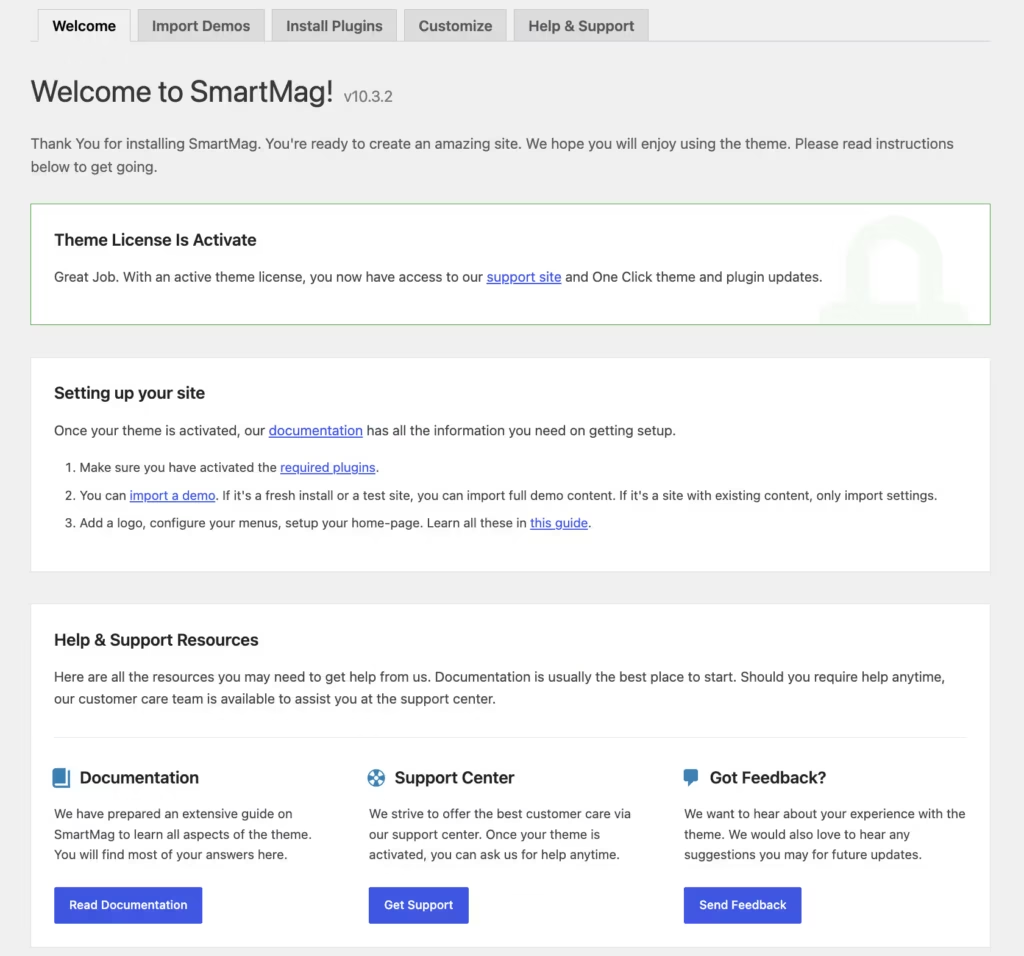
The ThemeForest download package is not directly installable. Opening the ZIP reveals several files — a Licensing folder, a Documentation.html file, a README.txt, and the installable smart-mag.zip file. That inner ZIP is what gets uploaded to WordPress.
- Log in to your WordPress dashboard and navigate to Appearance → Themes → Add New → Upload Theme.
- Upload smart-mag.zip (extracted from the ThemeForest package) and click Install Now, then Activate.
- Install and activate the required plugins. SmartMag requires Elementor Page Builder, SmartMag Core, and Sphere Core — all three must be installed and activated before the theme functions correctly. WordPress will prompt you to install them via a notice after activation.
- Install the recommended plugins for full functionality:
- Bunyad Demo Import — enables one-click demo site imports
- Debloat – Optimize Performance — assists with front-end performance optimization
- To import a pre-built demo site, navigate to the demo import panel (made available by Bunyad Demo Import) and select your preferred starter layout.
- Customize the site through the theme’s built-in customization panel, accessible under Appearance → Customize.
Basic setup from theme upload to a working demo site takes approximately five minutes.
Compatibility and Requirements
| Requirement | Detail |
|---|---|
| Tested on WordPress | 6.5 |
| Tested on PHP | 8.4 |
| Page builder | Elementor Page Builder |
| Plugin dependencies | Elementor Page Builder, SmartMag Core, Sphere Core |
| eCommerce | WooCommerce |
| SEO plugins | Yoast SEO, RankMath |
| Multilingual | WPML |
| Community forums | bbPress |
Running the current stable WordPress release and a supported PHP version is advisable for any live site — older PHP branches that have reached end-of-life no longer receive security patches.
The theme’s plugin dependencies — Elementor Page Builder, SmartMag Core, and Sphere Core — are required for core functionality. WooCommerce, WPML, Yoast SEO, RankMath, and bbPress are each listed as compatible for sites that need eCommerce, multilingual publishing, SEO tooling, or community forum features.
SmartMag Pricing
SmartMag is a premium theme sold exclusively through ThemeForest. There is no free version or trial tier.
A Standard License costs $59 as a one-time purchase and covers a single website.
For the current license price and any active marketplace promotions, check the SmartMag listing on ThemeForest.
👉 Get SmartMag at the best available price
Alternatives to SmartMag
Several strong premium themes compete in the WordPress magazine and news space, each with a different emphasis on page building, monetization, or layout variety.
| Product | Key Difference | Best For | Price Tier |
|---|---|---|---|
| SmartMag | Elementor compatibility, built-in dark mode, and WooCommerce integration at a one-time purchase price | Magazine publishers and bloggers wanting Elementor flexibility with e-commerce support | Paid |
| Newspaper Theme | Proprietary tagDiv Composer builder with an extensive library of pre-built news templates | News publishers who prefer a self-contained builder ecosystem | Paid |
| Jannah | Performance-focused architecture with strong ad management tooling | High-traffic editorial sites prioritizing speed and ad revenue | Paid |
| Soledad | Exceptionally large library of pre-built demo layouts spanning lifestyle and content niches | Bloggers and lifestyle publishers who want maximum layout variety | Paid |
| Publisher | Front-end builder by BetterStudio with deep ad placement and monetization controls | Editorial sites where advertising revenue is the primary business model | Paid |
| Newsmag | Grid-based news layouts with a drag-and-drop builder from tagDiv | Publishers who want structured, grid-heavy news presentation out of the box | Paid |
Competitor details reflect publicly known positioning as of 2026 and may have changed.
The right choice depends on your priorities. SmartMag suits publishers who want Elementor as their design tool and a WooCommerce-ready setup from day one, while Jannah and Newspaper Theme are worth evaluating if ad management depth or a fully proprietary builder ecosystem matters more to your workflow.
Frequently Asked Questions
How much does SmartMag cost?
SmartMag costs $59 as a one-time purchase on ThemeForest under a Standard License covering a single site. There is no subscription fee or recurring annual charge.
Does SmartMag work with Elementor?
Yes, SmartMag is compatible with Elementor Page Builder, and Elementor is one of three plugins required for the theme to function. Layout editing can be handled through Elementor’s drag-and-drop interface alongside SmartMag’s own native builder.
Is SmartMag good for a news website?
SmartMag is built specifically for magazines, newspapers, and content-heavy blogs, making it a direct fit for news publishing. It includes a demo import system, extensive layout customization, and compatibility with Yoast SEO and RankMath — all practical requirements for a news operation.
Does SmartMag have a dark mode?
Yes, SmartMag includes a built-in dark mode toggle out of the box. It is part of the theme’s core feature set and does not require a separate plugin.
How do I install SmartMag from ThemeForest?
The ZIP file downloaded from ThemeForest is not directly installable in WordPress — you must extract it first. Inside, you will find the installable smart-mag.zip file alongside a Licensing folder, Documentation.html, and a README.txt. Upload that inner ZIP through the WordPress theme installer.
Does SmartMag support WooCommerce?
Yes, SmartMag integrates with WooCommerce, making it suitable for editorial sites that also sell products or subscriptions. This is listed as a core feature of the theme.
SmartMag vs Newspaper theme — which is better?
Both are premium WordPress themes aimed at magazine and news publishers, and both are sold on ThemeForest. SmartMag’s headline advantages are its one-time $59 price point, native Elementor compatibility, and built-in dark mode. Newspaper theme is a long-established competitor with its own builder and a large template library. The better choice depends on whether you prefer Elementor-based editing or Newspaper’s native toolset. Specific pricing and features for Newspaper may have changed, so verify current details before purchasing.
Download & Pricing Options
🔍 Try Before You Buy
SmartMag does not have an official free tier. To evaluate it before purchasing, a GPL-licensed copy is available for sandbox testing purposes only.
👉 Download GPL Evaluation Copy
This is a GPL-licensed redistributed copy for testing only — not an official developer product.
💎 Get SmartMag (Best Available Price)
👉 Check Current Pricing for SmartMag
Pricing and availability may change — use the link above for current rates.