Getting store visitors to hand over their email before they bounce is one of the hardest parts of running a WooCommerce shop, and generic discount pop-ups rarely move the needle anymore. This WooCommerce Lucky Wheel review looks at a gamified alternative: a spin-to-win wheel that captures an email address before generating a discount coupon, built specifically for WooCommerce rather than as a general-purpose opt-in tool. It comes from VillaTheme, sold as a one-time CodeCanyon purchase with no free version to test first.
The real question is whether a narrow, WooCommerce-only wheel plugin justifies its cost against broader gamified popup platforms that offer more channels and flexibility.
Quick Verdict
This plugin suits WooCommerce store owners who want a simple, dedicated spin-to-win mechanic without paying for a full multi-channel marketing suite. It’s less suited to stores wanting A/B testing, multi-platform lead capture, or a free trial before committing.
Pros
- Purpose-built spin-to-win wheel that integrates directly with WooCommerce instead of a generic popup builder
- Choice of a popup display or a dedicated shortcode wheel page
- Captures visitor emails before the spin and auto-generates discount coupons on a win
- Compatible with Elementor, Elementor Pro, and WPML for page-builder and multilingual setups
- Straightforward installation, with the plugin file uploadable directly through the WordPress plugin uploader
Cons
- No free tier; the plugin must be purchased outright before you can try it
- Requires WooCommerce to function
- A single-purpose tool compared to broader multi-channel popup and lead-generation platforms
👉 See WooCommerce Lucky Wheel – Spin to win pricing
Core Features
Gamified Lucky Wheel Popup
The plugin’s central feature is a spinning wheel that appears as a popup on the storefront, prompting visitors to try their luck for a discount before they browse further. It’s a purpose-built lucky wheel display rather than a generic exit-intent overlay repurposed for gamification.
For a WooCommerce store, this turns an otherwise passive visit into an interactive moment. Shoppers who might have left without engaging are given a reason to stay a few seconds longer, which is the whole premise behind spin-to-win as a conversion tactic.
Lucky Wheel Shortcode Page
Instead of forcing the wheel into a popup, store owners can place it on its own page using the shortcode-based wheel page. This suits stores that want to promote the wheel through a dedicated link — in an email campaign, a social post, or a site menu item — rather than interrupting every visitor automatically.
Running the wheel as a standalone page also gives more control over when and where it appears, since it only shows to people who land on that specific URL.
Email Capture for List Building
Before a visitor spins, the plugin asks for an email address through its built-in entry form. That single step ties the wheel directly to list building rather than treating the game as a standalone novelty.
For email marketers running WooCommerce promotions, this converts wheel interactions into subscriber records automatically, giving every spin a dual purpose: entertainment for the shopper, a lead for the store.
Spin-to-Win Discount Coupon Generation
Winning a spin triggers automatic discount coupon generation, so the plugin issues a working WooCommerce coupon on the spot rather than just displaying a “you won” message. That’s what makes the wheel functional as a sales tool and not just a visual gimmick.
Because the coupon is generated automatically, there’s no manual step for the store owner between a visitor winning and that visitor being able to redeem a discount at checkout.
Elementor and Elementor Pro Compatibility
The wheel works alongside Elementor and Elementor Pro, which matters for stores that have built their layouts around that page builder rather than the default WordPress editor. Compatibility here means the wheel can sit within Elementor-designed pages without requiring a separate theme or template setup.
Store owners already invested in an Elementor-based design don’t need to rework their pages to accommodate the wheel — it fits into the existing build.
WPML Multilingual Compatibility
For stores selling across multiple language markets, the plugin supports WPML. That allows the wheel, its entry form, and its messaging to be translated alongside the rest of a multilingual WooCommerce site.
It’s a narrower but practical inclusion: stores running international storefronts can offer the same spin-to-win promotion to visitors in different languages without maintaining separate wheel setups per locale.
Installation and Setup
- Confirm WooCommerce is installed and activated on your WordPress site.
- Purchase a license and download the plugin zip file from the CodeCanyon item page.
- In your WordPress dashboard, go to Plugins → Add New Plugin → Upload Plugin and upload the zip file directly. There’s no need to extract the archive first — the plugin installs from the compressed file as-is.
- Click Activate once the upload finishes.
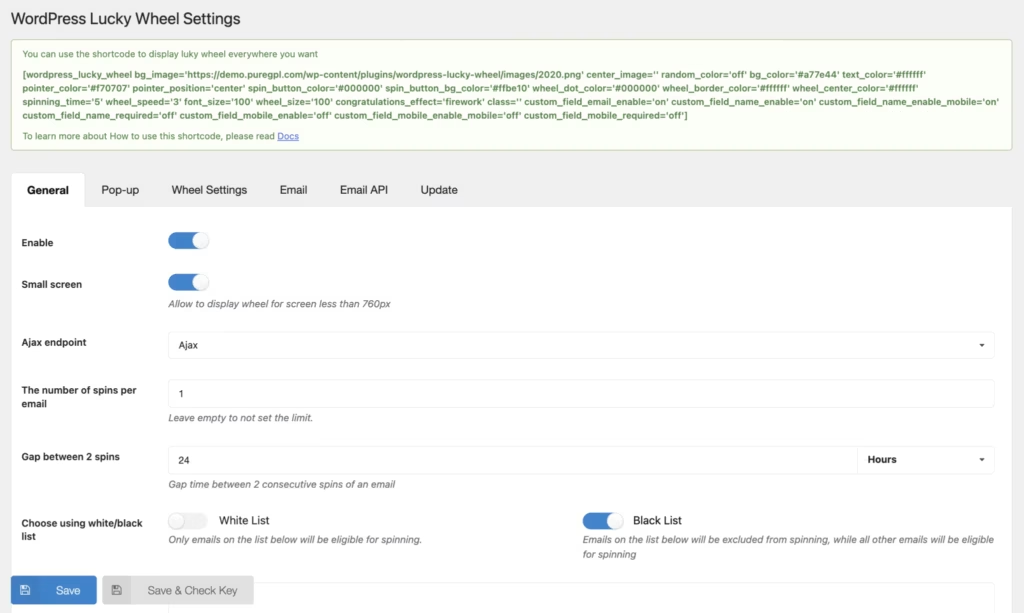
- Open the plugin’s settings to build your wheel: choose whether it displays as a popup or as a dedicated shortcode page, set up the email capture form visitors fill in before spinning, and configure the discount coupons the wheel awards on a win.
- If you’re running Elementor or Elementor Pro, or a WPML-powered multilingual site, check that the wheel displays and translates as expected within those environments before publishing it live.
Installation itself is quick. In hands-on testing on WordPress 6.5 with PHP 8.4, uploading the zip, activating the plugin, and getting a basic wheel running took about two minutes.
Compatibility and Requirements
| Requirement | Details |
|---|---|
| WordPress | 7.0.x, 6.9.x, 6.8.x, 6.7.x, 6.6.x, 6.5.x, 6.4.x, 6.3.x, 6.2.x, 6.1.x, 6.0.x |
| WooCommerce | 10.x.x, 9.x.x, 8.x.x, 7.x.x, 6.x.x (required for the plugin to function) |
| Page builder | Elementor and Elementor Pro |
| Multilingual | WPML |
| Browsers | Firefox, Safari, Chrome, Edge |
WooCommerce isn’t just supported — it’s a hard dependency. The wheel has no reason to exist without an active WooCommerce store to generate coupons for, so it needs to be installed and running before this plugin will do anything useful.
WooCommerce Lucky Wheel Pricing
WooCommerce Lucky Wheel is sold exclusively through CodeCanyon, with no free version available. Buyers choose between two license types.
| License | Price | Support included |
|---|---|---|
| Regular License | $59 | 6 months, extendable for an additional fee |
| Extended License | $125 | 6 months, extendable for an additional fee |
Both prices include the item cost and buyer fee but exclude tax and any handling charges applied at checkout. The Regular License and Extended License differ in price and intended use case; check the CodeCanyon listing for exact usage terms.
Support from VillaTheme runs for six months from the date of purchase on either license. Store owners who want coverage beyond that window can extend to 12 months for an added cost at checkout. Check the official CodeCanyon listing for the current extension fee and full license terms before buying, since marketplace pricing and add-on costs can change.
👉 Get WooCommerce Lucky Wheel – Spin to win at the best available price
Alternatives to WooCommerce Lucky Wheel – Spin to win
WooCommerce Lucky Wheel isn’t the only way to add gamified email capture to a store. Depending on whether you want a dedicated WooCommerce tool or a broader popup platform, a few alternatives are worth comparing.
| Product | Key Difference | Best For | Price Tier |
|---|---|---|---|
| WooCommerce Lucky Wheel – Spin to win | Purpose-built spin-to-win wheel integrated directly into WooCommerce, offered as a one-time paid plugin | Store owners wanting a low-cost, single-purpose gamified coupon wheel | Paid |
| OptinMonster | Broad lead-generation and popup platform with a drag-and-drop builder covering many popup types beyond spin wheels, not limited to WooCommerce | Marketers who need multi-channel popups and lead capture across different site types | Freemium |
| Wheelio | Dedicated spin-to-win popup app built specifically for e-commerce gamified email capture, similar in concept to a lucky wheel plugin | Ecommerce sites focused specifically on spin-wheel email capture campaigns | Paid |
Competitor data is sourced from publicly available information as of 2026 and may have changed.
The right pick depends on scope: a dedicated WooCommerce wheel plugin suits stores that only need this one feature, while a fuller platform like OptinMonster makes more sense for sites running varied popup campaigns beyond spin-to-win.
Frequently Asked Questions
Does WooCommerce Lucky Wheel work with Elementor?
Yes, the plugin is compatible with both Elementor and Elementor Pro. This lets store owners place or style the lucky wheel using Elementor’s page-building tools rather than relying solely on the built-in popup or shortcode display.
Is WooCommerce Lucky Wheel compatible with WPML?
Yes, WooCommerce Lucky Wheel is compatible with WPML. This makes it usable on multilingual WooCommerce stores where the wheel, its prompts, and coupon messaging need to appear in more than one language.
How much does WooCommerce Lucky Wheel cost?
The Regular License costs $59, while the Extended License costs $125. Both prices include the item price and buyer fee but exclude tax and handling fees, and both licenses come with 6 months of developer support.
Does WooCommerce Lucky Wheel have a free version?
No, WooCommerce Lucky Wheel is a paid product only with no free tier. Store owners need to purchase either the Regular or Extended License before they can install and use it.
How long is support included with WooCommerce Lucky Wheel?
Both license types include 6 months of developer support from VillaTheme. This can be extended to 12 months by purchasing a support extension add-on for an additional fee.
Which WordPress and WooCommerce versions does Lucky Wheel support?
The plugin lists compatibility with WordPress versions from 6.0.x through 7.0.x, and with WooCommerce versions from 6.x.x through 10.x.x. It also supports the Firefox, Safari, Chrome, and Edge browsers, and requires WooCommerce to be installed and active to function.
Is WooCommerce Lucky Wheel easy to install?
Installation is straightforward: the plugin zip file can be uploaded directly through Plugins → Add New Plugin → Upload Plugin without needing to extract it first. On a test setup running WordPress 6.5 with PHP 8.4, installation and basic setup took about 2 minutes.
Download & Pricing Options
🔍 Try Before You Buy
WooCommerce Lucky Wheel – Spin to win does not have an official free tier. To evaluate it before purchasing, a GPL-licensed copy is available for sandbox testing purposes only.
👉 Download GPL Evaluation Copy
This is a GPL-licensed redistributed copy for testing only — not an official developer product.
💎 Get WooCommerce Lucky Wheel – Spin to win (Best Available Price)
👉 Check Current Pricing for WooCommerce Lucky Wheel – Spin to win
Pricing and availability may change — use the link above for current rates.