
Building a service marketplace typically means stitching together a directory plugin, a separate job board tool, and a third system for bookings and invoicing. This Service Finder theme review looks at a WordPress theme that bundles all three into one package, alongside staff management and provider reviews. The question is whether that consolidation actually saves time and money once the required plugin stack is factored in.
The real decision isn’t whether the feature list is long enough — it’s whether managing ten-plus companion plugins beats running separate, purpose-built tools.
Quick Verdict
Service Finder suits agencies and site owners who want a directory, job board, and booking system launched from a single theme purchase and don’t mind assembling a supporting plugin stack to get there. It’s a poor fit for anyone wanting a lighter setup, a free trial before committing, or a job board that doesn’t hinge on a separate plugin working correctly.
Pros
- Combines a business/service directory with a job board in one theme
- Built-in booking system plus staff management and invoicing tools for providers
- Customer review functionality built in for service providers
- Search and filtering tools that help customers find the right provider
- Installation was straightforward in first-hand testing, taking around five minutes
Cons
- Requires installing and configuring at least ten companion plugins for full functionality
- No free version or trial exists to test before buying
- Job board functionality depends entirely on WP Job Manager being installed and configured correctly
Core Features
Service and Business Directory Listings
Service Finder’s foundation is a searchable directory where service providers and local businesses each get a listing page. This is the structural core the rest of the theme builds on — job board entries, bookings, and reviews all attach back to these listings rather than existing as separate, disconnected content types.
For a site owner, this means one theme covers what would otherwise require stitching together a directory plugin and a separate business profile system. Anyone launching a niche or local service directory gets the listing structure already in place.
In our testing on WordPress 6.5 with PHP 8.4, basic installation and setup took about 5 minutes. The downloaded package isn’t directly installable — it needs to be extracted first, then the service-finder.zip file uploaded through Appearance → Themes → Add New → Upload Theme. Two additional files bundled in the download, aone-messaging.zip and aone-sms.zip, are companion plugins that can be installed later if the site needs their messaging or SMS functionality.
Job Board for Provider Applications
Alongside the directory, Service Finder includes a job board where employers or customers can post work and providers apply directly through the platform. The job board depends on WP Job Manager, one of the companion plugins bundled with the theme, so it only goes live once that plugin is installed and connected.
The practical upside is a two-sided marketplace in a single install: a business directory for discovery and a job board for active hiring or gig requests, without running two unrelated platforms side by side.
In our testing on WordPress 6.5 with PHP 8.4, the theme’s full required plugin list included Comments Ratings, Elementor, Elementor Header & Footer Builder, One Click Demo Import, Paid Memberships Pro, Redux Framework, Service Finder Booking, Service Finder Shortcodes, Service Finder Texonomy, and WP Job Manager. Nextend Social Login and Register, Slider Revolution, Video Conferencing with Zoom, and WP Job Manager – Alerts were listed as recommended additions rather than requirements.
Service Provider Profiles
Each provider gets a dedicated profile separate from the basic directory listing, giving them a space to present their services, credentials, and availability. This profile becomes the hub that connects to the booking system, staff tools, and invoicing described below.
Site owners get a consistent, provider-facing presence across the site — useful for marketplaces where trust in an individual provider (a cleaner, consultant, or repair technician) matters as much as the business itself.
Booking System for Services
A built-in booking system lets customers schedule services directly from a provider’s profile rather than sending an inquiry and waiting for a manual reply. This is listed as a core feature of the theme itself, working alongside the dedicated Service Finder Booking companion plugin.
For providers, this cuts the back-and-forth of manual scheduling. For site owners, it turns the directory from a static listings page into an actual transaction point where visitors can act immediately.
Staff Management for Providers
Providers running a team, rather than working solo, can manage staff through their profile dashboard. Staff tie directly into the booking system, so a customer can plausibly book a specific staff member’s time rather than the business generically.
This matters for the target audience of small service businesses — cleaning companies, repair shops, consultancies — where jobs are assigned to individual employees and availability differs person to person.
Invoicing Tools for Providers
Providers get invoicing tools built into their dashboard, allowing them to bill customers for completed work without exporting data to a separate accounting tool. This sits alongside booking and staff management as part of the same provider-side toolset.
For freelancers and agencies using Service Finder as a booking platform, this closes the loop from inquiry to payment inside one interface — a meaningful convenience compared to directory themes that stop at the listing page.
Customer Reviews for Service Providers
Customers can leave reviews on provider profiles, a function supported by the bundled Comments Ratings plugin. Reviews attach to the same provider profile that hosts bookings and staff details, keeping reputation and transaction history in one place.
This gives prospective customers a trust signal before booking, which matters more in service marketplaces than in generic directories since customers are hiring a person or team, not just browsing a listing.
Search Functionality for Customers
Customers can search the directory to find providers that match what they need — the mechanism that ties the whole site together for the end user. Search is what turns the listings, job board, and provider profiles into something a visitor can actually navigate rather than browse page by page.
For site owners, a working search function is what makes a growing directory usable as listings scale into the hundreds. Without it, the other features have limited practical value.
Installation and Setup
- Purchase the Regular License ($49) from the ThemeForest listing and download the theme package to your computer.
- Extract the downloaded ZIP file before doing anything else — the file as delivered from ThemeForest is a package, not the installable theme itself, and WordPress will reject it if you try to upload it directly.
- In your WordPress dashboard, go to Appearance > Themes > Add New > Upload Theme and upload the extracted service-finder.zip file.
- Activate the theme once the upload finishes.
- Install and activate the companion plugins the theme depends on. Comments Ratings, Elementor, Elementor Header & Footer Builder, One Click Demo Import, Paid Memberships Pro, Redux Framework, Service Finder Booking, Service Finder Shortcodes, Service Finder Texonomy, and WP Job Manager are required for the theme to function as described. Nextend Social Login and Register, Slider Revolution, Video Conferencing with Zoom, and WP Job Manager – Alerts are recommended additions rather than requirements.
- WP Job Manager (free) is specifically required to power the Job Board feature; without it, job posting and job application functionality will not work.
- The required plugins above are usable in their free forms to get core theme functionality running. Some of them, including Paid Memberships Pro and Elementor, offer optional paid upgrade tiers, but these are not required for the theme’s core functionality.
- Use One Click Demo Import to bring in the sample directory, job board, and provider profile content, which gives you a working starting layout instead of building every page from scratch.
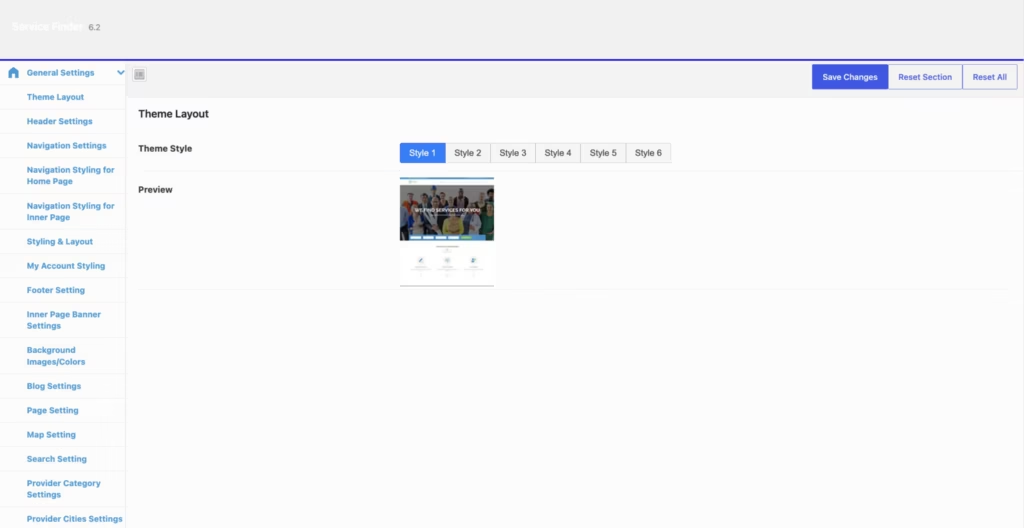
- Configure global theme settings — colors, layout, header/footer, and directory options — through the Redux Framework options panel.
- Install the bundled aone-messaging.zip and aone-sms.zip companion plugins if you need in-dashboard messaging or SMS notifications; these can be added later and are not required for basic setup.
- Set up service provider profiles, staff accounts, booking rules, and invoicing options from the provider-facing dashboard screens once the core theme and plugins are active.
Compatibility and Requirements
| Requirement | Detail |
|---|---|
| Tested environment | WordPress 6.5, PHP 8.4 |
| License | Proprietary (ThemeForest commercial license) |
| Job Board dependency | WP Job Manager (free plugin), required specifically for job posting and application features |
Service Finder was tested on WordPress 6.5 with PHP 8.4.
Because the theme leans on at least ten required companion plugins for its directory, booking, and job board features, keep all of them updated alongside your PHP version — running any of this stack on an end-of-life PHP release is asking for compatibility breakage down the line, regardless of what theme sits on top of it.
Service Finder Pricing
Service Finder is sold as a one-time purchase on ThemeForest, with no free tier or trial version available.
| License | Price | Includes |
|---|---|---|
| Regular License | $49 | Theme files only; most companion plugins are free but some offer paid upgrade tiers purchased separately |
The Regular License is the only price point listed on the product page; ThemeForest does not display a separate Extended License figure for this theme.
That $49 covers the theme itself, but Service Finder depends on around ten additional plugins to deliver its advertised directory, job board, booking, and invoicing features — including WP Job Manager, Elementor, and Paid Memberships Pro.
As with other ThemeForest items, a Regular License includes six months of item support by default, which can be upgraded to twelve months at checkout or extended afterward through Envato’s standard support process.
For the current price and license options, check the official ThemeForest listing before purchasing.
👉 Get Service Finder at the best available price
Alternatives to Service Finder
Service Finder isn’t the only option for building a directory or job board site on WordPress. Depending on whether you need a combined platform or a single-purpose tool, one of these alternatives might fit better.
| Product | Key Difference | Best For | Price Tier |
|---|---|---|---|
| Service Finder | Combines a service directory, job board, booking system, staff management, and invoicing in one theme, but needs at least 10 companion plugins configured to work | Site owners who want directory, job board, and booking tools bundled into a single purchase | Paid |
| Listeo | A well-known directory and listing theme built on a custom framework with booking features, positioned similarly to Service Finder | Agencies and site owners who want a directory-and-booking site without a separate job board focus | Paid |
| Jobify | Built around WP Job Manager and focused specifically on employer/candidate job listings rather than a combined directory | Site owners whose primary goal is a dedicated job board rather than a service directory | Paid |
| Listify | Built on WP Job Manager’s listing engine, geared toward business directories with reviews and search | Site owners who want a directory-first theme with strong search and review features | Paid |
Competitor data is sourced from publicly available information as of 2026 and may have changed.
The right pick depends on scope. If a job board is the main goal, Jobify’s dedicated focus may serve better than adapting Service Finder’s combined feature set, while Listeo and Listify suit those prioritizing directory listings over provider booking and invoicing tools.
Frequently Asked Questions
What plugins does Service Finder require to work properly?
Service Finder needs at least 10 companion plugins to deliver its full feature set, including Comments Ratings, Elementor, Elementor Header & Footer Builder, One Click Demo Import, Paid Memberships Pro, Redux Framework, Service Finder Booking, Service Finder Shortcodes, Service Finder Texonomy, and WP Job Manager. Nextend Social Login and Register, Slider Revolution, Video Conferencing with Zoom, and WP Job Manager – Alerts round out the list depending on which features you enable. Setting up the directory, booking, and job board functions all depends on getting these plugins installed and configured correctly.
Does Service Finder have a free version or trial?
No, there is no free tier or trial version available. The theme is sold as a one-time purchase at $49, so buyers cannot test the directory, job board, or booking features before paying.
How long does Service Finder theme support last?
Support runs for six months from the date of purchase under the standard ThemeForest Regular License, which is the default for this kind of item. Buyers can upgrade to 12 months of support at checkout, or extend the support period later on through Envato Market’s support guidelines.
How do you install the Service Finder theme?
After downloading the package, you first need to extract the ZIP file since it isn’t directly installable in its downloaded form. From there, upload service-finder.zip through Appearance > Themes > Add New > Upload Theme in the WordPress dashboard; bundled companion plugins like aone-messaging.zip and aone-sms.zip can be installed afterward as needed. In practice, this basic setup process takes around five minutes on a standard WordPress install.
Is Service Finder good for building a job board site?
Yes, job board functionality is one of the theme’s core features, letting employers post jobs and candidates or providers apply directly on the site. This depends entirely on WP Job Manager being installed and properly configured, since that plugin powers the job board component rather than the theme alone.
How does Service Finder compare to Listeo?
Both themes target the same directory and booking niche, with Service Finder differentiating itself by folding in a job board on top of directory listings, provider profiles, booking, staff management, and invoicing. The choice largely comes down to whether a site needs the combined directory-plus-job-board approach or a more focused directory/booking tool.
Download & Pricing Options
🔍 Try Before You Buy
Service Finder does not have an official free tier. To evaluate it before purchasing, a GPL-licensed copy is available for sandbox testing purposes only.
👉 Download GPL Evaluation Copy
This is a GPL-licensed redistributed copy for testing only — not an official developer product.
💎 Get Service Finder (Best Available Price)
👉 Check Current Pricing for Service Finder
Pricing and availability may change — use the link above for current rates.