Astra is a free WordPress theme from Brainstorm Force, with a separate Pro addon for advanced functionality. This Astra theme review explains what belongs to the theme, what requires a plugin, and how current paid plans differ from the free starting point.
Quick Verdict
Astra is a practical option for blogs, business sites and WooCommerce stores when you want to choose your own content editor. Start with the free theme and identify the missing functions before purchasing Pro or a toolkit. Broad compatibility is useful, but it does not mean you should install several competing page builders.
- Strengths: a free theme, Customizer-based layout controls, header/footer tools and optional integrations.
- Tradeoffs: separate plugins for Pro and template importing, plan-dependent premium content, and additional configuration for a finished store.
Astra Free, Pro and Site Builder
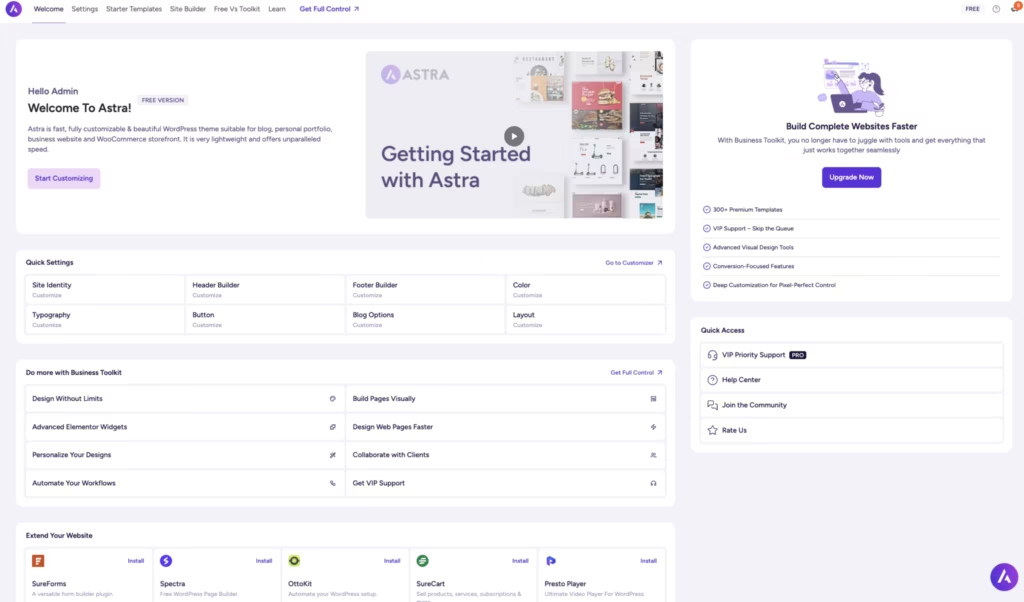
The free Astra theme on WordPress.org can be used without installing Astra Pro. It supplies the base design and customization layer. Page content can be created with the native block editor or a compatible visual builder.
The Astra Site Builder is a premium feature of the Astra Pro Addon plugin. It handles custom headers, footers, hooks, 404 pages and single/archive templates. It should not be confused with the free theme’s standard header/footer controls or described as a complete proprietary page builder bundled into every free installation.
Starter Templates and Page Editors
Starter Templates is a separate plugin. Install it to browse and import designs; it is not automatically present just because the theme is active. The library contains free and premium templates. Choose a design for the editor you intend to use and review its plugin dependencies before import.
The Pro setup guide distinguishes Astra Pro features from premium Starter Templates. Buying the addon alone does not automatically grant the premium template library. Check the exact toolkit entitlement before selecting a premium design.
Astra works with block-editor and visual-builder workflows. Spectra extends WordPress blocks, while Elementor and Beaver Builder provide different editing experiences. Compatibility does not automatically translate an existing layout from one editor into another. Use the smallest set of tools that meets the project requirements.
WooCommerce and Site Scope
Astra provides WooCommerce-oriented styling and options; WooCommerce supplies commerce functionality. A store still needs product data, payment configuration, shipping and tax rules, transactional emails and any specialist extensions. Some advanced theme controls are paid features, so test the free configuration before deciding which upgrade is useful.
For a business or editorial site, check navigation, forms, archives and mobile typography. Starter designs can accelerate layout work, but their example copy and images need to be replaced. Do not treat a successful import as a completed site.
Correct Installation Procedure
- In Appearance → Themes → Add New, search for Astra, install it and activate it.
- If importing a design, install Starter Templates through Plugins → Add New and choose a free or appropriately licensed template.
- Install the selected template’s editor and required plugins; add WooCommerce only for store functionality.
- For Pro, download the Astra Pro Addon plugin from your account and upload it through Plugins → Add New → Upload Plugin. Keep the free Astra theme installed.
- Activate the Pro license and enable the required modules. Configure the theme through its dashboard and Customizer.
- Replace demo content and test the finished pages before launch.
The official Pro installation guide confirms that Pro is a plugin. Uploading an Astra theme ZIP as a plugin, or treating the Pro addon as a theme, is the wrong installation path.
Compatibility and Test Scope
Our earlier setup record used WordPress 6.5 and PHP 8.4. This is a historical installation observation, not a new test of the latest theme, every builder or every WooCommerce extension. Use current supported releases and test your actual combination on staging.
Performance depends on hosting, images, fonts, scripts and plugins as well as the theme. This review does not provide a controlled benchmark or guarantee a particular load time. A short initial setup also excludes content preparation, integrations and final checks.
Astra Pricing
The free theme remains available on WordPress.org. The official pricing page, checked November 5, 2026, displays these US-dollar options:
| Plan | Displayed price | Site allowance / renewal |
|---|---|---|
| Astra Pro addon only | $69/year or $249 promotional lifetime | Up to 3 sites; lifetime reference price $349 |
| Astra Pro + AI | $99 first year | 3 sites; renews at $149/year |
| Essential Toolkit + AI | $199 first year | 10 sites; renews at $299/year |
| Business Toolkit + AI | $279 first year | 1,000 sites; renews at $429/year |
Compare exact included products, AI allowances, hosting terms and renewal prices at checkout. The standalone addon and bundled plans are different offers; do not assume every feature or service has the same lifetime entitlement. Promotional prices can change.
Astra vs GeneratePress and Blocksy
| Option | Approach | What to compare |
|---|---|---|
| Astra | Free theme, optional Pro addon and separate Starter Templates. | Required modules and template entitlements for your chosen editor. |
| GeneratePress | GP Premium Block Elements can create headers, footers and templates with blocks. | Whether that block-based customization workflow suits your team. |
| Blocksy | Base theme plus optional Companion for starter sites and extensions. | The available design controls and the paid plan needed for advanced features. |
GeneratePress should not be reduced to a theme with no visual template tools, and companion plugins should be included in the comparison. Test the same layout and content before making speed or maintenance-cost judgments.
Frequently Asked Questions
Is Astra Pro a separate theme?
No. It is an addon plugin used with the free Astra theme.
Does Astra Pro automatically unlock every premium template?
No. Premium Starter Templates have separate plan entitlements. Verify the selected package.
Can I use Astra without a page builder?
Yes. You can create content using the native WordPress block editor. Additional editors and block plugins are optional.
Is the full Site Builder included in free Astra?
The documented Site Builder is an Astra Pro feature, distinct from the free theme’s standard customization controls.
Download and Evaluate
Download free Astra from WordPress.org or install it through the WordPress theme directory. Evaluate your required layouts first, then compare paid modules and toolkit plans only where they solve a specific need.