
Most WordPress themes force a choice: pay once for a static design, or subscribe to a page builder to get real design flexibility. This Avada theme review looks at a product that tries to skip that trade-off entirely, bundling a drag-and-drop editor, WooCommerce tools, and prebuilt templates into a single license you buy once rather than rent monthly.
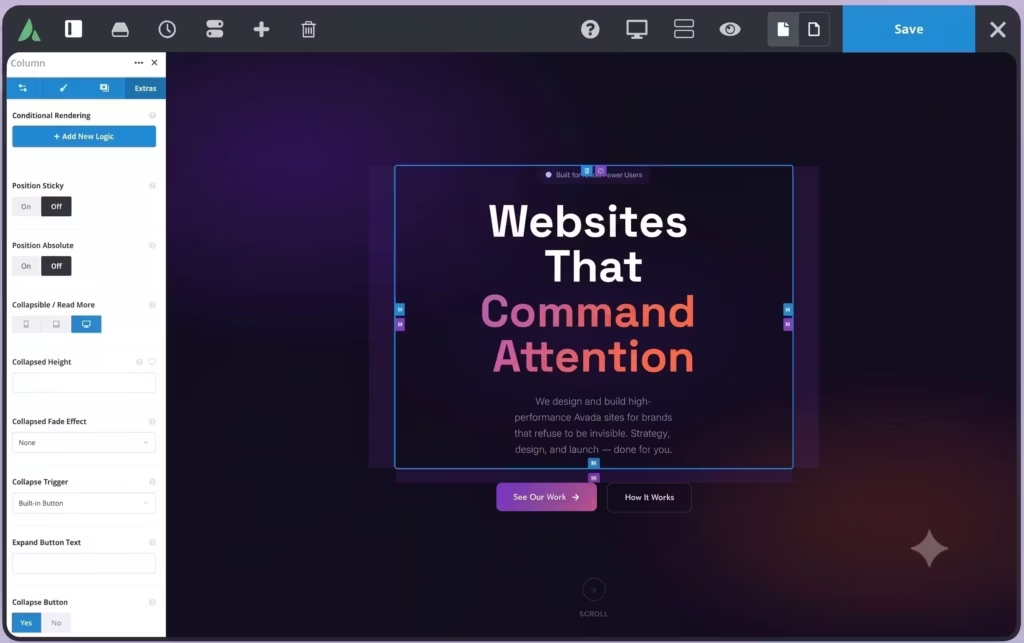
The question is whether that one-time bundle actually holds up against subscription-based rivals like Divi and Elementor, or whether the savings come with hidden costs in setup and support.
Quick Verdict
Avada suits website owners, marketers, and developers who want a single purchase to cover theme, builder, and eCommerce functionality without an ongoing subscription. It’s a reasonable fit for agencies building client sites under the Regular License, though anyone charging end users needs to budget for the steep Extended License jump. Buyers who need a permanently free option, or who want a builder that activates without manual setup, should weigh the alternatives first.
Pros
- Drag-and-drop Avada Builder (formerly Fusion Builder) is included with the theme, not sold separately
- Built-in WooCommerce tools for building and managing eCommerce stores
- Prebuilt website templates help launch sites faster
- One-time Regular License purchase instead of a recurring subscription
- Best-selling status on ThemeForest with over 1 million sales, showing sustained market traction
Cons
- No free tier; the entire product line is premium-only
- Extended License pricing jumps sharply to $2,950 for projects that charge end users
Core Features
Drag-and-Drop Visual Editor (Avada Builder)
The visual editing layer in Avada is officially named the Avada Builder, previously known as Fusion Builder, and it comes bundled with the theme rather than sold as a separate add-on. It handles the actual page-building work — placing elements, arranging columns, and adjusting layout — directly on the front end.
Because the builder is a mandatory companion plugin rather than an optional extra, every Avada site is built on the same editing foundation. That consistency matters for developers handing off projects to clients, since the editing experience won’t vary between installs.
WooCommerce Integration
Avada includes dedicated WooCommerce store-building tools as one of its three core features, and the theme lists compatibility with WooCommerce 7.x.x through 9.x.x. This positions it as a single package for merchants who want theme, builder, and store layout tools without stitching together separate plugins.
For a site owner setting up a shop, this means product pages, catalog layouts, and store elements can be styled through the same drag-and-drop interface used for the rest of the site, rather than switching to a disconnected page builder for commerce pages.
Prebuilt Website Templates
The theme ships with a library of prebuilt website templates, aimed squarely at users who want to launch without designing every page from a blank canvas. This is listed as a core feature alongside the builder and WooCommerce tools, and the developer describes it as a way to get a multipurpose site running quickly.
For beginners and marketers in particular — both named as target users — starting from a template shortcuts the layout decisions that usually stall a first build. Developers handling client work can use the same library as a starting point for faster turnaround, then customize through the Avada Builder from there.
Also included: compatibility with bbPress, Easy Digital Downloads, Events Calendar and Events Calendar Pro, Gravity Forms, and WPML extends Avada’s reach beyond a standalone theme into forums, digital downloads, event listings, forms, and multilingual setups built on top of WPML.
Installation and Setup
- Purchase Avada from ThemeFusion or through the Envato Market/ThemeForest checkout, then download the product files from your account dashboard.
- Log in to the WordPress admin area of the site where Avada will run, and navigate to Appearance, then Themes, then Add New, then Upload Theme to install the main Avada theme package.
- Activate the Avada theme once the upload finishes.
- Install and activate the mandatory companion plugins. This product requires Avada Core AND Avada Builder — both must be installed and activate. These plugins are bundled with the Avada download but are not activated automatically, so you need to install and enable them manually from the WordPress Dashboard before the visual editor becomes available.
- Avada Core handles core theme functions and framework options
- Avada Builder (the drag-and-drop page builder tool, formerly known as Fusion Builder) enables the visual editing interface
- Register a My Avada support account to unlock access to documentation and updates.
- Use the built-in prebuilt website template library to import a starting design, or begin building pages from scratch with the drag-and-drop editor.
- If running a store, install WooCommerce from the plugin directory and connect it to Avada’s WooCommerce store building tools to configure product pages, checkout, and shop layouts.
Compatibility and Requirements
Avada states support for the following WordPress versions and third-party plugins:
| Component | Supported versions |
|---|---|
| WordPress | 6.9.x, 6.8.x, 6.7.x, 6.6.x, 6.5.x, 6.4.x, 6.3.x, 6.2.x, 6.1.x, 6.0.x, 5.9.x, 5.8.x, 5.7.x |
| WooCommerce | 9.x.x, 8.x.x, 7.x.x |
| bbPress | 2.6.x |
| WPML | Compatible |
| Gravity Forms | Compatible |
| Events Calendar | Compatible |
| Events Calendar Pro | Compatible |
| Easy Digital Downloads | Compatible |
This is a broad WordPress version range, covering several major release cycles, so most active WordPress installations should meet the minimum requirement. Site owners running very old WordPress installs should update to a version within this supported range before installing Avada, since running any WordPress theme on an outdated, unsupported core version carries security risk regardless of the theme in question.
Beyond WPML, no other multilingual or translation tools are listed. Buyers with strict hosting or PHP-version constraints should confirm those details directly with ThemeFusion before purchasing.
Avada Pricing
Avada is sold exclusively as a premium product through the Envato/ThemeForest marketplace. There is no free tier, and no free version exists to test the theme before buying. Two license types are available, both structured as one-time purchases rather than subscriptions.
Regular License — $69
This license covers a single end product where end users are not charged for access. It includes the core theme along with the mandatory companion plugins, Avada Core and Avada Builder, which must be installed and activated manually from the WordPress Dashboard after purchase. This is the license most individual site owners, bloggers, and small business builders will need.
Extended License — $2,950
This tier is intended for projects where end users can be charged, such as building a site for a client who will pay to access it or use it commercially. It covers the same single end product scope as the Regular License but permits that broader commercial use case.
Both license totals shown on ThemeForest add a buyer fee on top of the listed item price, so the final checkout amount will be higher than the base $69 or $2,950 figures.
Support is included with either license for six months from the date of purchase and requires setting up a My Avada support account. Extending support coverage to a full 12 months costs an additional fee on top of the license price.
Alternatives to Avada
Avada isn’t the only route to a drag-and-drop WordPress site, and the right pick often comes down to licensing model as much as features. Here’s how it stacks up against three widely-used builder alternatives.
| Product | Key Difference | Best For | Price Tier |
|---|---|---|---|
| Avada | Bundled drag-and-drop builder plus theme in one one-time purchase, with WooCommerce tools included | Buyers wanting a single one-time license covering theme, builder, and store features | Paid |
| Divi | Drag-and-drop WordPress theme and page builder from Elegant Themes, sold via subscription or lifetime membership covering unlimited sites | Users who want one license usable across many sites | Paid |
| Elementor | Popular WordPress page builder plugin with a free tier and paid Pro tiers unlocking theme building and advanced widgets | Users who want to start free and upgrade only if needed | Freemium |
| WPBakery Page Builder | Drag-and-drop page builder plugin frequently bundled with ThemeForest themes, sold as a one-time purchase via CodeCanyon | Users already committed to a WPBakery-based theme ecosystem | Paid |
Competitor data is sourced from publicly available information as of 2026 and may have changed.
None of these are strictly better or worse than Avada across the board. The right choice depends on whether you value a single bundled purchase, a free entry point to test before paying, or a license structure that scales across multiple sites.
Frequently Asked Questions
What is Avada used for?
Avada is a multipurpose WordPress theme and website builder used to build business websites, eCommerce stores, and other sites via a drag-and-drop visual editor. It includes prebuilt website templates and WooCommerce integration, making it suited to beginners, marketers, and professional developers alike.
Does Avada have a free version?
No, Avada has no free tier and is sold entirely as a premium product. Buyers choose between a Regular License at $69 or an Extended License at $2,950, both one-time purchases.
What is the difference between Avada Core and Avada Builder?
Avada Core and Avada Builder are two mandatory companion plugins bundled with the theme purchase, previously known as Fusion Core and Fusion Builder. Avada Builder is the drag-and-drop editor itself, now officially rebranded as the Avada Builder, while Avada Core handles supporting framework functions. Neither activates automatically on install — both must be manually installed and activated through the WordPress Dashboard.
How much does Avada cost?
The Regular License costs $69 for a single end product where end users are not charged, while the Extended License costs $2,950 for projects where end users can be charged. Both are one-time purchases, and the checkout total adds a buyer fee on top of the listed price since Avada is sold through the Envato/ThemeForest marketplace.
Is Avada compatible with WooCommerce?
Yes, Avada includes built-in WooCommerce store-building tools and is compatible with WooCommerce versions 7.x.x through 9.x.x. This makes it usable for building full eCommerce stores alongside its general-purpose website features.
How long does Avada’s included support last?
Included support runs for 6 months from the date of purchase and requires a My Avada support account. Extending coverage to a full 12 months is available for an additional fee.
Is Avada really the best-selling WordPress theme?
Yes, Avada is the #1 all-time best-selling WordPress theme on ThemeForest, having surpassed 1 million sales. This makes it one of the most established theme and builder bundles in the WordPress marketplace.
Why does Avada’s checkout price include an extra fee?
Avada is sold through the Envato/ThemeForest marketplace, which adds a buyer fee on top of the listed item price at checkout. This means the final total for either the Regular or Extended License will be higher than the base listed price of $69 or $2,950.
Download & Pricing Options
Avada on PureGPL
Avada is a premium theme. The PureGPL listing provides its current version and purchase options; check update and support terms before buying.
PureGPL is an independent distributor; its purchase does not include a ThemeForest license or developer support.
💎 Check the PureGPL listing
👉 Check Current Pricing for Avada
Pricing and availability may change — use the link above for current rates.