
Most WordPress site owners eventually hit the same wall: their SEO plugin’s free version stops short of what a growing site actually needs, and the paid upgrade feels mandatory rather than optional. This Rank Math SEO review looks at whether that pattern holds true here, or whether the free tier genuinely covers the essentials. With 15+ modules, built-in schema support, and Google Search Console data pulled straight into the dashboard, Rank Math’s free offering is unusually generous by plugin standards.
The question is whether that generosity is enough to skip a paid SEO plugin entirely, or whether specific gaps push serious site owners toward an upgrade anyway.
Quick Verdict
Rank Math suits WordPress site owners and bloggers who want comprehensive on-page SEO, schema markup, and rank tracking without paying for a separate tool from day one. Anyone running an older hosting stack should weigh the requirements and paid tiers more carefully before committing.
Pros
- Free tier includes 15+ built-in modules, keyword rank tracking, and SEO analysis based on 30 factors
- Built-in Google Search Console integration surfaces search analytics directly inside the WordPress dashboard
- Supports 20+ schema types alongside core Local SEO and WooCommerce SEO settings at no cost
- One-click migration import simplifies switching from another SEO plugin
- Installation and basic setup completed in about 2 minutes during hands-on testing
Cons
- Advanced Local SEO features, such as multi-location support, and deeper WooCommerce analytics require a paid upgrade
- Requires WordPress 6.5 and PHP 8.4, which may rule out sites on older hosting stacks
- The sheer breadth of 15+ modules and schema options can present a learning curve for first-time users
Core Features
Built-In Content Optimization Suggestions
Rank Math scores content directly inside the WordPress editor, checking it against the same 30-factor analysis the plugin uses to grade overall SEO health. Suggestions appear as you write, covering things like keyword placement, content length, and use of headings, rather than requiring a separate report you have to run and interpret later.
For a blogger or site owner without an SEO background, this turns abstract advice into a checklist that updates as the draft changes. It works inside both the Gutenberg block editor and the Classic Editor, so the workflow doesn’t force a switch in how you write posts or pages.
Installation was straightforward: the plugin zip file (seo-by-rank-math.zip) can be uploaded directly through Plugins → Add New Plugin → Upload Plugin without needing to extract it first, so the content optimization suggestions described above are available almost immediately after upload.
Indexability Management
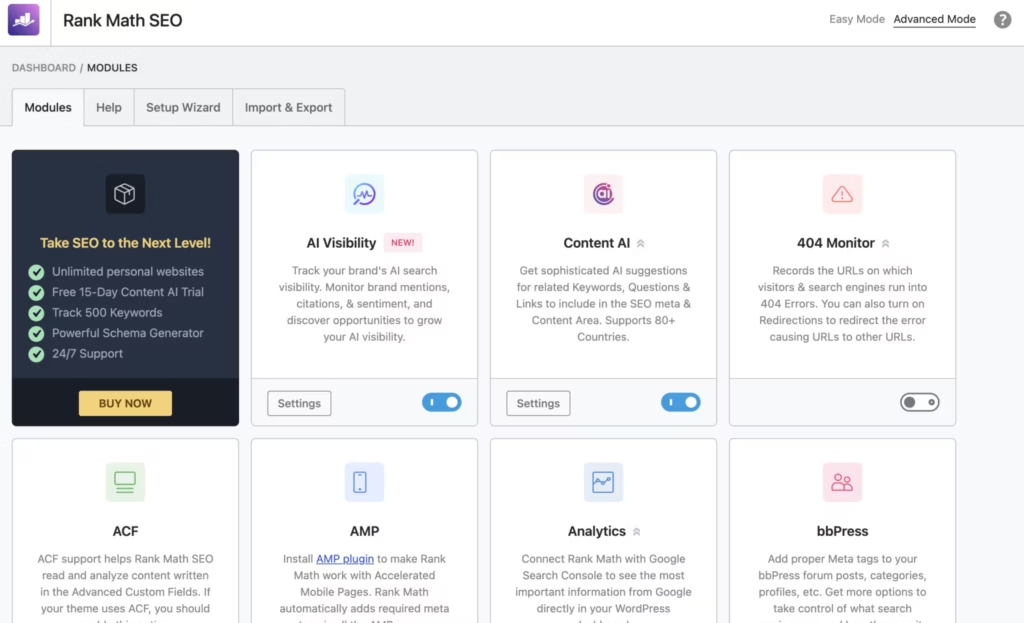
Rank Math gives site owners direct control over which pages, categories, and archives get indexed by search engines, rather than leaving that decision to WordPress defaults. It sits alongside the plugin’s other modules as one of the 15+ built-in tools available without a separate download.
Getting indexability settings wrong is one of the more common ways a site loses search visibility, whether through accidentally noindexed pages or duplicate archive content competing against itself. Managing this from one screen means fewer surprises when checking how a site actually appears in search results.
Structured Data and Schema Markup
Rank Math supports configuration of structured data across 20+ schema types, letting site owners mark up content so search engines can understand it as a specific kind of thing, such as an article, review, or product, rather than generic text. Local SEO markup is included here too, through LocalBusiness schema and related metadata, available in the free version.
Schema is one of the more technical parts of SEO, and having it built into the plugin removes the need for a separate structured data add-on. Sites selling physical products or services can add basic Product Schema through Rank Math’s WooCommerce SEO settings without upgrading to a paid plan.
Keyword Rank Tracking
The free version includes keyword rank tracking, letting site owners monitor how specific target keywords are performing in search results from within the WordPress dashboard. It pairs with a built-in Google Search Console integration that pulls search analytics directly into WordPress, so ranking data and real search performance sit in the same place.
Tracking rankings without leaving the admin area saves the step of cross-referencing a separate analytics tool every time you want to check how a page is doing. For anyone managing content on a regular schedule, that combination of rank data and Search Console traffic in one dashboard is a practical time-saver.
SEO Analysis Based on 30 Factors
Every page and post gets scored against a 30-factor analysis covering technical and content-level SEO elements. It’s the same engine behind the editor’s content suggestions, so the score isn’t a one-off audit result but something that updates as changes are made.
Having a single, consistent score to reference makes it easier to prioritize which pages need attention first, particularly on larger sites where manually auditing every post isn’t realistic.
One-Click Migration Import
Rank Math includes a one-click migration import tool built to pull settings over from another SEO plugin, rather than requiring a manual rebuild of titles, meta descriptions, and schema settings page by page. It’s one of the plugin’s core built-in modules, available in the free tier.
For anyone currently running a competing plugin like Yoast SEO or All in One SEO, this removes a large part of the friction in switching, since existing SEO configuration doesn’t have to be recreated from scratch.
Also included: support for Gutenberg and Classic Editor compatibility across all modules, and access to the full set of 15+ built-in modules without needing separate add-ons for core functionality.
Installation and Setup
- Download the Rank Math SEO plugin package (seo-by-rank-math.zip) from the official Rank Math site or the WordPress.org plugin directory.
- Log in to the WordPress admin dashboard and navigate to Plugins → Add New Plugin → Upload Plugin. The zip file can be uploaded directly, with no need to extract it first before uploading.
- Click Install Now, then Activate Plugin once the upload finishes.
- Launch the built-in setup wizard. This is where indexability settings, sitemap options, and the SEO analysis engine are configured for the site.
- Connect Google Search Console through the plugin’s built-in integration to pull search analytics directly into the WordPress dashboard.
- If migrating from another SEO plugin such as Yoast SEO or All in One SEO, use the one-click migration import tool to bring over existing metadata and settings rather than re-entering them manually.
- Review the Modules section to enable relevant features — Local SEO (LocalBusiness schema and metadata) and WooCommerce SEO settings (basic Product Schema and URL optimizations) are both included in the free version and can be toggled on as needed.
On a WordPress 6.5 install running PHP 8.4, this process — from upload through basic setup — took about two minutes.
Compatibility and Requirements
| Requirement | Detail |
|---|---|
| Editor support | Gutenberg and Classic Editor |
| Schema markup | 20+ schema types supported |
| Content optimization | SEO analysis based on 30 factors |
| Support | 24×7 support |
Keeping both WordPress core and PHP on a currently supported version is worth doing regardless of which SEO plugin is installed, since running an end-of-life PHP release leaves a live site exposed to unpatched security issues.
Rank Math Pricing
Current pricing details are not available in this review. Check the official developer website for up-to-date pricing information.
Rank Math does offer a free version that stands on its own for many WordPress sites. It includes 15+ built-in modules, keyword rank tracking, an SEO analysis engine covering 30 factors, one-click migration import from other SEO plugins, support for 20+ schema types, and full compatibility with both Gutenberg and the Classic Editor. Core Local SEO functionality, through LocalBusiness schema and metadata, and basic WooCommerce SEO settings such as Product Schema and URL optimizations are also part of the free plan.
For readers weighing a purchase against Yoast SEO or All in One SEO, it’s worth checking the Rank Math pricing page directly to compare current plan costs and licensing terms before deciding.
👉 Get Rank Math at the best available price
Alternatives to Rank Math
Rank Math is not the only SEO plugin bundling schema, sitemaps, and content analysis into WordPress. Two long-standing alternatives worth weighing are Yoast SEO and All in One SEO.
| Product | Key Difference | Best For | Price Tier |
|---|---|---|---|
| Rank Math | Bundles schema, rank tracking, and indexability controls into a feature-rich free tier | Site owners who want a wide feature set without paying upfront | Freemium |
| Yoast SEO | Known for readability analysis and a widely-used free tier with a paid Premium upgrade | Bloggers who value content readability guidance alongside SEO | Freemium |
| All in One SEO | An all-in-one toolkit covering sitemaps, schema, and site audits with tiered paid plans | Users wanting audits and schema handled in one dashboard | Freemium |
Competitor data is sourced from publicly available information as of 2026 and may have changed.
The right pick depends on what matters most to your workflow: Rank Math’s free-tier depth, Yoast’s readability focus, or All in One SEO’s audit tools.
Frequently Asked Questions
Is Rank Math free to use?
Yes, Rank Math is a freemium plugin with a fully functional free tier. The free version includes 15+ built-in modules, keyword rank tracking, SEO analysis based on 30 factors, and support for 20+ schema types, with no cost to install or use.
What features are included in Rank Math’s free version?
The free tier covers 15+ built-in modules, a 30-factor SEO analysis engine, keyword rank tracking, and one-click migration import from other SEO plugins. It also works with both the Gutenberg and Classic editors, and supports 20+ schema types out of the box.
Does Rank Math support WooCommerce SEO?
Yes, core WooCommerce SEO settings are included in the free version, including basic Product Schema and URL optimizations. More advanced WooCommerce-related analytics require a paid upgrade.
Does Rank Math integrate with Google Search Console?
Yes, Rank Math has a built-in Google Search Console integration that pulls search analytics directly into the WordPress admin dashboard. This lets site owners review performance data without leaving WordPress.
Is Rank Math better than Yoast SEO?
Rank Math and Yoast SEO are the two most commonly compared WordPress SEO plugins, and the better choice depends on what a site needs. Rank Math’s free tier includes keyword rank tracking, 20+ schema types, and built-in Google Search Console integration, features that Yoast typically reserves for its paid tier, which gives Rank Math’s free version broader functionality out of the box.
How long does it take to set up Rank Math?
In hands-on testing, installation and basic setup took about 2 minutes on WordPress 6.5 with PHP 8.4. The plugin file could be uploaded directly through Plugins → Add New Plugin → Upload Plugin without needing to extract the zip first.
Does Rank Math support schema markup?
Yes, Rank Math supports 20+ schema types as part of its structured data configuration tools. This includes LocalBusiness schema for local SEO and basic Product Schema for WooCommerce stores, both available in the free version.
Download & Pricing Options
🆓 Free Version
👉 Download the Free Version of Rank Math
💎 Get Rank Math (Best Available Price)
👉 Check Current Pricing for Rank Math
Pricing and availability may change — use the link above for current rates.