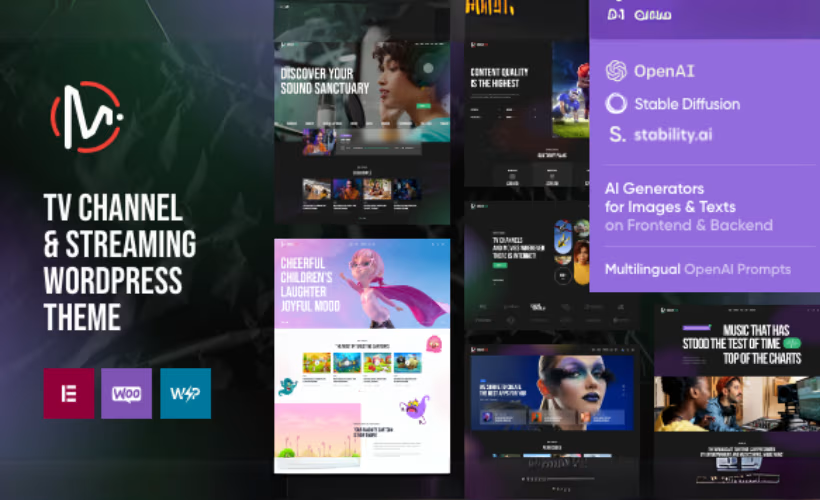
Building a professional TV channel or streaming site on WordPress has always meant stitching together generic themes with media-specific plugins and hoping the result looks intentional. This MediaFlex theme review examines a purpose-built alternative: eight homepage layouts designed specifically for broadcasters, streaming services, podcasters, and entertainment portals, all backed by Elementor’s drag-and-drop editor.
Whether $69 buys enough to justify skipping a more flexible multipurpose theme is the real question here.
Quick Verdict
MediaFlex is a strong fit for TV channel operators, streaming service owners, and media entrepreneurs who want a niche-specific starting point without hiring a developer. Buyers who need a white-label solution for client resale, or who want to evaluate a theme hands-on before committing, should look elsewhere.
Pros
- Eight pre-built homepage layouts built around TV, streaming, and entertainment use cases
- Full Elementor and Elementor Pro compatibility puts layout control in non-developer hands
- WooCommerce support enables direct sales of media products or subscriptions
- WPML compatibility makes multilingual builds straightforward for international audiences
- Child theme ships in the download package, so safe customization is available from day one
Cons
- No free trial or demo version exists, so buyers cannot evaluate the theme before purchasing
- The Extended License price is steep enough to rule it out for most smaller commercial projects
Core Features
Eight Homepage Layouts
MediaFlex ships with eight pre-built homepage layouts, each designed around the visual conventions of TV channels, streaming services, and entertainment publishing. Rather than adapting a general-purpose layout to a media context, these templates start from that context — which means the grid structures, hero sections, and content hierarchies are already oriented toward broadcast and streaming audiences.
For site owners who need to launch quickly, having eight distinct starting points reduces the design work to selection and customization rather than construction from scratch. A podcast operator and a news channel publisher can each find a layout that fits their format without forcing either into a template built for the other.
Elementor and Elementor Pro Compatibility
The theme works with both Elementor and Elementor Pro, giving editors drag-and-drop control over every page without touching code. This compatibility extends to the full Elementor Pro widget library, so advanced elements like forms, sliders, and dynamic content modules are available alongside the theme’s own design choices.
Non-developers can modify layouts, swap content blocks, and build new inner pages entirely within the visual editor. Teams that have already invested in Elementor Pro get full use of their existing toolset.
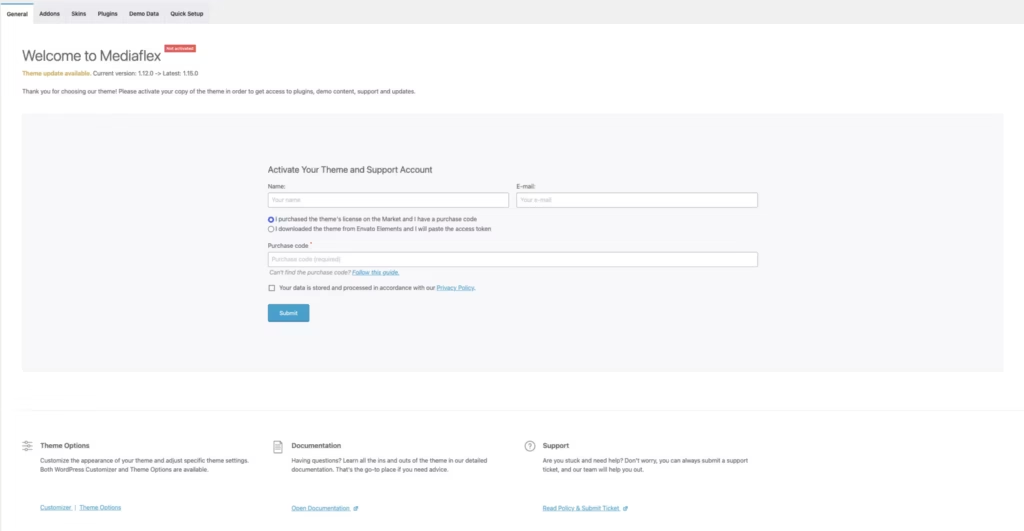
Once installed, the theme surfaces a recommended plugin list that includes Elementor alongside Advanced Popups, Contact Form 7, Instagram Feed, MailChimp for WP, TI WooCommerce Wishlist, and WooCommerce — so the full companion ecosystem is presented in one place rather than discovered piecemeal.
WooCommerce Integration
MediaFlex is compatible with WooCommerce versions 5.x.x through 8.x.x, covering a wide span of the plugin’s release history. That range matters for entertainment businesses running established stores that want to adopt a new theme without forcing a WooCommerce upgrade at the same time.
Selling media products, merchandise, or subscription access alongside editorial content becomes a single-site operation rather than a split between a storefront and a separate content hub.
WPML Compatibility
MediaFlex supports WPML, the widely-used multilingual plugin for WordPress. For broadcasters or streaming services targeting audiences across multiple language markets, the site’s structure and content can be translated and managed within a single WordPress installation.
International media operations — a TV channel with regional feeds, or a streaming service covering multiple countries — can build one site that serves all of them rather than maintaining separate installs per language.
Cross-Browser Support
MediaFlex is tested and confirmed compatible with Firefox, Safari, Opera, Chrome, and Edge. Covering all five major desktop browsers means visitors arrive at a consistent experience regardless of their browser preference, which matters for entertainment sites where visual presentation is central to the brand.
This is particularly relevant for streaming and TV channel sites, where layout inconsistencies across browsers can undermine the polished, broadcast-quality appearance these audiences expect.
Child Theme Included
The download package contains a ready-made child theme alongside the parent theme files. Customizations made in the child theme survive parent theme updates without being overwritten, protecting any design or code changes made after installation.
For developers or agencies building on behalf of clients, starting with the child theme from day one is standard practice — and having it bundled removes the step of generating one manually before work begins.
The downloaded package extracts to four items: the mediaflex.zip theme file, the mediaflex-child.zip child theme, a Licensing folder, and a documentation.html file. Everything needed to get started — including the child theme and offline documentation — is contained in that single download.
Installation and Setup
- Purchase MediaFlex from ThemeForest and download the package. Inside you will find the main
mediaflex.ziptheme file, amediaflex-child.zipchild theme, a Licensing folder, and adocumentation.htmlfile.
- Log in to your WordPress dashboard, navigate to Appearance → Themes → Add New → Upload Theme, and upload
mediaflex.zip. Click Install Now, then Activate.
- If you plan to customize the theme without losing changes on future updates, upload and activate
mediaflex-child.zipusing the same process, then switch your active theme to the child theme.
- After activation, WordPress will prompt you to install recommended plugins. Install and activate each of the following — all seven are recommended by the theme:
- Advanced Popups
- Contact Form 7
- Elementor
- Instagram Feed
- MailChimp for WP
- TI WooCommerce Wishlist
- WooCommerce
- If you intend to build or edit pages visually, install Elementor Pro separately. MediaFlex is compatible with both the free Elementor plugin and Elementor Pro.
- For multilingual sites, install and configure WPML after the theme and companion plugins are active.
- Open
documentation.htmlfrom the downloaded package for configuration guidance covering theme options, homepage layout selection, and any additional setup steps specific to your site type.
Compatibility and Requirements
| Requirement | Details |
|---|---|
| WordPress | 4.9.x – 6.9.x |
| WooCommerce | 5.x.x – 8.x.x |
| Page Builder | Elementor, Elementor Pro |
| Multilingual | WPML |
| Browsers | Firefox, Safari, Opera, Chrome, Edge |
MediaFlex covers a wide WordPress version range, so it will run on installations from older managed hosting environments through the current stable WordPress release. The WooCommerce compatibility window spans four major release series, giving store operators reasonable flexibility before an upgrade becomes necessary.
A child theme is included in the download package, making it straightforward to apply customizations that survive theme updates.
MediaFlex Pricing
MediaFlex is a premium theme with no free version available. It is sold exclusively through ThemeForest under two license types, both covering a single site.
Regular License — $69
The standard option for most buyers. This covers one website that you own or operate directly, and includes six months of support from axiomthemes.
Extended License — $1,999
Required when the theme is used in a product sold to end users — for example, a site built for a paying client who receives the finished product. Like the Regular License, it covers one site and includes six months of support.
Support Extension — Optional
Both licenses include six months of support from the date of purchase. Support can be extended to twelve months by purchasing the optional support extension. ThemeForest currently displays both $21.38 and $49.88 in connection with the support extension, but the listing does not clearly identify which is the regular price and which is the promotional price. Check the MediaFlex product page for the latest pricing before purchasing.
For the current rate on any tier, check the MediaFlex listing on ThemeForest directly.
👉 Get MediaFlex at the best available price
Alternatives to MediaFlex
Several paid WordPress themes compete in the media, news, and entertainment space, though few match MediaFlex’s specific focus on TV channels and streaming services out of the box.
| Product | Key Difference | Best For | Price Tier |
|---|---|---|---|
| MediaFlex | Elementor-based theme built specifically for TV channels, streaming services, and entertainment businesses with eight pre-built homepage layouts | TV channel operators, streaming services, podcast and radio sites | Paid |
| Newspaper | Built around the tagDiv Composer page builder and optimized for editorial publishing and ad revenue | News publishers and content-heavy editorial sites monetizing through advertising | Paid |
| Jnews | Extensive layout options and built-in AMP support targeting editorial and news publishers | News and magazine sites requiring broad layout flexibility and AMP compatibility | Paid |
| Rehub | Deep WooCommerce integration and affiliate marketing tools rather than a media or streaming focus | Affiliate marketers and price comparison sites with heavy WooCommerce requirements | Paid |
Competitor details reflect publicly available information and may have changed.
The right choice depends heavily on your site’s primary purpose. MediaFlex suits operators building a dedicated streaming or broadcast presence; Newspaper and Jnews are stronger fits for editorial-first publishers; Rehub serves affiliate and ecommerce-driven projects where media presentation is secondary.
Frequently Asked Questions
What is MediaFlex WordPress theme used for?
MediaFlex is built for TV channels, streaming services, and entertainment businesses that need a media-focused website. It suits a range of publishing formats — video streaming platforms, music and radio stations, news portals, and podcast sites. WooCommerce compatibility also makes it viable for selling media-related products directly from the same site.
How much does MediaFlex theme cost?
The Regular License costs $69 and covers a single site. An Extended License, intended for products sold to end users, is priced at $1,999. Both licenses include six months of support from axiomthemes.
Does MediaFlex work with Elementor?
Yes, MediaFlex is compatible with both Elementor and Elementor Pro. The theme’s page building and layout customization rely on Elementor, so the plugin needs to be installed and maintained alongside the theme.
Is MediaFlex compatible with WooCommerce?
MediaFlex supports WooCommerce versions 5.x.x through 8.x.x, allowing store functionality to be added to a media or entertainment site. This makes it possible to sell products, memberships, or other media-related items without switching themes.
How long does MediaFlex theme support last?
Support runs for six months from the date of purchase. It can be extended to twelve months by purchasing the optional support extension. ThemeForest currently displays both $21.38 and $49.88 for the support extension, but the listing does not clearly indicate which is the regular price and which is the promotional price. Check the product page for the latest pricing before purchasing.
Does MediaFlex include a child theme?
Yes, a child theme is included in the download package alongside the main theme file and documentation. Having it available from the start means customizations can be made safely without modifying core theme files.
What WordPress versions does MediaFlex support?
MediaFlex is compatible with WordPress versions 4.9.x through 6.9.x. The theme also supports current major browsers including Chrome, Firefox, Safari, Opera, and Edge.
Download & Pricing Options
🔍 Try Before You Buy
MediaFlex does not have an official free tier. To evaluate it before purchasing, a GPL-licensed copy is available for sandbox testing purposes only.
👉 Download GPL Evaluation Copy
This is a GPL-licensed redistributed copy for testing only — not an official developer product.
💎 Get MediaFlex (Best Available Price)
👉 Check Current Pricing for MediaFlex
Pricing and availability may change — use the link above for current rates.