WordPress performance optimization has a complexity problem. Most caching plugins either oversimplify the process or bury site owners in settings they don’t understand — and the wrong configuration can slow a site down rather than speed it up. This W3 Total Cache review examines whether its unusually deep feature set is a strength worth mastering or a liability that pushes most users toward simpler alternatives.

The real question is whether the free tier’s breadth and the Pro upgrade’s added value justify the learning curve when polished competitors exist.
Quick Verdict
W3 Total Cache is the right choice for developers and technically confident site owners who want granular control over every layer of WordPress caching without paying for a premium plugin. Those who want a fast, low-configuration setup will find the complexity frustrating and should look at alternatives.
Pros
- Generous free tier covers page cache, minification, CDN integration, object cache, database cache, and more
- Works across shared hosting and dedicated or clustered server environments
- Official free plugin available through WordPress.org, with a paid upgrade for additional tools
- Multi-site license tiers include a free Plugin Configuration service, reducing setup burden
- 30-day money-back guarantee on all Pro plans
Cons
- Configuration depth is substantially higher than competitors like WP Rocket, requiring real technical knowledge to get right
Core Features
Page Cache
Page cache is the foundation of what W3 Total Cache does: it stores fully rendered HTML versions of WordPress pages so eligible cache hits can avoid rebuilding the page; the work bypassed depends on the selected caching method. The plugin extends this with automatic page cache priming, which pre-generates cached versions of pages before a visitor requests them — rather than waiting for the first real visitor to trigger the cache.
Preview mode lets you test a new cache configuration against your live site before committing to it. That’s a practical safeguard when you’re adjusting cache rules on a site that can’t afford downtime or visual regressions.
Minify (HTML, CSS, and JavaScript)
Minification strips whitespace, comments, and redundant characters from HTML, CSS, and JavaScript files, reducing their transfer size. W3 Total Cache handles all three file types within a single plugin, so there’s no need to layer a separate minification tool on top of a caching solution.
The practical effect is fewer bytes sent over the wire on every page load. For sites carrying multiple third-party scripts or large stylesheets, this reduction compounds across every visitor session.
Database Cache and Object Cache
Database cache stores the results of MySQL queries so repeated identical queries return from cache rather than hitting the database again. Object cache works at the WordPress object layer, persisting the results of expensive PHP operations — such as complex WP_Query calls — across requests.
These caches are not automatic improvements on every host. Disk-backed caching can introduce extra I/O, while persistent memory caching depends on server support. Measure the effect of each module and check the host’s existing cache configuration rather than enabling both by default.
Browser Cache
Browser cache instructs visitors’ browsers to store static assets locally — images, scripts, stylesheets — so subsequent page views load those files from the user’s own machine rather than re-downloading them. W3 Total Cache manages the HTTP headers that control this behavior.
Valid cached assets can reduce repeat transfers; measure the effect with your actual cache lifetimes and page content.
CDN Integration
Static-asset CDN integration is available in the free plugin. It connects your site to a separately configured CDN; it does not include a free CDN subscription. Full Site Delivery of HTML is a separate Pro capability, rather than the same feature as rewriting static-asset URLs.
For sites with a geographically distributed audience, offloading static assets to a CDN reduces latency and takes bandwidth pressure off the origin server.
HTTP/2 Push is not a current Chrome optimisation
The vendor feature table still mentions HTTP/2 Push, but Chrome disabled server push from version 106. Do not enable it expecting a benefit for current Chromium visitors. Resource preload and Early Hints are different mechanisms and should also be tested, not applied indiscriminately.
Lazy Load Images and WebP Conversion
Lazy loading defers the loading of off-screen images until the user scrolls toward them, cutting the initial page weight on image-heavy pages. WebP conversion automatically serves images in the WebP format to browsers that support it, which typically produces smaller file sizes than JPEG or PNG equivalents.
On the free tier, WebP conversion is rate-limited to 10 conversions per hour and 100 per month — sites with large image libraries will hit that ceiling quickly.
AMP and Reverse Proxy Support
W3 Total Cache includes AMP support, allowing its caching rules to apply correctly to Accelerated Mobile Pages without breaking the AMP document structure. Reverse proxy support lets the plugin work within server architectures where a proxy layer sits in front of WordPress — a common setup on dedicated or clustered hosting environments.
Both features address infrastructure scenarios that simpler caching plugins often ignore, which is part of why W3 Total Cache targets a range from shared hosting to dedicated server clusters.
Script and Emoji Controls
Three lightweight but frequently useful toggles ship alongside the main caching features: disabling the WordPress emoji script, disabling the wp-embed script, and disabling jquery-migrate on the front end. Each can remove an asset that some sites do not need. Check dependencies before disabling jquery-migrate or other scripts; older extensions may rely on them.
Individually, the savings are small. Across a high-traffic site, eliminating unnecessary HTTP requests on every page load adds up — and doing it through a single plugin avoids the need for custom code in functions.php.
PageSpeed Tests and Dashboard Widget
A PageSpeed widget sits in the WordPress dashboard, surfacing performance scores without requiring a separate browser tab or third-party tool. The plugin also includes PageSpeed testing functionality for running assessments directly from within WordPress.
Having performance data visible inside the admin panel makes it easier to spot regressions after a theme update or new plugin install, rather than discovering a slowdown through user complaints.
Developer and Multisite Tools
WP-CLI support means cache operations — flushing, priming, configuring — can be scripted and run from the command line, which matters for developers managing deployments or automating maintenance tasks. Import and export of settings allows a working configuration to be transferred between installations without manual re-entry.
File locking, debug tools, and user agent, referrer, and cookie groups round out the toolkit for more complex setups. The grouping controls let you serve different cached versions to different visitor segments — useful for sites that vary content by device type, traffic source, or session state. WPML support and Genesis Framework optimizations address two common WordPress stack combinations where generic caching configurations can cause conflicts.
Installation and Setup
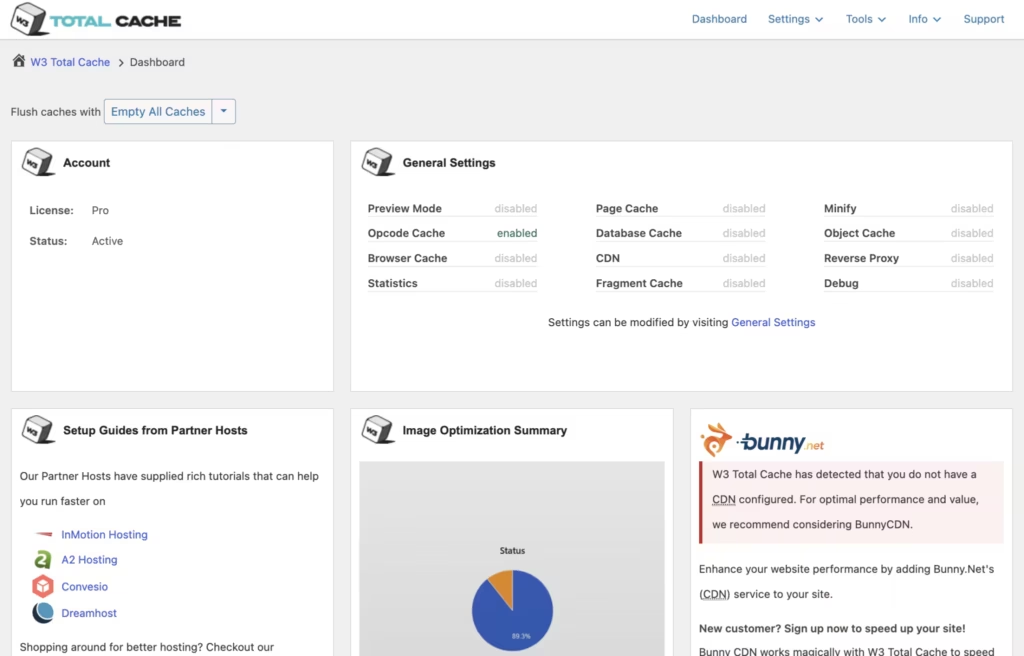
Install the free plugin from its official WordPress.org listing, or search for W3 Total Cache by BoldGrid under Plugins → Add New. Back up the site first and review existing host-level caching. Avoid running overlapping page-cache plugins.
- Install and activate the plugin.
- Navigate to Performance in the left-hand admin menu — this is where all W3 Total Cache settings live.
- Work through the setup wizard or configure each caching module manually: Page Cache, Minify, Database Cache, Object Cache, and Browser Cache each have their own settings tab.
- Enable the caching methods appropriate for your hosting environment. Not every method suits every server configuration, so enable one module at a time and verify site behavior before moving to the next.
- Use the built-in Preview mode to test configuration changes before applying them site-wide.
- Check cart, checkout, account pages, logged-in content, forms and mobile navigation. Once satisfied, use Import/Export Settings to save a configuration backup. Do not copy host-specific settings blindly between installations.
Pro license holders with 5-site or 10-site plans can take advantage of the Plugin Configuration service included with those tiers, which covers the configuration process on your behalf.
Compatibility and Requirements
W3 Total Cache is designed to work across a wide range of WordPress hosting environments, from shared hosting to dedicated server clusters. The plugin explicitly supports both ends of that spectrum, making it one of the more broadly applicable caching solutions available.
WPML and the Genesis Framework are explicitly supported, with dedicated optimization handling built into the plugin for both. AMP support is also included, as is WP-CLI for command-line management — relevant for developers and agencies handling deployments programmatically.
WordPress Multisite is supported and counts as a single installation for licensing purposes, which is a practical advantage for agencies or developers running network installs.
W3 Total Cache Pricing
W3 Total Cache is available as a freemium plugin. The free version is genuinely capable — it includes page caching, minification of HTML, CSS, and JavaScript, database and object caching, browser caching, CDN asset integration, lazy load images, WebP image conversion, AMP support, WP-CLI support, and a range of developer tools including debug utilities, import/export settings, and preview mode. For many sites, the free tier will be sufficient.
WebP image conversion on the free plan is rate-limited to 10 conversions per hour and 100 per month. Sites with large image libraries will hit that ceiling quickly and may want to consider the Pro license.
Pro Pricing Tiers
| Plan | Price | Sites Covered |
|---|---|---|
| 1 Site License | $99/year | 1 |
| 5 Site Licenses | $350/year | 5 |
| 10 Site Licenses | $500/year | 10 |
| Bulk Licenses | Custom | Custom |
The 5-site plan works out to $70 per license and includes one free Plugin Configuration service, valued at $125. The 10-site plan drops to $50 per license and includes two free Plugin Configurations (valued at $250 total). Agencies or developers managing larger portfolios can contact BoldGrid directly for bulk pricing.
Each WordPress installation requires its own unique license. WordPress Multisite counts as a single installation regardless of how many subsites it contains. The Plugin Configuration service is bundled only with the 5-site and 10-site tiers, not with the single-site license.
A 30-day money-back guarantee applies to all Pro plans. Prices were checked on 6 November 2026 against BoldGrid’s official plans. Recheck current rates and terms before purchase. Pro adds tools including script delay, REST API caching and Full Site Delivery; buy it for a specific need rather than assuming that paying alone improves performance.
👉 View the PureGPL W3 Total Cache listing
Alternatives to W3 Total Cache
| Plugin | Reason to compare | Important distinction |
|---|---|---|
| WP Rocket | Paid caching and optimisation with automatic defaults. | Consider it if you prefer fewer initial decisions; still verify dynamic pages and script behaviour. |
| WP Super Cache | Free static HTML page caching. | A narrower starting point when you primarily need page caching rather than a broad optimisation suite. |
| LiteSpeed Cache | Free plugin with server-cache integration and optimisation tools. | Its cache features require compatible LiteSpeed infrastructure or QUIC.cloud; general optimisation features can work on other servers. CDN services have their own terms. |
The right choice depends on your host and workload. Compare cold and warm requests under the same conditions, and check functionality alongside timings. This review does not establish a fastest plugin through a fresh benchmark.
Frequently Asked Questions
Is W3 Total Cache free?
Yes, W3 Total Cache has a free tier that covers a wide range of caching and performance features. The free version includes page cache, minification of HTML, CSS, and JavaScript, database cache, object cache, browser cache, CDN asset caching, lazy load images, WebP image conversion, and more. WebP conversions on the free tier are rate-limited to 10 per hour and 100 per month.
How much does W3 Total Cache Pro cost?
A single-site Pro license costs $99 per year. A 5-site license is $350 per year ($70 per site) and includes one free Plugin Configuration service, while a 10-site license is $500 per year ($50 per site) and includes two free Plugin Configurations. Custom bulk pricing is available for larger license needs.
W3 Total Cache vs WP Rocket: which is better?
The right choice depends on your priorities. W3 Total Cache offers a comprehensive free tier and supports both shared hosting and dedicated or clustered server environments, making it a strong option for technically confident users who want granular control without paying upfront. WP Rocket is a premium-only plugin known for a simpler setup experience, which may suit site owners who prefer a faster configuration process over deep customization.
Does W3 Total Cache work on shared hosting?
Yes, W3 Total Cache is designed to work on shared hosting environments. It also supports dedicated servers and clustered server setups, so it scales from entry-level hosting to more complex infrastructure.
Does W3 Total Cache support CDN integration?
Yes, CDN integration for static asset caching is included in both the free and Pro versions. Static files can be served through a CDN rather than directly from your origin server.
Is there a money-back guarantee for W3 Total Cache Pro?
All Pro plans include a 30-day money-back guarantee.
Download & Pricing Options
🆓 Free Version
👉 Download official W3 Total Cache Free
💎 Get W3 Total Cache (PureGPL Listing)
👉 Check Current Pricing for W3 Total Cache
Pricing and availability may change — use the link above for current rates.
Third-party distribution terms are separate from a direct BoldGrid Pro purchase. Do not assume a package includes vendor account access, licence services, configuration assistance or direct support.