
blog-logo
  • Home
  • WP Plugins
    WP PluginsShow More
    SEOPress Pro Review 2026: Features, Pricing and Verdict
    21 Min Read
    Most WordPress form plugins stop at the point of submission: the entry lands in the database, an email goes out, and everything after that is your problem. This Formidable Forms Pro review looks at a builder that treats submitted data as something you can act on — collecting payments, triggering automated workflows, and publishing entries back to the front end through Views. For anyone who has outgrown a basic contact form and started sketching directories, calculators, or client-facing dashboards, that distinction matters more than field types do. The question is whether an annual license justifies itself for site owners whose forms need to do real work after the submit button. Quick Verdict Formidable Forms suits freelancers, agencies, and business owners building data-driven forms — payment flows, application systems, front-end listings — on WordPress. Anyone who only needs a styled contact form will find the license hard to justify, and the plugin has no use outside WordPress. Pros Views display submitted entry data on the front end, turning forms into simple web applications rather than one-way capture points Payment collection through Stripe, PayPal, Square, and Authorize.net covers most common checkout setups CRM and automation integrations include Salesforce, Zapier, Google Sheets, HubSpot, and Mailchimp Business and Elite licenses cover unlimited sites, including client sites — practical for agencies juggling multiple builds Over 100 form templates give you a starting point instead of a blank canvas Layered spam protection built in via reCAPTCHA, honeypot, and Akismet Pro zip uploads directly through the WordPress plugin uploader with no extraction step Cons User registration is limited to certain plans and requires a separate add-on rather than working out of the box Single-site and three-site limits on Basic and Plus push multi-site owners toward the pricier Business or Elite tiers 👉 See Formidable Forms pricing Core Features The formidable-pro-6.34.zip file installs directly in WordPress via Plugins → Add New Plugin → Upload Plugin, without extracting it first — a small detail, but one that saves a step for anyone used to unzipping archives before upload. Views: Displaying Submitted Entries on the Front End Views are the feature that separates Formidable Forms from the average contact form plugin. Instead of entry data sitting in the WordPress admin waiting for someone to export it, Views pull submitted entries back out and render them on the front end — as directories, listings, tables, profile pages, or whatever layout the data suits. That changes what a form is for. A submission stops being a message you reply to and becomes content that populates a page. Job boards, member directories, event calendars, review listings, and internal dashboards all become achievable without a separate directory plugin or custom post type work. For anyone considering the Pro license specifically, this is usually the reason. Views are what make the "front-end web applications" claim more than marketing language. Form Builder for Simple Forms and Full Applications The builder handles the ordinary case — a contact form, a quote request, a newsletter signup — and then keeps going. The same interface builds multi-step forms and calculation-driven applications, so you are not learning a second tool when a project grows past a name-and-email field. The practical benefit is consistency across a portfolio. A freelancer building a five-field contact form on one site and a mortgage calculator on another works inside the same builder both times, which shortens the second build considerably. Payment Collection Payments run through Stripe, PayPal, Square, and Authorize.net. Having four processors available matters more than it sounds: merchant account availability varies by country and by business type, and being locked to a single gateway is a common reason form plugins get replaced mid-project. This covers the transactions that do not belong in a full store — donations, deposits, booking fees, application charges, invoice payments. Rather than installing WooCommerce to take a single fee, you attach payment collection to a form you were building anyway. A WooCommerce integration is available separately for sites that do run a store. Workflow Automation Automation ties what happens after submission to conditions you set, so form data triggers actions instead of just landing in a database table. Combined with Views, it is the second half of the application-building story — data comes in, actions fire, results display. For a business owner, this is the difference between checking an inbox and having submissions route themselves. Approval steps, conditional notifications, and follow-up actions run without anyone opening the WordPress dashboard. Integrations With CRMs, Marketing Tools, and Automation Platforms The integration list covers Salesforce, HubSpot, Mailchimp, Zapier, Google Sheets, ChatGPT, and Webhooks alongside the payment gateways, plus WooCommerce and ACF on the WordPress side. Two of those deserve attention. Zapier and Webhooks together mean that anything not on the native list is still reachable, and Webhooks in particular gives developers a direct route into custom endpoints. Google Sheets suits teams who want submissions in a spreadsheet their non-technical colleagues already use, without granting WordPress admin access. 100+ Form Templates The template library ships with over 100 prebuilt forms. For agencies handling repetitive client requests — contact, quote, registration, application, feedback — starting from a template and editing fields is faster than building from an empty canvas each time. Templates also serve as a reference for how the builder handles more complex structures, which helps when you are moving from simple forms toward calculation or multi-page setups. Layered Spam Protection Three spam defenses are built into the plugin's settings: reCAPTCHA, a honeypot field, and Akismet. They work at different points — the honeypot catches naive bots silently, reCAPTCHA challenges suspicious sessions, and Akismet checks submission content against a shared spam database. Because all three are configured inside Formidable Forms rather than bolted on through separate plugins, you can layer them according to how aggressive a given form needs to be. A newsletter signup and a public job application do not need the same level of friction. User Registration Forms can create WordPress user accounts, which turns a signup form into the front door of a membership area, client portal, or community site. Registration is not part of the base install — it depends on the user registration add-on and is limited to certain plans, so confirm plan eligibility before committing to a build that relies on it. Paired with Views, registration supports a common pattern: users sign up, submit entries, and see their own submissions displayed back to them on the front end. Installation and Setup Setup is quick. Tested on WordPress 6.5 with PHP 8.4, installation and basic configuration took about two minutes from upload to a working form. Install the free Formidable Forms plugin first. The free core plugin is distributed through the WordPress.org plugin directory. Search for it under Plugins → Add New Plugin, install it, and activate it. The Pro plugin is an extension, not a replacement — the free core plugin must remain installed and active for Pro to function. Deactivating it will break the Pro features. Purchase a Pro license. Four tiers are sold: Basic, Plus, Business, and Elite. Download the Pro plugin ZIP from your account after purchase. Upload the Pro ZIP through WordPress. Go to Plugins → Add New Plugin → Upload Plugin, choose the ZIP file, and install it. The archive installs directly — there is no need to extract it or dig for a nested plugin folder inside it first. Activate the Pro plugin. Both plugins now appear in your plugin list, and the Pro features become available inside the Formidable Forms admin screens. Build your first form, starting from a template rather than a blank canvas. Turn on spam protection. reCAPTCHA, honeypot, and Akismet are all supported and configured through the plugin's settings. Connect the services you need. Payment processors and third-party tools are set up per form or through the global settings, depending on the integration. Add the user registration add-on if your plan includes it. The vendor maintains a Docs & Support area and a community resource for anything beyond the basics. Compatibility and Requirements Requirement Detail WordPress version 6.3 or higher PHP version 7.4 or higher License GPL The vendor is blunt about the platform requirement: "Formidable Forms is a WordPress Plugin. In order to use Formidable Forms, you must have a WordPress site. That's all." There is no standalone, hosted, or non-WordPress version — if your site runs on Squarespace, Webflow, or a static generator, this is not the tool for you. For a live, public-facing site, pair a currently supported PHP version with the current stable WordPress release rather than sitting at the stated minimums. Unsupported PHP branches stop receiving security patches, and a form plugin handling payments and personal data is the last place to accept that risk. On the integration side, the plugin connects with Stripe, PayPal, Square, and Authorize.net for payments, plus Salesforce, HubSpot, Mailchimp, Zapier, ChatGPT, Google Sheets, Webhooks, WooCommerce, and ACF. Formidable Forms Pricing Formidable Forms runs on a freemium model. The free core plugin, distributed through the WordPress.org plugin directory and often referred to as Formidable Forms Lite, is a drag-and-drop form builder used on hundreds of thousands of active sites. It handles standard form building on its own, and it also acts as the foundation for the paid product. The Pro version is sold as an annual license across four tiers. Plan Price Sites Basic $79/year 1 site Plus $199/year Up to 3 sites Business $399/year Unlimited sites, including client sites Elite $599/year Unlimited sites, including client sites All four tiers are currently listed at 50% off those regular rates — Basic at $39.50/year, Plus at $99.50/year, Business at $199.50/year, and Elite at $299.50/year. Discounting at this depth is a familiar pattern in the WordPress form builder market, so treat the promotional figure as the price you are likely to see rather than the price the plugin is nominally worth. Paid plans are GPL licensed and include one year of updates and support. A 14-day money-back guarantee applies to purchases. For agencies and freelancers, the Business and Elite tiers are the ones worth weighing. Both cover unlimited sites, client sites included, which removes the per-project license math that eats into small builds. Alternatively, a license can be purchased per client site if you would rather bill each project separately. Formidable Forms also runs an affiliate program paying 20% commission. Feature availability differs by tier. Check the current plan comparison at formidableforms.com before buying so the tier you choose covers the integrations and add-ons your build actually needs. 👉 Get Formidable Forms at the best available price Alternatives to Formidable Forms Formidable Forms sits at the heavier end of the WordPress form builder market, where the job extends past capturing a message into payments, automation, and displaying submitted entries on the front end through Views. The alternatives below are the names most site owners weigh against it, and they differ mainly in how far past basic form capture they go. Product Key Difference Best For Price Tier Formidable Forms Views display submitted entry data on the front end, alongside payments, workflow automation, and unlimited-site licensing on the Business and Elite tiers Freelancers and agencies building data-driven forms and front-end applications across multiple sites Freemium, with paid annual Pro licenses WPForms Beginner-oriented drag-and-drop builder with a template-first onboarding flow Site owners who want conventional contact, survey, and order forms with minimal setup Freemium, with paid annual licenses Gravity Forms Long-established developer-focused builder with a large third-party add-on ecosystem Developers who want extensive hooks and a wide catalog of extensions Paid, subscription-based Fluent Forms Positioned around a lightweight footprint and fast form rendering Sites where keeping plugin overhead low is a priority Freemium, with paid licenses Ninja Forms Modular architecture where features are added as individual extensions Users who prefer to pay only for the specific functions they need Freemium, with paid extensions Contact Form 7 Minimal, markup-driven form handling with no built-in visual builder Simple contact forms on sites that need nothing more Free Competitor data is sourced from publicly available information as of 2026 and may have changed. The right pick comes down to what you are actually building. A single contact form does not justify an annual license, but if you need front-end entry display, payment gateways, and CRM handoff on several client sites, the comparison narrows quickly. Frequently Asked Questions Is Formidable Forms free or do you need the Pro version? A free version exists and is distributed through the WordPress.org plugin directory as a drag-and-drop form builder. The Pro version is sold as a paid annual license and adds the features covered above, including Views, payment collection, and the wider integration set. Does Formidable Forms require the free plugin to be installed? Yes. The free Formidable Forms core plugin must remain installed and active for the Pro plugin to function — Pro runs as an extension of the core plugin rather than a standalone replacement. How much does Formidable Forms cost per year? There are four annual tiers: Basic at $79/year, Plus at $199/year, Business at $399/year, and Elite at $599/year. All four are currently listed at 50% off those regular prices, so the promotional figures are $39.50, $99.50, $199.50, and $299.50 respectively. How many sites can I use one Formidable Forms license on? Basic covers a single website and Plus covers up to three sites. Business and Elite licenses can be used on unlimited sites, including client sites, or a license can instead be purchased per client site. What are Formidable Forms Views used for? Views display submitted entry data on the front end of your site, so form submissions become readable content rather than data locked in the admin area. That is what allows the plugin to power directories, listings, and simple front-end web applications instead of just capturing and storing entries. Can Formidable Forms collect payments with Stripe or PayPal? Yes. Payment collection is a core capability, with integrations for Stripe, PayPal, Square, and Authorize.net, alongside WooCommerce for store-based workflows. What are the WordPress and PHP requirements for Formidable Forms? Recent versions require WordPress 6.3 or higher and PHP 7.4 or higher. Beyond that, a WordPress site is the only requirement — the plugin does not work on non-WordPress platforms. We installed it on WordPress 6.5 with PHP 8.4 without issues. Does Formidable Forms offer a refund or money-back guarantee? Yes, a 14-day money-back guarantee applies to purchases. That gives you a short window to test the Pro feature set on a real site before the sale becomes final. Is Formidable Forms GPL licensed? Yes, the Pro plugin is distributed under the GNU General Public License. Paid plans include one year of updates and support, which means continued access to updates depends on renewing the license. Download & Pricing Options 🆓 Free Version 👉 Download the Free Version of Formidable Forms 💎 Get Formidable Forms (Best Available Price) 👉 Check Current Pricing for Formidable Forms Pricing and availability may change — use the link above for current rates. Buying Formidable Forms Pro outright is not the only route. See our best GPL site for WordPress comparison for how ten GPL vendors differ on file integrity, update speed and licence keys.
    Formidable Forms Pro Review 2026: Features, Pricing, Verdict
    19 Min Read
    UpdraftPlus Premium Review 2026: Is the Upgrade Worth It?
    23 Min Read
    FluentCRM Pro Review 2026: Features, Pricing and Verdict
    22 Min Read
    PixelYourSite PRO Review 2026: Is This Tracking Plugin Worth It?
    17 Min Read
  • WP Themes
    WP ThemesShow More
    Loco Translate Pro + Pro Addons Review 2026: Features and Setup
    12 Min Read
    Order Delivery Date Pro Review (2026)
    14 Min Read
    MainWP Sucuri Extension Review 2026: Free Malware Scanning?
    13 Min Read
    TaxoPress Review 2026: Is This WordPress Taxonomy Plugin Worth It?
    15 Min Read
    Social Snap Review 2026: Is This WordPress Social Plugin Worth It?
    15 Min Read
  • Security
  • SEO
  • Woo
  • Contact
GPL Store
PureGPL BlogPureGPL Blog
Font ResizerAa
Search
  • Home
  • WP Plugins
  • WP Themes
  • Security
  • SEO
  • Woo
  • Contact
Follow US
Copyright © 2014-2023 Ruby Theme Ltd. All Rights Reserved.
Web Guides

Download Ultimate Affiliate Pro – Get Started with the Best Affiliate Program Management

Siddharth
By Siddharth
Last updated: May 12, 2025
17 Min Read
Download Ultimate Affiliate pro
SHARE

Thinking of expanding your sales and reach? One great way to do that is by using affiliate marketing. Imagine that you had an army of salesmen promoting your products or services for you, who didn’t actually receive payment until they made a sale! That might sound great, but running an affiliate program manually can very quickly become an administrative headache of spreadsheets, tracking codes, and counting sales made. I’ve seen people try it. Best was a complete and utter mess. Enter a dedicated software to the rescue… That’s where something like the Ultimate Affiliate Pro comes in. If you’re looking to Download Ultimate Affiliate Pro, then you’re looking at one of the most comprehensive affiliate management solutions available for WordPress and WooCommerce.

Contents
What is Ultimate Affiliate Pro?Ultimate Affiliate Pro Key FeaturesMany Commission Structures & RanksMLM Options & Performance BonusesMaster Monies ManagementDeep IntegrationsAffiliate Panel & Promotions MaterialsDetailed ReportingWhy Start an Affiliate Program with Ultimate Affiliate Pro?Download Ultimate Affiliate Pro: Understanding Your OptionsHow to Download Ultimate Affiliate Pro (Premium)Choose Your Ultimate Affiliate Pro Version:Quick Installation GuideGetting Started: Setting Up Your Affiliate ProgramTips for Running a Successful Affiliate ProgramFrequently Asked Questions (FAQ)Conclusion: Is Ultimate Affiliate Pro Worth It?

When I worked with various WordPress setups I found that putting in place an efficient affiliate scheme can boost a company’s growth exponentially. Hence, Ultimate Affiliate Pro aims to serve as an all-encompassing solution, full of functions for everything from affiliate registration and commission tracking right on up to multi-level marketing (MLM) structures to performance rewards. We’ll use this article to dig into what makes the Ultimate Affiliate Pro tick, explore some of its powerful features and discuss why it is the smart move for many online businesses today. Finally, we’ll show you how to Download Ultimate Affiliate Pro and get your own affiliate scheme off the ground. Let’s now discover how to systemize and expand your affiliate marketing operations!

What is Ultimate Affiliate Pro?

Ultimate Affiliate Pro is a premium WordPress plugin designed to create, manage and track your own affiliate program from within the WordPress dashboard. It was developed by Azzaroco and is fully integrated with WooCommerce — but good for other forms of transactions too, such as service and membership selling or digital products.

Consider this your mission control for affiliate marketing! Rather than using separate tools or a manual tracking system (which is error-prone and super inefficient), Ultimate Affiliate Pro makes everything a lot simpler. It takes care of assigning specific affiliate links, logging clicks and conversions, determining commissions according to rules you set, authoring affiliate profiles, granting marketing materials, overseeing payouts, and presenting reports containing particulars. This is one big step in the right direction to understand how to download Ultimate Affiliate Pro and implement, if your goal is to build a serious scalable affiliate program.

Ultimate Affiliate Pro Key Features
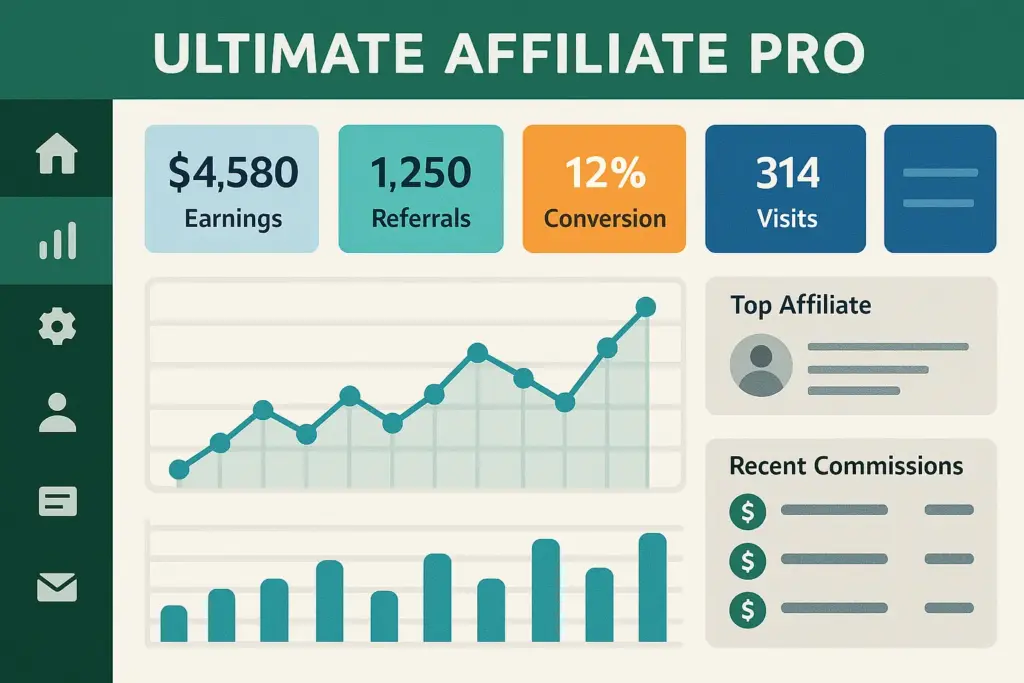
Ultimate Affiliate Pro WordPress plugin dashboard features

This plugin has a lot of features, it’s not lightweight. Although it’s a long list, there are several capabilities that I think pack a punch for anyone who runs an affiliate program.

Many Commission Structures & Ranks

You’re not bound to a fixed commission rate. Multiple rates possible on product level or on affiliate level or with implementing Ranks. Performance (for example number of sales, total earnings) of the affiliates allows them to reach higher ranks (and reach better commission rates). This component is genius for incentivizing your affiliates to do better. So you can set flat, percentage, or even custom formulas.

MLM Options & Performance Bonuses

Do you want to reward your top performers even more? You can establish performance bonuses based on completing certain milestones. Furthermore, the Ultimate Affiliate Pro also provides Multi-Level Marketing(MLM) models for a certain degree of levels. So, affiliates can earn commissions not only from their own sales but also from those generated by affiliates they refer. This has the potential to exponentially increase your reach, though it needs to be managed carefully.

Master Monies Management

It is very important to always pay your affiliates accurately and on time in order to keep a good relationship. It supports multiple methods of payout (PayPal, Stripe, bank transfer and others), features the ability to generate bulk payout files, a feature for setting a minimum withdrawal limit, transaction history, etc. This, in turn, saves a huge amount of administrative time.

Deep Integrations

In addition to its strong WooCommerce integration (tracking per-product commissions, refund/chargeback handling), Ultimate Affiliate Pro also integrates with popular membership plugins (such as Ultimate Membership Pro, MemberPress), form builders (such as Contact Form 7, Gravity Forms) and email marketing services (such as Mailchimp). This helps you to create a consistent marketing ecosystem.

Affiliate Panel & Promotions Materials

You get your own dashboard area in the backend so that you can follow performance, view earnings and retrieve individual referral links and marketing materials (banners, text links, social sharing buttons) as provided through the plugin. Your goal is to make it easy for them to recommend you!

Detailed Reporting

Data is all in the advertising world. Ultimate Affiliate Pro provides click, conversion, commission, affiliate, and payout history reports. KNOWING WHAT WORKS (AND WHAT DOESN’T) ENABLES YOU TO CALIBRATE YOUR PROGRAM.

Why Start an Affiliate Program with Ultimate Affiliate Pro?

Maybe you’re on the fence about starting an affiliate program, or perhaps you’re struggling with a manual system. Using a robust plugin like Ultimate Affiliate Pro offers compelling advantages:

  • Increased Sales & Traffic: Leverage the networks of your affiliates to drive targeted traffic and generate sales you might not have reached otherwise.
  • Performance-Based Marketing: You primarily pay for results (conversions), making it a highly cost-effective marketing channel compared to traditional advertising.
  • Automation & Time Saving: The plugin automates tracking, commission calculation, and provides tools for management, freeing up your time to focus on strategy and relationships.
  • Scalability: A manual system breaks down quickly as you grow. A plugin like this is built to handle hundreds or even thousands of affiliates without collapsing under the administrative burden.
  • Enhanced Tracking & ROI Measurement: Get clear data on which affiliates are driving results and measure the return on investment of your affiliate program accurately.
  • Professionalism: Providing affiliates with a dedicated dashboard, clear stats, and reliable payouts builds trust and encourages participation.

Considering these benefits makes the decision to download Ultimate Affiliate Pro seem much more strategic for long-term growth.

Make Money Online: https://blog.puregpl.com/category/make-money-online/

Download Ultimate Affiliate Pro: Understanding Your Options

Benefits of using Ultimate Affiliate Pro vs manual tracking - Download Ultimate Affiliate Pro

While there are some plugins out there that do offer free “lite” versions, Ultimate Affiliate Pro is not one of them; it is a premium plugin. You won’t find a working free version on the official WordPress repository, though. It’s built as a full, pro-level solution that must be purchased.

When you want to download Ultimate Affiliate Pro, what you’re seeking is, in fact, the premium version. This in turn leads to inefficiencies and loss of opportunities when trying to run a growing affiliate program manually or with very basic tools. A dedicated plugin is worth paying for in saved time gained from reduced tracking errors and greater affiliate motivation.

Let’s see the features you get when you download and install the premium Ultimate Affiliate Pro plugin:

Task / Feature Ultimate Affiliate Pro (Premium)
Affiliate Registration & Management Automated registration, dedicated dashboard ✅
Referral Link Tracking Automatic unique link generation & tracking ✅
Commission Calculation Automated based on flexible rules (ranks, products) ✅
Performance Reporting Detailed, real-time reports in dashboard ✅
Marketing Creatives Access Central library within affiliate dashboard ✅
Payout Processing Bulk payout options, multiple gateways ✅
Advanced Features (MLM, Bonuses) Built-in capabilities ✅

Why the Premium Download Makes Sense:

As illustrated, the premium version integrates and simplifies practically every element of developing an affiliate an affiliate program in no time. Acquiring Download Ultimate Affiliate Pro as a premium plug-in plugin provides the necessary fully-featured foundation to enable a well-done expansion. You may do this at a significantly reduced cost by getting it from a GPL supplier, and these goods are even more affordable to acquire if you are interested in using it much further and on numerous websites primarily if you use the software’s original license, which generally includes updates to the most recent version of the program.

How to Download Ultimate Affiliate Pro (Premium)

Since Ultimate Affiliate Pro is a premium plugin, here are the primary ways to obtain the files:

  1. Official Developer Website: You can purchase the plugin directly from the developer (Azzaroco, often found on marketplaces like CodeCanyon/Envato). This typically includes a license key for direct support and automatic updates.
  2. Premium GPL Version Download: For significant savings and flexibility, especially if you manage multiple sites or don’t need direct developer support, you can use the download link below. This provides the original, complete premium plugin under the GPL license.

Choose Your Ultimate Affiliate Pro Version:

Select the version that best suits your needs.

⬇️ Download Free Version Link

🚀 Download Ultimate Affiliate Pro

The Premium Download provides access to the latest version of Ultimate Affiliate Pro under the license.

Quick Installation Guide
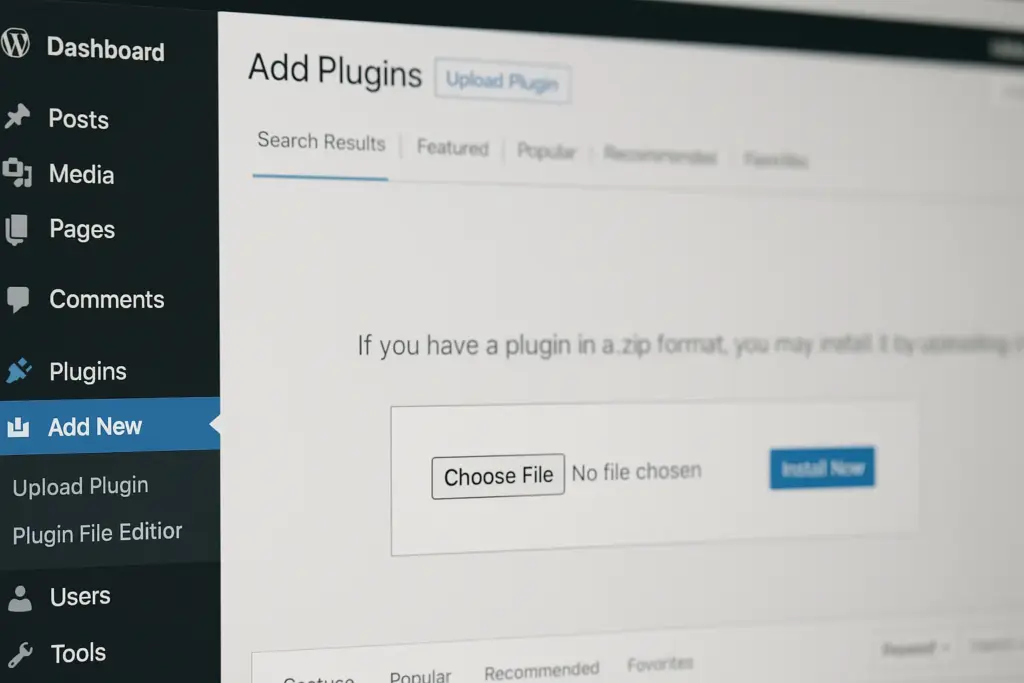
How to upload and install when you Download Ultimate Affiliate pro plugin file

Got the Zip file after you chose to Download Ultimate Affiliate Pro? Installing it is standard WordPress procedure:

  1. Log in to your WordPress Dashboard.
  2. Navigate to Plugins > Add New.
  3. Click the “Upload Plugin” button at the top of the page.
  4. Click “Choose File” and select the `.zip` file you downloaded.
  5. Click “Install Now”. Wait for WordPress to upload and unpack the plugin.
  6. Click “Activate Plugin”.

Once activated, you should see a new menu item in your WordPress sidebar, usually labeled “Ultimate Affiliate Pro”, where you can start configuring your program.

Getting Started: Setting Up Your Affiliate Program

Okay, you’ve managed to download Ultimate Affiliate Pro and install it. What next? Here’s a simplified setup checklist:

  • General Settings: Explore the main settings area. Configure basics like referral link format, cookie duration, currency, and general program rules.
  • Commission Structure: Define your default commission rate. Then, explore setting up specific rules, product-based commissions (if using WooCommerce), and potentially Ranks if you plan to use them.
  • Integrations: Connect Ultimate Affiliate Pro with WooCommerce, membership plugins, or email services if you use them.
  • Affiliate Registration: Customize the affiliate registration form and decide if you want to manually approve affiliates or allow automatic registration. Create the necessary pages (like Login, Register, Account Page) using the provided shortcodes.
  • Marketing Creatives: Upload banners, text links, or other promotional materials that your affiliates can easily grab from their dashboard.
  • Payout Settings: Configure your preferred payout methods and withdrawal limits.

Take your time going through the settings. It’s better to configure things correctly from the start!

Tips for Running a Successful Affiliate Program

Just installing the plugin isn’t enough. Here are some tips for making your affiliate program thrive:

  • Recruit the Right Affiliates: Look for partners whose audience aligns with your target customers. Reach out personally.
  • Provide Resources: Offer high-quality banners, email swipes, and product information. Make it easy for them to promote you.
  • Communicate Clearly: Keep affiliates informed about new products, promotions, and program updates.
  • Offer Competitive Commissions: Research what similar programs offer. Ensure your rates are attractive.
  • Track Performance: Use the plugin’s reports to see who your top affiliates are and what strategies are working.
  • Pay On Time: This is non-negotiable for building trust and keeping affiliates motivated.

🚀 Download Ultimate Affiliate Pro

Frequently Asked Questions (FAQ)

Is Ultimate Affiliate Pro compatible with my theme and other plugins?

The current design is to provide compatibility, especially with most well-written WordPress themes and plugins (such as WooCommerce). Nevertheless problems occasionally occur due to heavily customized themes and plugins which modify checkout or user registration routines in other ways. After downloading and installing Ultimate Affiliate Pro it is always recommended that you test on a staging site.

What kind of support can I expect?

If you buy direct from the developer (CodeCanyon, Duda, etc) you usually receive 6-12mo of direct developer support to fix customizations or answer technical questions. If you use the Premium GPL Download option, your support a lot of the time comes courtesy of either community forums helping with installation and core functionality, or the GPL providers own documentation — not custom coding help.

How do updates work if I download Ultimate Affiliate Pro via the GPL option?

Most reputable GPL providers will allow access to updated plugin files as theyre released (usually for the duration of a subscription/membership). You would have to download the new . zip file to your WordPress dashboard (Plugins > Add New > Upload plugin) and replace the previous version. To have automatic updates via license key, the software must be purchased directly from the developer.

GPL Explained: https://blog.puregpl.com/category/gpl-explained/

Does Ultimate Affiliate Pro work well with WooCommerce Subscriptions?

Yes, we do find that Ultimate Affiliate Pro integrates well with WooCommerce, including common extensions like Subscriptions, so you can track recurring commissions for subscription renewals, which is an immense bonus.

Do I need a special license to run an MLM structure?

The plugin provides the technical infrastructure for MLM. However to run it involves specific legal and regulatory demands that change significantly from country to country and region. It is important that you consult with a legal professional to make sure your MLM structure and compensation plan comply fully with all applicable law before implementing.

Is the GPL download the full version?

Yes, when you download Ultimate Affiliate Pro from a reputable GPL source, you get the original complete premium plugin file as issued by the developer under GPL license. This gives you all functions of the commercial version.

Conclusion: Is Ultimate Affiliate Pro Worth It?

  • To run a successful affiliate program, you need to be organized, track your progress accurately, and have tools that empower both you and your affiliates. Aiming to handle this manually is a guarantee for headaches and limited expansion. With Ultimate Affiliate Pro, you will have a powerful, rich-functionality affiliate solution available right inside your WordPress site.
  • It contains everything you need to create and grow a serious affiliate program, from flexible commissions and MLM functionality to in-depth reporting and integrations. In short, you’re investing in a premium plugin, but the return is frequently worth its weight in gold via increased sales, allowed administrative time and superior relationships with affiliates.
  • Consider Download Ultimate Affiliate Pro If you want to use Affiliate on your WordPress/WooCommerce site. The premium GPL version is the simplest method to power up and put that flexibility to use.

TAGGED:Affiliate ManagementAffiliate MarketingAzzarocoDownload Ultimate Affiliate ProGPL PluginMLM PluginUltimate Affiliate ProWooCommerce AffiliateWordPress Affiliate PluginWordPress Plugin
Previous Article download elementor pro Download Elementor Pro – Get Started with the Best WordPress Page Builder
Next Article Download Intense Download Intense – Get Started with the Best Shortcodes and Site Builder
FacebookLike
PinterestPin
InstagramFollow
YoutubeSubscribe

Subscribe Now

Subscribe to our newsletter to get our newest articles instantly!

    Most Popular
    SEOPress Pro Review 2026: Features, Pricing and Verdict
    September 21, 2026
    Most WordPress form plugins stop at the point of submission: the entry lands in the database, an email goes out, and everything after that is your problem. This Formidable Forms Pro review looks at a builder that treats submitted data as something you can act on — collecting payments, triggering automated workflows, and publishing entries back to the front end through Views. For anyone who has outgrown a basic contact form and started sketching directories, calculators, or client-facing dashboards, that distinction matters more than field types do. The question is whether an annual license justifies itself for site owners whose forms need to do real work after the submit button. Quick Verdict Formidable Forms suits freelancers, agencies, and business owners building data-driven forms — payment flows, application systems, front-end listings — on WordPress. Anyone who only needs a styled contact form will find the license hard to justify, and the plugin has no use outside WordPress. Pros Views display submitted entry data on the front end, turning forms into simple web applications rather than one-way capture points Payment collection through Stripe, PayPal, Square, and Authorize.net covers most common checkout setups CRM and automation integrations include Salesforce, Zapier, Google Sheets, HubSpot, and Mailchimp Business and Elite licenses cover unlimited sites, including client sites — practical for agencies juggling multiple builds Over 100 form templates give you a starting point instead of a blank canvas Layered spam protection built in via reCAPTCHA, honeypot, and Akismet Pro zip uploads directly through the WordPress plugin uploader with no extraction step Cons User registration is limited to certain plans and requires a separate add-on rather than working out of the box Single-site and three-site limits on Basic and Plus push multi-site owners toward the pricier Business or Elite tiers 👉 See Formidable Forms pricing Core Features The formidable-pro-6.34.zip file installs directly in WordPress via Plugins → Add New Plugin → Upload Plugin, without extracting it first — a small detail, but one that saves a step for anyone used to unzipping archives before upload. Views: Displaying Submitted Entries on the Front End Views are the feature that separates Formidable Forms from the average contact form plugin. Instead of entry data sitting in the WordPress admin waiting for someone to export it, Views pull submitted entries back out and render them on the front end — as directories, listings, tables, profile pages, or whatever layout the data suits. That changes what a form is for. A submission stops being a message you reply to and becomes content that populates a page. Job boards, member directories, event calendars, review listings, and internal dashboards all become achievable without a separate directory plugin or custom post type work. For anyone considering the Pro license specifically, this is usually the reason. Views are what make the "front-end web applications" claim more than marketing language. Form Builder for Simple Forms and Full Applications The builder handles the ordinary case — a contact form, a quote request, a newsletter signup — and then keeps going. The same interface builds multi-step forms and calculation-driven applications, so you are not learning a second tool when a project grows past a name-and-email field. The practical benefit is consistency across a portfolio. A freelancer building a five-field contact form on one site and a mortgage calculator on another works inside the same builder both times, which shortens the second build considerably. Payment Collection Payments run through Stripe, PayPal, Square, and Authorize.net. Having four processors available matters more than it sounds: merchant account availability varies by country and by business type, and being locked to a single gateway is a common reason form plugins get replaced mid-project. This covers the transactions that do not belong in a full store — donations, deposits, booking fees, application charges, invoice payments. Rather than installing WooCommerce to take a single fee, you attach payment collection to a form you were building anyway. A WooCommerce integration is available separately for sites that do run a store. Workflow Automation Automation ties what happens after submission to conditions you set, so form data triggers actions instead of just landing in a database table. Combined with Views, it is the second half of the application-building story — data comes in, actions fire, results display. For a business owner, this is the difference between checking an inbox and having submissions route themselves. Approval steps, conditional notifications, and follow-up actions run without anyone opening the WordPress dashboard. Integrations With CRMs, Marketing Tools, and Automation Platforms The integration list covers Salesforce, HubSpot, Mailchimp, Zapier, Google Sheets, ChatGPT, and Webhooks alongside the payment gateways, plus WooCommerce and ACF on the WordPress side. Two of those deserve attention. Zapier and Webhooks together mean that anything not on the native list is still reachable, and Webhooks in particular gives developers a direct route into custom endpoints. Google Sheets suits teams who want submissions in a spreadsheet their non-technical colleagues already use, without granting WordPress admin access. 100+ Form Templates The template library ships with over 100 prebuilt forms. For agencies handling repetitive client requests — contact, quote, registration, application, feedback — starting from a template and editing fields is faster than building from an empty canvas each time. Templates also serve as a reference for how the builder handles more complex structures, which helps when you are moving from simple forms toward calculation or multi-page setups. Layered Spam Protection Three spam defenses are built into the plugin's settings: reCAPTCHA, a honeypot field, and Akismet. They work at different points — the honeypot catches naive bots silently, reCAPTCHA challenges suspicious sessions, and Akismet checks submission content against a shared spam database. Because all three are configured inside Formidable Forms rather than bolted on through separate plugins, you can layer them according to how aggressive a given form needs to be. A newsletter signup and a public job application do not need the same level of friction. User Registration Forms can create WordPress user accounts, which turns a signup form into the front door of a membership area, client portal, or community site. Registration is not part of the base install — it depends on the user registration add-on and is limited to certain plans, so confirm plan eligibility before committing to a build that relies on it. Paired with Views, registration supports a common pattern: users sign up, submit entries, and see their own submissions displayed back to them on the front end. Installation and Setup Setup is quick. Tested on WordPress 6.5 with PHP 8.4, installation and basic configuration took about two minutes from upload to a working form. Install the free Formidable Forms plugin first. The free core plugin is distributed through the WordPress.org plugin directory. Search for it under Plugins → Add New Plugin, install it, and activate it. The Pro plugin is an extension, not a replacement — the free core plugin must remain installed and active for Pro to function. Deactivating it will break the Pro features. Purchase a Pro license. Four tiers are sold: Basic, Plus, Business, and Elite. Download the Pro plugin ZIP from your account after purchase. Upload the Pro ZIP through WordPress. Go to Plugins → Add New Plugin → Upload Plugin, choose the ZIP file, and install it. The archive installs directly — there is no need to extract it or dig for a nested plugin folder inside it first. Activate the Pro plugin. Both plugins now appear in your plugin list, and the Pro features become available inside the Formidable Forms admin screens. Build your first form, starting from a template rather than a blank canvas. Turn on spam protection. reCAPTCHA, honeypot, and Akismet are all supported and configured through the plugin's settings. Connect the services you need. Payment processors and third-party tools are set up per form or through the global settings, depending on the integration. Add the user registration add-on if your plan includes it. The vendor maintains a Docs & Support area and a community resource for anything beyond the basics. Compatibility and Requirements Requirement Detail WordPress version 6.3 or higher PHP version 7.4 or higher License GPL The vendor is blunt about the platform requirement: "Formidable Forms is a WordPress Plugin. In order to use Formidable Forms, you must have a WordPress site. That's all." There is no standalone, hosted, or non-WordPress version — if your site runs on Squarespace, Webflow, or a static generator, this is not the tool for you. For a live, public-facing site, pair a currently supported PHP version with the current stable WordPress release rather than sitting at the stated minimums. Unsupported PHP branches stop receiving security patches, and a form plugin handling payments and personal data is the last place to accept that risk. On the integration side, the plugin connects with Stripe, PayPal, Square, and Authorize.net for payments, plus Salesforce, HubSpot, Mailchimp, Zapier, ChatGPT, Google Sheets, Webhooks, WooCommerce, and ACF. Formidable Forms Pricing Formidable Forms runs on a freemium model. The free core plugin, distributed through the WordPress.org plugin directory and often referred to as Formidable Forms Lite, is a drag-and-drop form builder used on hundreds of thousands of active sites. It handles standard form building on its own, and it also acts as the foundation for the paid product. The Pro version is sold as an annual license across four tiers. Plan Price Sites Basic $79/year 1 site Plus $199/year Up to 3 sites Business $399/year Unlimited sites, including client sites Elite $599/year Unlimited sites, including client sites All four tiers are currently listed at 50% off those regular rates — Basic at $39.50/year, Plus at $99.50/year, Business at $199.50/year, and Elite at $299.50/year. Discounting at this depth is a familiar pattern in the WordPress form builder market, so treat the promotional figure as the price you are likely to see rather than the price the plugin is nominally worth. Paid plans are GPL licensed and include one year of updates and support. A 14-day money-back guarantee applies to purchases. For agencies and freelancers, the Business and Elite tiers are the ones worth weighing. Both cover unlimited sites, client sites included, which removes the per-project license math that eats into small builds. Alternatively, a license can be purchased per client site if you would rather bill each project separately. Formidable Forms also runs an affiliate program paying 20% commission. Feature availability differs by tier. Check the current plan comparison at formidableforms.com before buying so the tier you choose covers the integrations and add-ons your build actually needs. 👉 Get Formidable Forms at the best available price Alternatives to Formidable Forms Formidable Forms sits at the heavier end of the WordPress form builder market, where the job extends past capturing a message into payments, automation, and displaying submitted entries on the front end through Views. The alternatives below are the names most site owners weigh against it, and they differ mainly in how far past basic form capture they go. Product Key Difference Best For Price Tier Formidable Forms Views display submitted entry data on the front end, alongside payments, workflow automation, and unlimited-site licensing on the Business and Elite tiers Freelancers and agencies building data-driven forms and front-end applications across multiple sites Freemium, with paid annual Pro licenses WPForms Beginner-oriented drag-and-drop builder with a template-first onboarding flow Site owners who want conventional contact, survey, and order forms with minimal setup Freemium, with paid annual licenses Gravity Forms Long-established developer-focused builder with a large third-party add-on ecosystem Developers who want extensive hooks and a wide catalog of extensions Paid, subscription-based Fluent Forms Positioned around a lightweight footprint and fast form rendering Sites where keeping plugin overhead low is a priority Freemium, with paid licenses Ninja Forms Modular architecture where features are added as individual extensions Users who prefer to pay only for the specific functions they need Freemium, with paid extensions Contact Form 7 Minimal, markup-driven form handling with no built-in visual builder Simple contact forms on sites that need nothing more Free Competitor data is sourced from publicly available information as of 2026 and may have changed. The right pick comes down to what you are actually building. A single contact form does not justify an annual license, but if you need front-end entry display, payment gateways, and CRM handoff on several client sites, the comparison narrows quickly. Frequently Asked Questions Is Formidable Forms free or do you need the Pro version? A free version exists and is distributed through the WordPress.org plugin directory as a drag-and-drop form builder. The Pro version is sold as a paid annual license and adds the features covered above, including Views, payment collection, and the wider integration set. Does Formidable Forms require the free plugin to be installed? Yes. The free Formidable Forms core plugin must remain installed and active for the Pro plugin to function — Pro runs as an extension of the core plugin rather than a standalone replacement. How much does Formidable Forms cost per year? There are four annual tiers: Basic at $79/year, Plus at $199/year, Business at $399/year, and Elite at $599/year. All four are currently listed at 50% off those regular prices, so the promotional figures are $39.50, $99.50, $199.50, and $299.50 respectively. How many sites can I use one Formidable Forms license on? Basic covers a single website and Plus covers up to three sites. Business and Elite licenses can be used on unlimited sites, including client sites, or a license can instead be purchased per client site. What are Formidable Forms Views used for? Views display submitted entry data on the front end of your site, so form submissions become readable content rather than data locked in the admin area. That is what allows the plugin to power directories, listings, and simple front-end web applications instead of just capturing and storing entries. Can Formidable Forms collect payments with Stripe or PayPal? Yes. Payment collection is a core capability, with integrations for Stripe, PayPal, Square, and Authorize.net, alongside WooCommerce for store-based workflows. What are the WordPress and PHP requirements for Formidable Forms? Recent versions require WordPress 6.3 or higher and PHP 7.4 or higher. Beyond that, a WordPress site is the only requirement — the plugin does not work on non-WordPress platforms. We installed it on WordPress 6.5 with PHP 8.4 without issues. Does Formidable Forms offer a refund or money-back guarantee? Yes, a 14-day money-back guarantee applies to purchases. That gives you a short window to test the Pro feature set on a real site before the sale becomes final. Is Formidable Forms GPL licensed? Yes, the Pro plugin is distributed under the GNU General Public License. Paid plans include one year of updates and support, which means continued access to updates depends on renewing the license. Download & Pricing Options 🆓 Free Version 👉 Download the Free Version of Formidable Forms 💎 Get Formidable Forms (Best Available Price) 👉 Check Current Pricing for Formidable Forms Pricing and availability may change — use the link above for current rates. Buying Formidable Forms Pro outright is not the only route. See our best GPL site for WordPress comparison for how ten GPL vendors differ on file integrity, update speed and licence keys.
    Formidable Forms Pro Review 2026: Features, Pricing, Verdict
    September 21, 2026
    UpdraftPlus Premium Review 2026: Is the Upgrade Worth It?
    September 21, 2026
    FluentCRM Pro Review 2026: Features, Pricing and Verdict
    September 21, 2026
    PixelYourSite PRO Review 2026: Is This Tracking Plugin Worth It?
    September 17, 2026

    You Might Also Like

    Web GuidesWordPress Plugins

    Rank Math SEO Review 2026: Features, Setup, and Free Tier

    14 Min Read
    Web GuidesWordPress Themes

    Shoptimizer Review 2026: Fast WooCommerce Theme Worth It?

    13 Min Read
    Web GuidesWordPress Themes

    Service Finder WordPress Theme Review 2026: Directory and Job Board Built-In

    18 Min Read
    Web GuidesWordPress Themes

    Hub WordPress Theme Review 2026: Pricing, Features & Verdict

    15 Min Read

    Always Stay Up to Date

    Subscribe to our newsletter to get our newest articles instantly!

      blog-log blog-log

      We share tips, tricks, and guides to help you build better WordPress websites and improve online success.

      Free For You!

      • Elementor Pro
      • AvadaNew
      • JNews
      • Premium Plugins

      Quick Links

      • GPL Explained
      • Tips & Tricks
      • Tutorials
      • Web Guides

      Unlock the Unexpected!

      Think PureGPL is just another GPL site? Think again. 👀
      Surprise Me
      Welcome Back!

      Sign in to your account

      Username or Email Address
      Password

      Lost your password?