Picking a multipurpose WordPress theme means betting on a builder ecosystem — and that bet gets expensive when you later want to switch. This review examines a different approach: a premium theme that works with Elementor, WPBakery, and the native Block Editor simultaneously, so your page-building choice stays yours. Pair that with WooCommerce support and 75+ ready-made templates, and the pitch is hard to ignore.
Whether that flexibility justifies the price — and the trade-offs around support terms and setup friction — is what this review weighs.
Quick Verdict
The7 suits freelancers and agencies who want one theme that adapts to multiple builder workflows and client use cases without locking into a proprietary ecosystem. Buyers who need a free trial before committing, or who want lifetime support included in a one-time fee, should look elsewhere.
Pros
- Works with Elementor, WPBakery, and the Block Editor — no single-builder dependency
- 75+ pre-made website templates spanning stores, portfolios, and event sites
- Broad plugin compatibility including WooCommerce, WPML, Gravity Forms, and Easy Digital Downloads
- Two purchasing channels (one-time ThemeForest license or direct annual subscription) let buyers choose their preferred cost structure
- Tested on PHP 8.4 with cross-browser support across Chrome, Firefox, Safari, Opera, and Edge
Cons
- No free tier or trial version — full purchase required before testing on your own site
- ThemeForest Regular License support expires after 6 months; extending to 12 months costs extra
- Direct-channel licenses carry annual renewal fees, making the long-term cost higher than the headline price suggests
- The installable theme file is buried inside a larger ZIP archive, requiring manual extraction before upload — a stumbling block for less experienced users
Core Features
Page Builder Flexibility
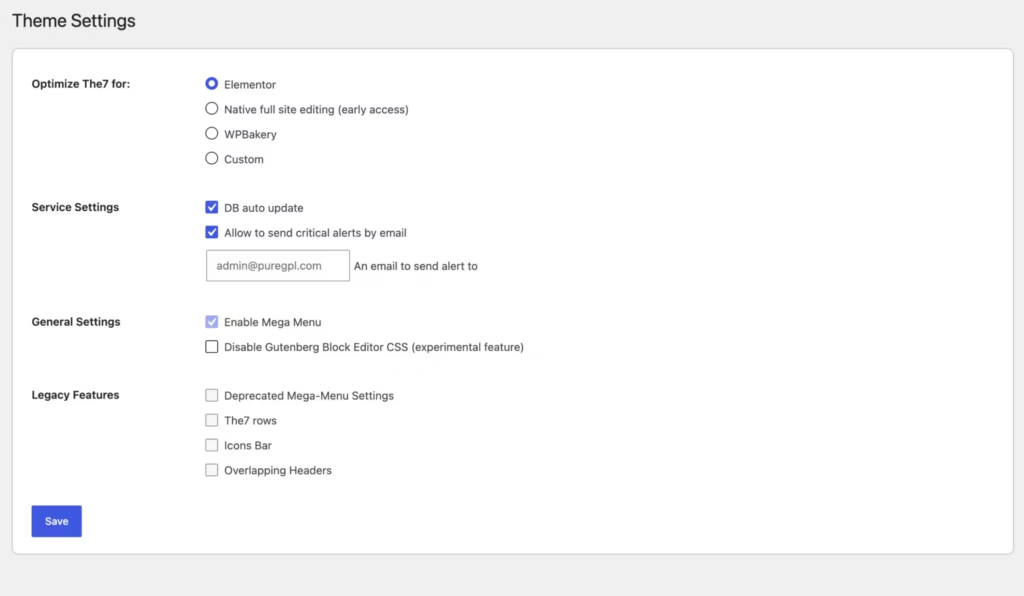
The7 supports three distinct page-building approaches from a single theme installation: Elementor, WPBakery Page Builder, and the native WordPress Block Editor with Full Site Editing. That combination is less common than it sounds — most multipurpose themes commit to one builder ecosystem and treat the others as afterthoughts. Here, each is treated as a primary workflow.
For freelancers and agencies managing sites across different client preferences, this matters practically. A client already invested in Elementor Pro stays in their familiar environment; a project built years ago on WPBakery doesn’t require a rebuild; a developer who prefers the Block Editor isn’t forced into a third-party dependency. The theme accommodates all three without requiring a switch.
Pre-Made Website Templates
The7 ships with 75+ pre-made website templates, importable directly through a built-in importer included in the theme. The templates span a range of use cases — WooCommerce stores, portfolios, event sites, community forums, and digital product storefronts — so the starting point for most projects is an existing design rather than a blank canvas.
The importer handles the heavy lifting of getting a template live. Rather than manually recreating layouts, a user selects a template and the importer brings in the demo structure. This is particularly useful for agencies turning around multiple client sites, where the template library functions as a reusable asset across projects.
WooCommerce Integration
WooCommerce support is built into The7 at the theme level, not bolted on through a child theme or separate plugin. The theme is tested against WooCommerce 10.8.x and WooCommerce 9.x.x, covering a range of store configurations. Several of the 75+ pre-made templates are specifically designed for ecommerce layouts, giving store builds a faster starting point.
The integration extends beyond basic product pages. Easy Digital Downloads and WP EasyCart are also listed as compatible, so digital product sellers and alternative cart setups aren’t excluded from the theme’s ecosystem.
Multilingual and Community Site Support
WPML compatibility makes The7 a viable choice for multilingual sites without requiring a theme swap or custom workaround. For businesses targeting multiple language markets, the theme handles the structural side of multilingual publishing while WPML manages the translation layer.
bbPress forum support extends the theme’s range into community and membership-style sites. Combined with Events Calendar and Events Calendar Pro compatibility, The7 covers use cases that most multipurpose themes treat as edge cases — a forum-based community site or an event-driven organization can use the same theme as a standard business or portfolio build.
Extended Plugin Compatibility
Beyond the page builders and ecommerce plugins, The7 is compatible with Gravity Forms, which handles contact forms, registration flows, and multi-step form logic on business and agency sites. Events Calendar and Events Calendar Pro compatibility adds structured event listings and ticketing support without requiring a theme change for event-heavy projects.
The companion plugin list also includes Slider Revolution and Ultimate Addons, both bundled with the theme. These are installed separately after the theme is active, but they’re included in the package rather than sold as additional purchases.
Cross-Browser Compatibility
The7 is tested across Firefox, Safari, Opera, Chrome, and Edge. For client-facing work, that breadth matters — a layout that breaks in Safari on iOS or renders incorrectly in Edge creates support overhead that falls on whoever built the site.
Tested compatibility on PHP 8.4 means the theme runs on current server environments without requiring a downgrade to maintain stability.
Installation and Setup
The downloaded package from ThemeForest is an outer ZIP archive — not the installable theme file itself. Before touching WordPress, extract it on your computer. Inside, you’ll find the actual theme file alongside folders for user guides, pre-made website resources, plugins, PSDs, licensing, and developer tools. Only the inner theme ZIP gets uploaded to WordPress.
- Extract the outer ThemeForest ZIP on your local machine to locate the installable theme file nested inside.
- Log in to your WordPress dashboard and navigate to Appearance → Themes → Add New → Upload Theme.
- Upload the inner theme ZIP file and click Install Now, then Activate.
- After activation, The7 will prompt you to install its bundled required plugins. Install and activate all three:
- WPBakery Page Builder
- Ultimate Addons
- Slider Revolution
- If you plan to use Elementor or Elementor Pro, install those from the WordPress plugin directory or your Elementor account and activate them. The7 integrates with both natively.
- Install any additional compatible plugins your project requires — WooCommerce, WPML, bbPress, Easy Digital Downloads, Events Calendar, Events Calendar Pro, Gravity Forms, or WP EasyCart — depending on your site’s needs.
- To import a pre-made website template, open the theme’s options panel and use the built-in website importer. Over 75 templates are available; select one and follow the on-screen prompts to pull in demo content.
- Customize your site through the theme options panel, the Block Editor, or your chosen page builder.
Compatibility and Requirements
| Requirement | Details |
|---|---|
| WordPress | Compatible with WordPress 6.9.x. Check the latest changelog for compatibility with newer WordPress releases. |
| PHP | Tested on PHP 8.4 |
| WooCommerce | Compatible with WooCommerce, including version 10.8.x. |
| Browsers | Chrome, Firefox, Safari, Opera, Edge |
| Page builders | Elementor, Elementor Pro, WPBakery Page Builder, WordPress Block Editor |
Beyond the core platform requirements, The7 carries a broad compatibility list. It works with bbPress for community forums, WPML for multilingual builds, Easy Digital Downloads for digital storefronts, Gravity Forms for advanced form handling, WP EasyCart for additional ecommerce options, and both Events Calendar and Events Calendar Pro for event-driven sites.
The three bundled plugins — WPBakery Page Builder, Ultimate Addons, and Slider Revolution — are included with purchase and do not require separate licenses to use with The7. Elementor and Elementor Pro, if needed, are obtained through their own channels.
The7 Pricing
At the time of writing, The7 is available through ThemeForest and the developer’s official website. Availability and licensing options may change over time at the7.io. Each channel uses a different licensing model, so the right choice depends on how you prefer to pay and how many sites you plan to build.
No free tier or trial version exists for either channel.
ThemeForest Licenses
Purchasing through ThemeForest means a one-time license fee with no annual renewal required to keep using the theme.
Regular License — $59
Covers one site where the end product is free to users. Includes six months of support from Dream-Theme. Support can be extended to twelve months for an additional $17.63 at checkout.
Extended License — $3,550
Covers one site where the end product is sold to end users. Standard ThemeForest Extended License terms apply.
Direct Licenses (the7.io)
Purchasing directly from the7.io uses an annual subscription model. Both tiers are currently offered at a launch discount.
1-Site License — $39 for the first year, then $49/year
The launch offer saves $10 off the standard first-year rate. Covers one site and includes standard support plus one year of updates.
Unlimited License — $199 for the first year, then $249/year
The launch offer saves $50 off the standard first-year rate. Covers unlimited sites and includes priority support plus one year of updates. This is the practical choice for agencies or freelancers managing multiple client builds.
Which Channel Makes Sense
The ThemeForest Regular License at $59 is a lower upfront cost for single-site buyers who want a one-time payment. The direct 1-Site License costs less in year one at $39 (a launch-discounted rate), but carries an ongoing renewal fee. Buyers planning to renew beyond the first year should compare the cumulative subscription cost against the one-time ThemeForest fee.
For multi-site use, the Unlimited License from the7.io is the only option that removes the per-site restriction entirely.
👉 Get The7 at the best available price
Alternatives to The7
Several strong multipurpose themes compete in the same space, each with a different philosophy around page builders, pricing, and target audience.
| Product | Key Difference | Best For | Price Tier |
|---|---|---|---|
| The7 | Supports Elementor, WPBakery, and the Block Editor simultaneously — no proprietary builder lock-in | Freelancers and agencies wanting builder flexibility with broad plugin compatibility | Paid |
| Avada | Ships with its own Fusion Builder and Fusion Core ecosystem — a self-contained bundle rather than a third-party builder approach | Users who want everything in one tightly integrated package | Paid |
| Divi | Built around the proprietary Divi Builder, sold via subscription or lifetime membership | Designers who prefer a dedicated visual builder with a large community | Paid |
| Enfold | Long-established theme with its own Avia Layout Builder, known for clean code and developer-friendly customization | Developers and agencies prioritizing stability and maintainable codebases | Paid |
| BeTheme | Competes on template volume with a very large library of niche-specific pre-built layouts | Agencies and freelancers who need a wide range of industry-specific starting points | Paid |
| Flatsome | WooCommerce-focused theme with a built-in UX Builder, positioned as a specialist e-commerce option | Store owners whose primary goal is a polished WooCommerce build | Paid |
| Astra | Lightweight, performance-focused theme with a free tier and deep Elementor and Gutenberg compatibility | Users who prioritize page speed and want a low or zero entry cost | Freemium |
| OceanWP | Free core theme with paid extensions, supporting Elementor and WooCommerce workflows | Budget-conscious users who want to start free and expand incrementally | Freemium |
Competitor details reflect publicly available information and may have changed.
The right choice depends on your priorities. If builder flexibility and avoiding ecosystem lock-in matter most, The7’s multi-builder approach is a genuine differentiator. If you want a single self-contained ecosystem, Avada or Divi are the natural alternatives. For pure WooCommerce focus, Flatsome is worth a close look, and if a free starting point is essential, Astra or OceanWP are the logical places to begin.
Frequently Asked Questions
How much does The7 WordPress theme cost?
The7 is available through two channels at different price points. On ThemeForest, a Regular License costs $59 for one site and includes six months of support, extendable to 12 months for an additional $17.63. Buying direct from the7.io runs $39 for the first year on a single site (renewing at $49/year), or $199 for the first year on an unlimited-site plan (renewing at $249/year) — both direct tiers carry a launch discount that may not be permanent.
Does The7 work with Elementor?
Yes. Elementor integration is one of The7’s core features, and both Elementor and Elementor Pro are listed as supported companion plugins. The theme also supports WPBakery Page Builder and the native WordPress Block Editor, so you are not locked into a single builder.
Is The7 theme good for WooCommerce?
The7 includes built-in WooCommerce integration and is compatible with current WooCommerce releases. Beyond standard store functionality, the template library includes WooCommerce-focused pre-made websites, and the theme also works alongside Easy Digital Downloads and WP EasyCart for alternative ecommerce setups.
How do I install The7 theme in WordPress?
The file downloaded from ThemeForest is a large outer ZIP archive — the installable theme file is nested inside and must be extracted first before uploading to WordPress. Once you locate the inner ZIP (named dt-the7-14.4.3.zip or the equivalent for your downloaded version), install it via Appearance → Themes → Add New → Upload Theme in the usual way. Required plugins such as WPBakery Page Builder, Ultimate Addons, and Slider Revolution are bundled separately inside the archive and need to be installed independently after the theme is active.
The7 theme vs Avada — which is better?
Both are long-established premium multipurpose themes sold on ThemeForest, but they differ in builder philosophy. Avada ships with its own proprietary Fusion Builder, while The7 supports Elementor, WPBakery, and the native Block Editor — giving The7 users more flexibility if they want to avoid builder lock-in. The right choice depends on whether you prefer a tightly integrated proprietary ecosystem or the ability to switch builders without changing themes.
Does The7 include pre-made website templates?
Yes — The7 ships with 75+ pre-made website templates covering a range of use cases including business sites, WooCommerce stores, portfolios, event websites, and community forums. Templates are imported through a built-in importer included with the theme.
What support does The7 theme include?
Support runs through Dream-Theme’s dedicated support portal, Monday through Friday, 08:00–17:00 GMT+0, with a typical response time within 24 hours. ThemeForest Regular License buyers receive six months of support from purchase, extendable to 12 months for $17.63. The direct Unlimited License includes priority support; the single-site direct license includes standard support and one year of updates.
Download & Pricing Options
🔍 Try Before You Buy
The7 does not have an official free tier. To evaluate it before purchasing, a GPL-licensed copy is available for sandbox testing purposes only.
👉 Download GPL Evaluation Copy
This is a GPL-licensed redistributed copy for testing only — not an official developer product.
💎 Get The7 (Best Available Price)
👉 Check Current Pricing for The7
Pricing and availability may change — use the link above for current rates.