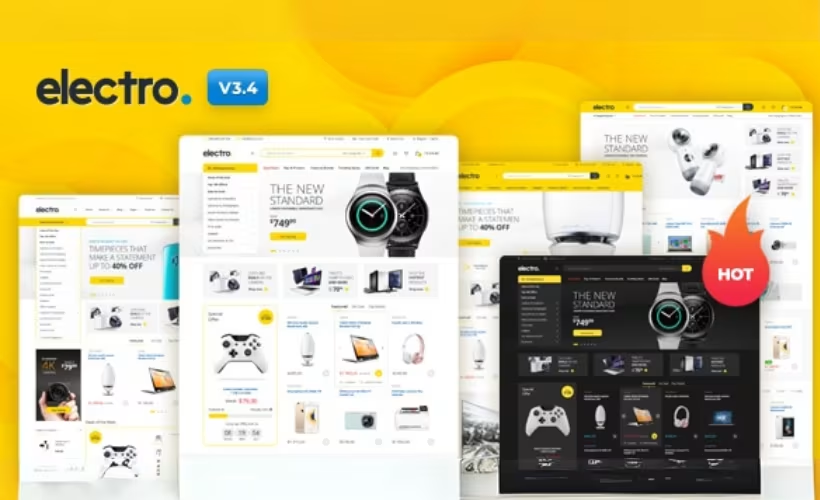
Electro is MadrasThemes’ WooCommerce theme for electronics shops, affiliate catalogues and multi-vendor storefronts. Its appeal is a catalogue-oriented design: buyers can browse categories and compare detailed products without the shop having to look like a general business website.
This Electro theme review covers its documented capabilities, installation workflow, purchase options and alternatives. It is a source-based assessment, not a new checkout-load test or speed benchmark.
Quick verdict
Consider Electro when its electronics layouts closely match your catalogue and you are comfortable maintaining WooCommerce plus the extensions your store needs. A theme can provide the storefront, but payments, shipping, vendor commissions and affiliate data feeds remain separate implementation decisions.
- Strength: a focused starting point for specification-heavy product browsing.
- Strength: documented setup guides and builder choices.
- Tradeoff: a marketplace requires a vendor plugin and operational configuration.
- Tradeoff: demo content is a starting point, not a finished store or a performance guarantee.
Features and integrations
The developer’s Electro page lists live product search, wishlist and comparison features, specifications, brand displays, WPML and RTL support. Marketplace integrations include Dokan, WC Vendors and WCFM. These correct the earlier claim that the author and supported marketplace tools were undocumented.
Product discovery
For electronics, the practical benefit comes from consistent product data. Populate attributes such as capacity, dimensions and connectivity before assessing comparison layouts. A comparison table cannot help customers if different products use inconsistent labels or missing specifications.
Single-store and marketplace use
WooCommerce supplies the commerce foundation. A multi-vendor extension adds seller workflows; the theme alone does not establish commission rules, payout procedures or vendor permissions. Check which extension edition covers your requirements and test its customer and seller screens with your selected layout.
Page-building choices
The ThemeForest listing documents page templates, Elementor and WPBakery options. Choose the workflow used by the demo you intend to customise. Having multiple builder integrations does not mean a page built with one can automatically be edited in another.
Affiliate catalogues
Electro is positioned for affiliate sites as well as stores. Plan how external product links, disclosures and price updates will work. Do not assume that a catalogue theme includes a retailer’s product-feed service, an API subscription or automatic price synchronisation.
Installation and demo import
- Prepare a backup and use staging for an existing store.
- Following the installation guide, upload electro.zip through Appearance → Themes → Add New → Upload Theme. The full marketplace download contains documentation and other files; uploading that outer archive can cause the missing-stylesheet error.
- Activate the theme and review Appearance → Install Plugins. Install WooCommerce and the required theme components, plus the builder and optional integrations needed for your chosen design.
- Use a child theme for code customisations so theme updates do not overwrite them.
- Follow the demo import instructions under Appearance → Import Demo Data. Some template variants require Advanced Custom Fields; Elementor and WPBakery variants require their corresponding builder.
- Replace imported sample products, menus, contact information and placeholder images. The documentation explains that demo photographs are not distributed with the import.
- Configure your own payment, tax, delivery and email settings, then test an order and refund using the payment gateway’s test mode.
Compatibility and maintenance
The marketplace listing currently includes WooCommerce 8–10 compatibility and integrations with Elementor, WPBakery and WPML. Check its current compatibility panel and changelog against your installed versions before updating.
The documentation spans several theme generations. Older introduction text mentions WordPress 4.8; that should not be treated as a recommended production environment today. Verify the requirements of your actual theme release and all installed extensions with the developer and host.
No independent performance result is claimed here. Evaluate your own category pages, product pages and checkout with realistic images and inventory. The number of widgets, tracking scripts and extensions can matter as much as the theme choice.
Electro pricing and support
Prices checked on 6 November 2026 are in USD and may change:
| Purchase channel | Published price | Published service terms |
|---|---|---|
| ThemeForest | $59 | Future updates and six months of author support; taxes and handling fees excluded. |
| MadrasThemes direct | $59/year | One year of updates and support, with unlimited sites advertised. |
These are different purchase channels. Compare the checkout terms and renewal obligations rather than treating both $59 offers as identical. The marketplace identifies the item as 100% GPL; software licensing and access to a vendor’s account, updates service and support are separate considerations.
This review does not verify an official free edition. A redistributed package should not be described as an author-provided evaluation licence or assumed to include direct developer services.
Alternatives to Electro
| Theme | Reason to compare | What to evaluate |
|---|---|---|
| XStore | A broad WooCommerce demo library across several retail categories. | Compare the demo and builder workflow closest to your own store, plus extension requirements. |
| Flatsome | The Classic product uses UX Builder; its newer Site Builder is a distinct offering. | Choose the product and editor deliberately instead of assuming every Flatsome purchase includes the same workflow. |
| Storefront | A free theme maintained by Woo, with a simpler starting design. | Useful when you prefer to build a custom storefront and can supply the electronics-specific design work yourself. |
Electro makes the strongest case when its existing catalogue design saves meaningful work. If your brand needs a very different layout, compare customisation effort and maintenance costs instead of counting demos. No theme in this table is declared the fastest without a controlled comparison.
Frequently asked questions
Who makes Electro?
MadrasThemes. Its official theme page, marketplace listing and public documentation are linked above.
Does Electro include a complete marketplace?
It supports marketplace integrations, but you still need to select and configure a vendor extension. Assess paid extension features, vendor permissions and payment flows separately.
Can I use Elementor?
Yes, Elementor is a documented integration. Select an Elementor demo and use the plugins specified for that layout.
Is there a free Electro theme?
No official free edition was verified for this review. Third-party distribution is distinct from an official trial and does not establish access to author services.
Does demo import make the store ready to sell?
No. Replace demo data and complete product, payment, shipping, tax and transactional-email setup. Verify checkout and mobile browsing before launch.
Where to get Electro
Compare the direct developer offer and ThemeForest listing. You can also view PureGPL’s Electro listing; assess its delivery, update and support terms independently.