
Adding a contact form, payment collection form, or event registration form to a WordPress site usually means either hiring a developer or wrestling with plugin settings that were never built for non-technical users. This WPForms review looks at whether the drag-and-drop builder actually removes that barrier, starting with its free Lite tier and running through its four paid plans. For a site owner with no coding background, the real question is whether the free version does enough on its own, and whether the paid upgrade path is worth the money when it isn’t.
This article weighs WPForms’ free-to-paid value against what a non-developer actually needs to collect leads, payments, and registrations without hiring outside help.
Quick Verdict
WPForms suits WordPress site owners and small business operators who need working contact, payment, or registration forms fast and don’t want to touch code. It’s a poor fit for anyone needing advanced multi-site licensing on a budget, since the entry-level plan caps usage at a single site. Those who outgrow basic forms should expect to climb the pricing tiers rather than stay on Lite indefinitely.
Pros
- Free Lite version is genuinely usable
- Drag-and-drop builder paired with a large library of pre-built templates
- AI-assisted form generator speeds up building forms from scratch
- Built-in integrations with Stripe, PayPal, Square, and Mailchimp
Cons
- Payment gateways and marketing integrations beyond the basics require upgrading past the free Lite tier
- Site allowances vary by plan, pushing multi-site owners toward pricier tiers
- Four separate paid tiers (Basic, Plus, Pro, Elite) require careful comparison to avoid over- or under-buying
- Advanced form logic and deeper integrations mean paying customers still need to climb the plan ladder rather than staying on a lower tier
Core Features
Drag-and-Drop Form Builder
WPForms centers on a visual builder where you place fields onto a form canvas by dragging them into position, rather than editing code or wrestling with shortcodes. It’s the foundation the rest of the plugin is built around, and it’s available even in the free Lite version.
For a site owner with no development background, building a working contact or lead-capture form is a matter of dragging in a name field, an email field, and a message box, then arranging them in the order you want. There’s no template file to touch and no PHP to learn.
In our testing on WordPress 6.5 with PHP 8.4, installation and basic setup took about 2 minutes. We also noticed that the wpforms-pro-2.0.0.4.zip package could be installed directly through Plugins → Add New Plugin → Upload Plugin without needing to extract the archive first.
AI-Assisted Form Generator
Instead of starting from a blank canvas, WPForms includes an AI-assisted generator that builds a form structure based on what you describe needing. It sits alongside the manual drag-and-drop builder rather than replacing it.
The practical benefit is speed: a user who needs a multi-field registration or survey form doesn’t have to assemble every field by hand first, then adjust from there. It cuts the initial setup step down considerably for anyone unsure where to start.
Pre-Built Template Library
WPForms ships with a library of pre-built templates covering common form types, so users aren’t required to design a form’s structure from scratch. You select a template close to what you need and edit it in the drag-and-drop builder.
This matters most for smaller sites and one-person businesses that need a working form quickly — a contact form, an event sign-up, or a simple survey — without spending time on layout decisions before any real content goes in.
Payment Forms
WPForms lets you build forms specifically for collecting payments, and it integrates with Stripe, PayPal, and Square to process transactions. This is one of the plugin’s core form types, alongside contact, survey, and registration forms.
For a small business, this turns a simple form into a payment collection point — accepting a deposit, a product order, or a donation — without needing a separate checkout plugin or custom payment page.
Contact and Registration Forms
Contact forms and registration forms are both built-in form types in WPForms, using the same drag-and-drop builder and template system as every other form on the site. Registration forms cover event sign-ups and user registration scenarios specifically.
A site owner running a webinar, a class, or a membership sign-up can build the registration flow using the same tool they’d use for a basic “get in touch” form, keeping the learning curve flat across every use case.
Surveys
Surveys are a distinct form type within WPForms, built with the same drag-and-drop interface used for contact and payment forms. There’s no separate survey plugin or add-on required to create one.
A business collecting customer feedback or running a quick poll can do so with the same tool already installed for its contact forms, rather than adding another plugin to the site.
Email Notifications
WPForms includes a built-in email notification system that sends alerts when a form is submitted. This is part of the core plugin rather than a separate add-on.
For anyone collecting leads or payments, this closes the loop — a submission on the contact form or payment form triggers a notification automatically, so nothing sits unnoticed in a database table.
Spam Protection
Spam protection is built directly into WPForms, giving forms a defense against automated and bot submissions without a separate anti-spam plugin.
This keeps a form’s submission list — and the inbox tied to its email notifications — cleaner, which matters most on public-facing contact and registration forms that tend to attract bot traffic.
Installation and Setup
- Choose your version. WPForms Lite is 100% free and can be installed directly from the WordPress plugin directory. If you need payment forms, surveys, or the full template library, you’ll need a paid plan.
- Download the plugin package. Free users install Lite through the WordPress dashboard search. Paid users download a zip file (such as a wpforms-pro package) from their WPForms account after purchase.
- Upload and install. From your WordPress dashboard, go to Plugins → Add New Plugin → Upload Plugin, then select the downloaded zip file. There’s no need to extract the archive first — the installer handles the compressed package directly.
- Activate the plugin. Once uploaded, click Activate. This step typically takes only a couple of minutes from start to finish on a standard WordPress install.
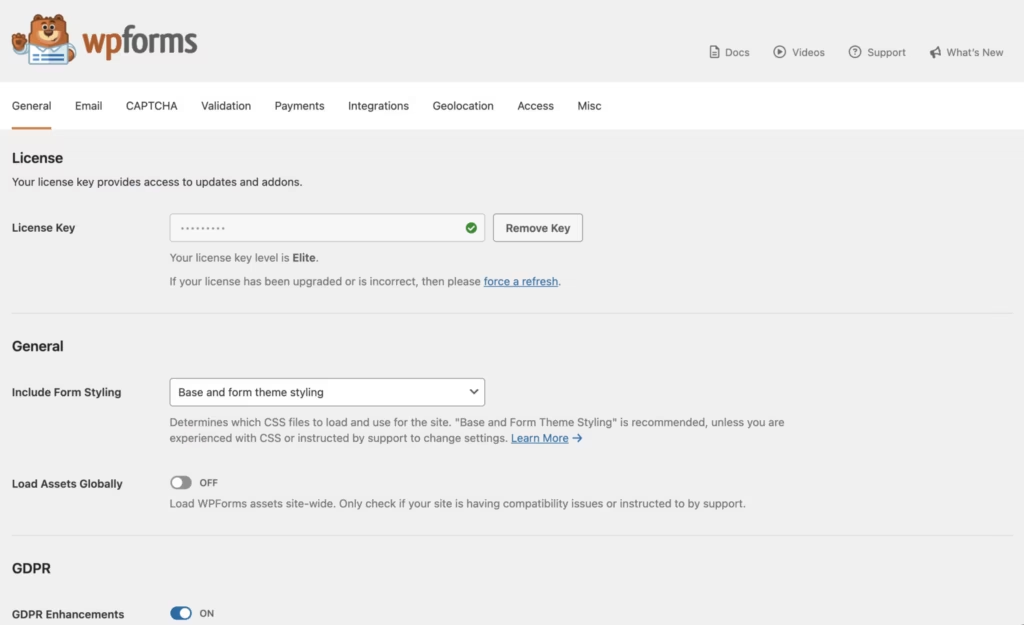
- Enter your license key (paid plans only). Navigate to WPForms → Settings and paste in the license key from your account dashboard to unlock premium templates, payment integrations, and updates.
- Build your first form. Use the drag-and-drop builder or the AI-assisted form generator to create a contact form, payment form, survey, or registration form from a pre-built template.
- Configure notifications and spam protection. Set up email notifications for form submissions and confirm spam protection is active before publishing the form on a live page or post.
Compatibility and Requirements
| Requirement | Details |
|---|---|
| PHP version | 7.2 or higher |
| Integrations | Mailchimp, Stripe, PayPal, Square |
WPForms connects with major email marketing tools like Mailchimp for automating lead follow-up, along with payment processors including Stripe, PayPal, and Square for collecting online payments directly through forms.
If your hosting environment still runs on an older, end-of-life PHP release, it’s worth upgrading before installing any actively maintained plugin — not just for WPForms, but for the security of the site as a whole.
WPForms Pricing
WPForms follows a freemium model. WPForms Lite is free to install and includes the drag-and-drop builder, pre-built templates, email notifications, and spam protection, with no credit card or trial required.
For site owners who need more than the free version offers, WPForms is sold across four paid tiers — Basic, Plus, Pro, and Elite. Site limits scale with the tier, starting at one site on Basic and reaching unlimited sites on the Elite plan. Paid plans start at $49.50/year, and every paid tier includes a 14-day money-back guarantee.
Exact feature breakdowns and per-tier pricing vary, so check the official WPForms pricing page for the current rate and a full comparison of what each tier unlocks.
👉 Get WPForms at the best available price
Alternatives to WPForms
WPForms competes with several established WordPress form builders, each taking a different approach to pricing and complexity. Here’s how it stacks up against the main alternatives.
| Product | Key Difference | Best For | Price Tier |
|---|---|---|---|
| WPForms | Beginner-friendly drag-and-drop builder with a genuinely usable free Lite tier | Non-developers needing quick contact, payment, or registration forms | Freemium |
| Gravity Forms | Advanced conditional logic and a mature add-on ecosystem for complex workflows | Developers and agencies building intricate multi-step forms | Paid |
| Ninja Forms | Freemium drag-and-drop builder that relies on paid extensions for payment gateways and integrations | Users who want a free starting point but expect to add extensions later | Freemium |
| Formidable Forms | Positions itself around building complex applications and calculators, not just simple contact forms | Site owners needing data-driven apps or calculators rather than basic forms | Freemium |
Competitor data is sourced from publicly available information as of 2026 and may have changed.
The right pick depends on what you’re building. Those wanting quick, no-fuss forms will likely find WPForms sufficient, while users needing deep customization or app-like functionality may prefer Gravity Forms or Formidable Forms instead.
Frequently Asked Questions
Is WPForms free to use?
Yes, WPForms Lite is 100% free with no credit card or trial required. It includes the drag-and-drop builder, a library of pre-built templates, email notifications, and spam protection, making it usable for basic contact forms without any payment.
What is the difference between WPForms Lite and the paid version?
Lite covers the core drag-and-drop builder, templates, email notifications, and spam protection at no cost. Paid plans unlock features tied to higher tiers, including expanded integrations and payment collection, and site allowances scale up as you move through the four tiers — Basic, Plus, Pro, and Elite.
Does WPForms work with Stripe and PayPal?
Yes, WPForms integrates with major payment processors including Stripe, PayPal, and Square, letting site owners collect online payments directly through their forms. It also connects with email marketing tools like Mailchimp for lead collection.
What PHP version does WPForms require?
WPForms requires PHP 7.2 or higher to function properly. Site owners should confirm their hosting environment meets this baseline before installing the plugin.
How much does WPForms cost?
Paid plans start at $49.50 per year, with pricing rising across the four tiers depending on the features and site allowance you need. Every paid plan includes a 14-day money-back guarantee.
Who develops WPForms?
WPForms is developed by Awesome Motive, the software and media company founded by Syed Balkhi. It’s part of a larger family of popular WordPress tools built by the same company.
How long does it take to install and set up WPForms?
Basic installation and setup takes about 2 minutes. The plugin package can be installed directly through the WordPress Plugins menu using Add New Plugin and Upload Plugin, without needing to extract the archive first.
Download & Pricing Options
🆓 Free Version
👉 Download the Free Version of WPForms
💎 Get WPForms (Best Available Price)
👉 Check Current Pricing for WPForms
Pricing and availability may change — use the link above for current rates.